If you’re in the process of migrating to or setting up a hybrid relationship with Office 365 SaaS offerings you probably want to simplify the login process for your users. There are a ton of articles and setup guides out there that explain how to set up Azure AD Connect and even AD FS if you need it but one thing that is more difficult to figure out is setting the UPN. The UPN is a logon in the format of an email address instead of the more common domain\username NTLM nomenclature. Office 365 prefers UPN logons and to be honest they’re easier in your on-premises Active Directory as well.
To prevent your users from needing to logon twice in hybrid environments and to make the UPN easier to remember in on-premises authentication it makes sence to set it to match the user’s email address. The script below assumes you have created a csv file of the user accounts that you want to modify. At least one column in that csv needs to be a qualified identity parameter (SamAccount, Distinguished Name, etc.). When you run the script it will ask for the file and then for the name of the column containing the ID parameter. After you’ve provided those, it will loop through the file and set each user’s UPN to match their current email address.
Import-Module ActiveDirectory
[System.Reflection.Assembly]::LoadWithPartialName('Microsoft.VisualBasic') | Out-Null
Start-Transcript -Path "$env.userprofile\documents\upnupdatelog.txt"

Function Get-FileName($initialDirectory)
{
 [System.Reflection.Assembly]::LoadWithPartialName("System.windows.forms") | Out-Null

$OpenFileDialog = New-Object System.Windows.Forms.OpenFileDialog
$OpenFileDialog.initialDirectory = $initialDirectory
$OpenFileDialog.filter = "CSV files (*.csv)| *.csv"
$OpenFileDialog.ShowDialog() | Out-Null
$OpenFileDialog.filename
} #end function Get-FileName

# *** Entry Point to Script ***

$userlist  = Get-FileName

$idcolumn = [Microsoft.VisualBasic.Interaction]::InputBox("Enter the case sensitive name of the column that contains the employee's account information:","SamAccountName, DN, CN or Name Column", "ID")

$usernames = Import-Csv -Path $userlist | select $idcolumn -ExpandProperty $idcolumn

Foreach ($user in $usernames)
{
    $address = Get-ADUser -Identity "$user" -Properties proxyAddresses | Select -Expand proxyAddresses | Where {$_ -clike "SMTP:*"}
    $newUPN = $address.SubString(5)
    Set-ADUser $user -UserPrincipalName $newUPN
}
User in a panic, “OMG! I need you to delete the email I accidentally sent to the wrong people.” Tech in a calm cool voice, “Who’d you send it to?”. Inevitably this conversation leads to you recieving a list of addresses that the user copy and pastes out of the To, CC, or BCC field of an Outlook object.
Unfortunatley, this data will not be in a useable format as far as bulk PowerShell operations are concerned. The Outlook name resolution feature will have changed the user’s names or email addresses to the format “First, Last <email@mycompany.com>;” The extra characters make using the data as the identity pararmeter in the Export-Mailbox or Search-Mailbox cmdlets impossible . Many people end up editing the list in Excel or Notepad to remove the extra text and get down to a list of just email addresses.
This PowerShell code uses RegEx pattern matching to turn your mess of a list into a useable list of email addresses. The split adds a carrige return after each semicolon and the RegEx pattern matches everthing between the < and > symbols. Incidentally, I searched all over the internet trying to find somebody else that was correctley using RegEx to copy the text between two symbols and never found anyone that did it correctly, so I’m pretty proud of myself for figuring this out.
You’ll need to paste your email dump into a text file and save it somewhere. Then alter the $path variable to point at it. When you execute the script it will output the email addresses to a file in your documents folder named emailaddresses.txt, but you could easily pipe it into your Search-Mailbox cmdlet instead.
Simulations have long been a part of driver education. Back in my day we sat in a classroom equipped with a movie screen that played video of a road course while each student manipulated a set of car like controls to react to situations presented on-screen, such as having a kid run out in front of you or a vehicle blowing through a 4-way stop. I’m not sure the exercise imparted any useful information about how to handle a car IRL, but it absolutely helped prepare me for unexpected events while driving. The simulation helped me conclude that these types of surprises probably happened a lot if they went to all this trouble. It showed me that driving was more about being mentally prepared to react in a controlled manner than it was about going fast, which, until this class, was all my teen boy brain was concerned with.
Old-School Driving Simulator, drivers education was literally taught at school in those days.
Fast forward 20 years and I now have two teens of my own who are ready to prepare for entering the highways and city streets. The thought scares the crap out of me. Roads are much more congested than they were even 10 years ago. I see and interact with so many incompetent drivers on the way to and from work each day that it boggles my mind. How did the lady putting on her makeup doing 60 in a 45 get her license? Why is the guy behind me intent on being less than a foot from my rear bumper? Doesn’t he have even a rudimentary understanding of physics? What makes that girl think she can read her phone and pilot a two and half ton vehicle moving at 88 feet every second at the same time? We all know she can’t walk and chew gum without running into the door.
I love driving, it’s one of my favorite activities in life. That being said, I cannot wait until cars drive themselves and humans are forbidden from touching the wheel. Too many of us do not give driving the respect it deserves and it costs others their lives. Just a few months ago I was hit on the freeway by someone changing lanes without looking because they were texting instead of paying attention to their driving. They pulled right into me at 60 mph. If I hadn’t been a well-trained driver, we’d both be dead. I was able to recover from the skid caused by the impact and come to a stop before going off a 30 foot high embankment that ended in a dry creek bed. My manuevers also stopped the other vehicle from taking the plunge, my car formed a guard rail for it, LOL.
I happen to have a decent gaming rig and I’ve long been a fan of racing games, so I also have a Thurstmaster T150 Force Feedback Wheel and pedal set. I play a lot of Assetto Corsa with it. The game is a fantastic race simulator. I know that playing it has made me a better driver. The military, air line pilots, boat captains, and F-1 race drivers all use simulators to hone their skills. I want my children to be ready for anything and have the skills it takes to handle a vehicle in any situation. Could a driving sim help teach my kids? Research time!
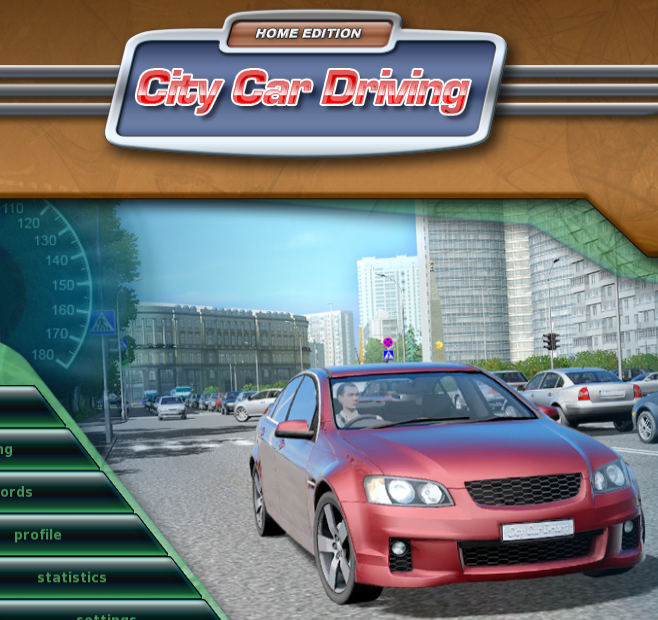
I knew that tossing my daughter in Ferrari 458 at the ring wasn’t going to help her understand how to drive around our city. It may help her understand the physics of handling a car but there are no 4 way stops on Laguna Seca. As it turns out there are very few road driving simulators that concern themselves with the actual rules of the road. The only one that matters is City Car Driving. For only $25.00, I decided to give it a go.
The game has full support for wheel input including force feedback, HD and UHD graphics and even supports VR. It downloaded from Steam in a few minutes and installed with no issues. The wheel setup was a little tricky, it doesn’t have a default set of controls mappings that match the T150. I started out with the default settings and spent around 30 minutes mapping the controls. If you get the game and have this wheel ask for the config in the comments and I’d be happy to send my setup to you.
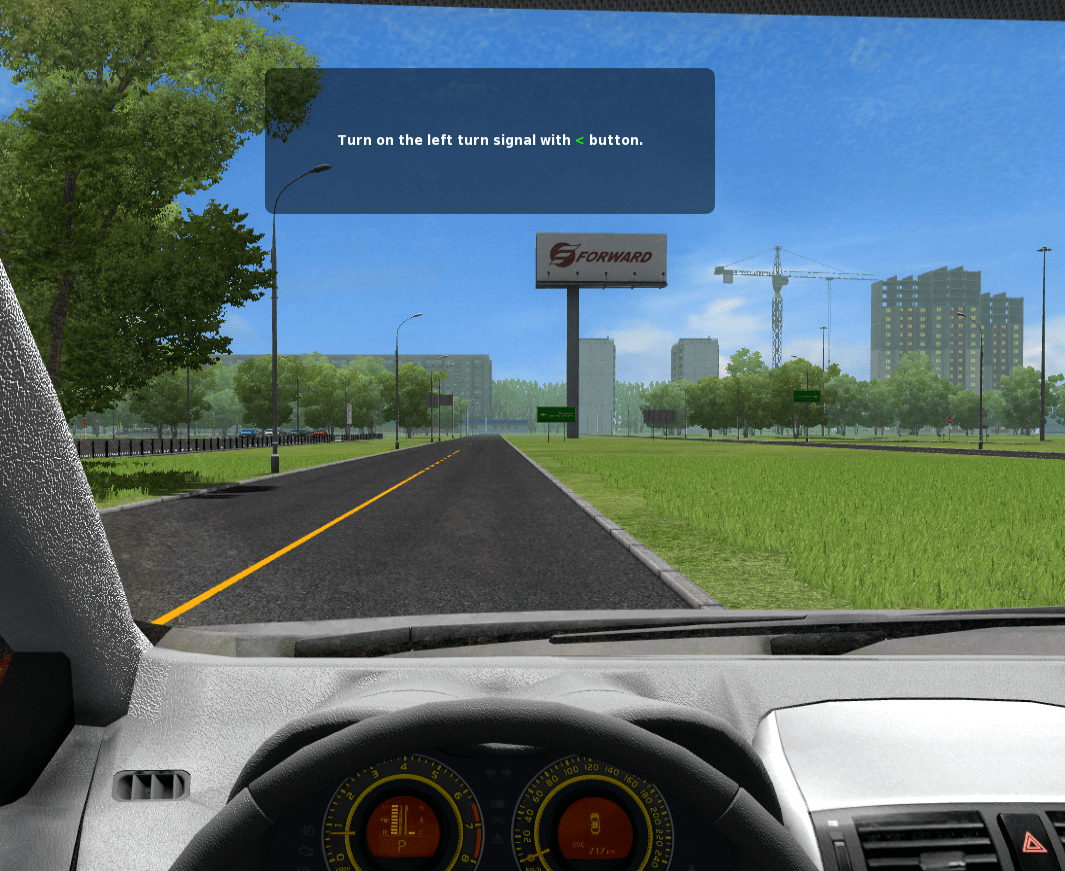
This is not a AAA title with a multimillion dollar development budget so I didn’t expect much in the way of graphics. I was pleasantly surprised, it looks decent; not on the same level as AC or Forsa 7 but more than good enough to get the job done. I’m running it at 2160p on my monitor and 1080P when we play in VR and either way the graphics are good enough to be immersive. The simulation is scary good if you have an Oculus Rift or HTC Vive combined with a force feed back wheel. You can look over your shoulder out the rear window and check out the people sitting next to you at stop lights. Also, being able to look into the corners is far more realistic than the pan view that happens on a flat monitor. Combining that with the bumps and slides the wheel emulates leads me to forget I’m not actually driving a car sometimes.
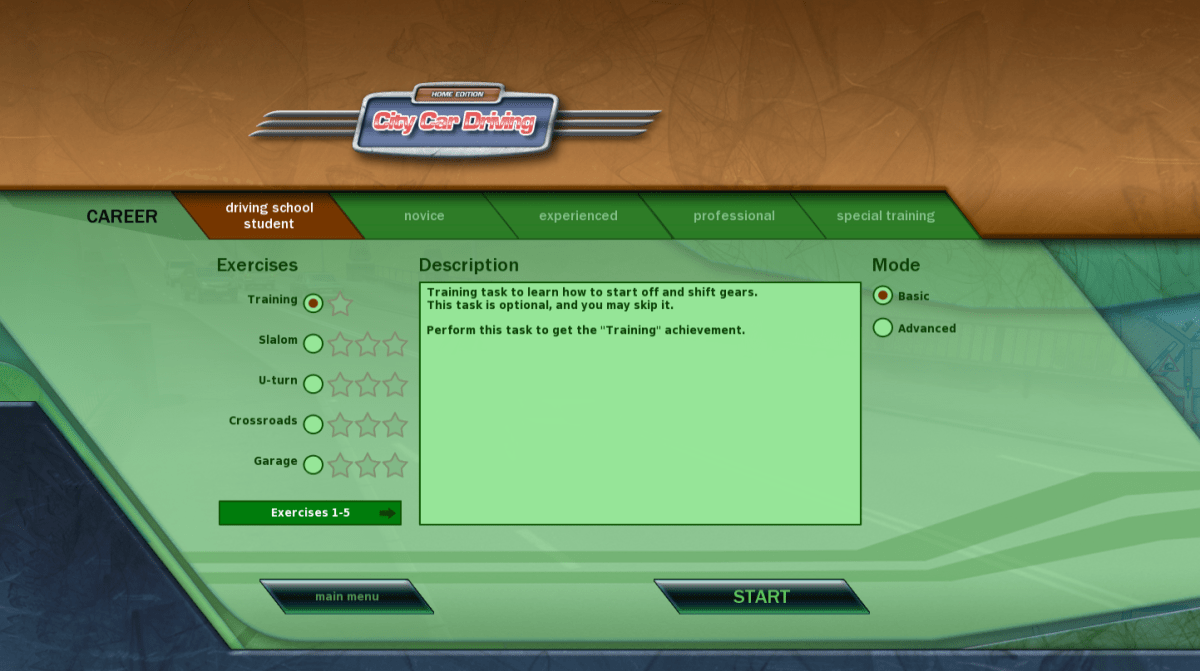
The game features a career mode in which a digital instructor leads you through a series of missions that range from buckling your seatbelt and starting the car and basic navigation through high-speed evasive maneuvers. To keep things fun you unlock more exotic vehicles as you progress through the stages. The simulator ensures you learn everything from the ground up and nags you when you do things like turning without your blinker, or pulling out without looking around a corner. It costs you points when you drive poorly and you don’t level up as quickly. You can set it to rules for countries other than the United States, I can see how this would be helpful if you need to drive in Europe on a business trip.
City Car Driving simulates every kind of weather: fog, rain, ice, and snow are all accounted for. All of the road surfaces you might encounter: cobble stone, dirt, gravel, pavement, and concrete are also available. It has you drive in the county, in a city, and even in a state park. I was shocked at the number of environments it prepares young drivers for. I personally learned to drive in the snow on the way home from my first job when it snowed 2 feet in early October. I would prefer that my kids not have that butt clenching experience if it can be avoided.
There are pedestrians, aggressive drivers, rush hour traffic, accidents, and police to deal with. Roads as small as dirt trails to 8 lane freeways are required routes in the various missions. In short, it is wholly representative of real life driving.
The answer to the question posed in the title is a resounding yes. A game can absolutely help teach your teen, or even yourself, be a better driver. I will require mine to complete the entire career mode before they are allowed to get behind the wheel of the real thing on a public road. They’ve already learned much from the application, my oldest who is studying for her permit just told me how much the game helps the meanings of the signs stick in her memory. Seeing them in action is better than memorizing them from a book in the same way that singing a song is easier than memorizing the same text on a page.
Denial of service attacks (DoS) have been around for quite a while and will continue to be a bothersome presence for the forseeable future. In part DoS attacks are popular because they are relatively simple to accomplish. The attacker isn’t required to hack secure systems or subvert encryption algorithms. They only need to instigate an action that causes the target system to become so busy that it is unable to fulfill its legitimate user requests.
DDoS (Distributed Denial of Service) methods involve getting multiple systems to make erroneous requests to a service until it can no longer answer its real users. These types of attacks have been responsible for taking down services like Google and Facebook on multiple occasions throughout the last few years and have gained notoriety in the process.
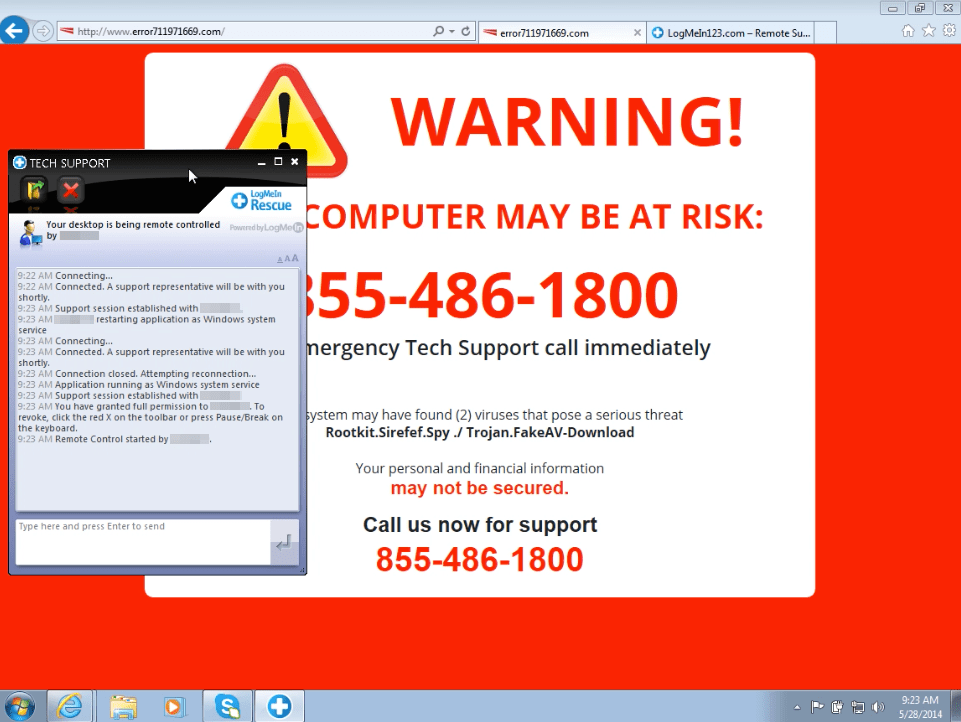
DoS attacks are less flashy and generally only effective against one system at a time. However they are now being combined with social engineering in new type of scam. Tech support scamming has been around for a while; you go to a web page and get a pop-up that says you need to call 1-800-FIX-MEUP because your computer has something terribly wrong with it.
A classic Tech Support Scam
These were effective at first, but they’ve been around for so long now that most people just close their browser and start over; being more careful not to type the wrong address or avoid the link that led them to the bad page. Occasionally you have to go as far as clearing your browser’s cache to keep the pop-up from recurring. This means the scammers need to do something different to get users to turn over control of their systems, passwords, and personal information.
Enter Blob Bombs. In short, a blob bomb is a technique in which nefarious characters code a web page in such a way that it causes your browser to download a small file over and over again. It performs the repetitive download so rapidly that your system can do nothing else and appears to be locked up. At the same time the page pops up a tech support scam like the one pictured above; the exact scam page will probably vary. The hope is the notion that something is really wrong will be more convincing since your system will appear to be hung when the message is presented. Social engineering at its finest. If you’re interested in the details of the method itself, the malwarebytes blog has published a full technical analyisis.
The current round of Blob Bombs are targeting the Chrome browser’s window.navigator.msSaveOrOpenBlob API. If you think you’re safe from this because you run Linux or Mac you should reconsider your position. The same technique will work on their browser APIs with just a slight modification to the landing page. It will also be possible to craft the landing pages to work with other browsers. I suspect this is going to be a wide-spread issue in the near future.
What do you do if you fall victim to this DoS scam? The first thing to try is to launch your task manager or application monitor software and forcibly close your browser (end its task). If your system is so busy that it can not open the task manager you can power off by holding down the power button until your computer shuts off, then turn it back on. Once you’ve gotten your browser shut down, use its menu options to clear its cache (temporary files) it will be full of the downloads. The downloaded files are blobs or unassociated raw data and shouldn’t pose a threat themselves but they do take up room on your hard drive. If this happens to you on your company system you should contact their tech support immediately and let them know what’s happened. I also suggest that you run a full virus and malware scan.
Microsoft has really turned over a new leaf in regards to its view of the previously despised Linux operating systems. Satya Nadella has led the company through a complete 180. Not only have they stopped dissing Linux, Microsoft seemingly fully supports it. Previous CEO Steve Balmer tried to put Linux in a guillotine with its 59,000 strong, patent portfolio blade. He pushed companies into signing patent licensing deals; search Amdocs for the details on one such agreement.
With Nadella at the helm, the company now views Linux as an asset rather than a competitor. They may be on to something, Linux is a fantastic operating system that has propagated to data centers world-wide. It usually far outnumbers Windows nodes in those same dcs. However, a lot of the software available for Linux is sub-par in many a users’ eye. Kolab is able to ape some of the best features of Microsoft Exchange, but lacks the polish and scalability features. Libre Office Writer 5 is good for free software, but I write all my documents in Microsoft Word.
The ablity to run Microsoft’s flagship software on Linux machines could greatly expand Microsoft’s user base, both in the Enterprise and by individuals. Last year MS released an edition of its SQL 2016 Server that runs on Linux and enabled Bash (the Linux terminal for my Windows readers) in Windows 10. It fully supports Linux virtual machines in its Azure cloud and Unbuntu on Windows is available in the Microsoft store. Its latest offering is the ubiquitous PowerShell and .Net core. The old lines in the sand are starting to become awfully blurry. The official Microsoft announcement is here if you’d like to read it.
Speculation could lead one to ponder what else will run on Linux now that it has the next-gen .Net framework easily available. Rumors abound that everything from Microsoft Exchange to Microsoft Office is on the way. Only the future will tell for sure, but I can’t imagine that MS went to all this trouble just to let Windows admins run their PowerShell scripts on the Linux team’s VMs. Python isn’t that big of a leap for those of us that are proficient at PowerShell, there’d be no reason for this type of overture unless they have plans to do something more with it.
So how do we get PowerShell on to Linux and what can you do with it after you do? Let’s find out! If you don’t have an old system lying around that you can toss your favorite Linux distro on, I suggest building a VM on your Windows machine. You can use Hyper-V if you have Windows 10 Pro or Server, and VirtualBox if you don’t. See my article about building a VM on windows for more info.
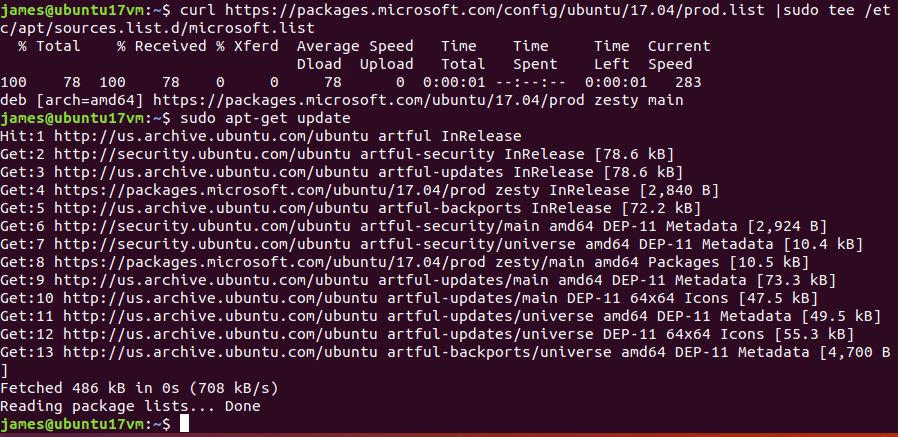
I’m using Ubuntu 17.10 and I’m going to add the Microsoft repository to my package manager so that my install stays up to date with my regular update procedure. If you’re doing this on a MAC you’ll want to grab one of the OS X packages from the GitHub Repository. The Macintosh operating system has an unknown developer lock on it just like your phone does. You’ll need to CTRL + Click on the PKG file that you downloaded and then pick Open to bypass the security feature. Follow the Wizard to complete the installation.
In Ubuntu, open a terminal and follow the instructions below.
We need to add the curl program unless you’ve already had to for some other task.
Type: sudo apt install curl and press enter.
Now we’re going to import the repository GPG keys.
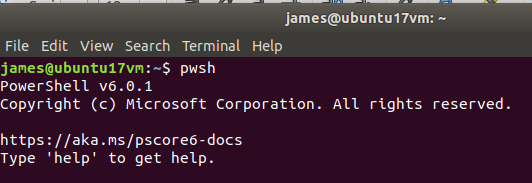
That’s it, you’ve installed PowerShell on Linux. To those of us that have been in tech for more than a few years, that is a very odd sentence to type. Now what? Well, first you’ll need to launch it. Open your terminal and depending on the version of Linux/Mac OS X and the package you’ll need to type either powershell or pwsh to access it.
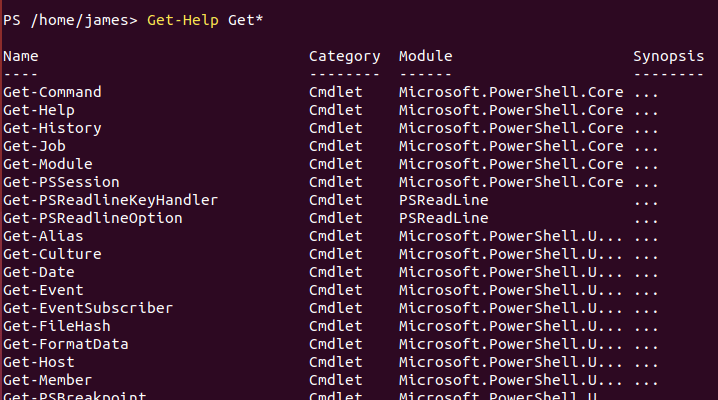
Once you’re in, it works exactly like it does on Windows. A good way to see what you can do is to list out the commands and modules available. Try Get-Help Get* for a list of get commands and Get-Help Set* for the settings you can alter. Get-Module -list is also handy.
There are a lot of commands available but some of my favorites are missing. Get-NetAdapterConfiguration and Test-Connection are nowhere to be seen but the trusty Get-ChildItem and Get-Process are both fully functional. You’ll have to check for your favorites. One would assume cmdlets will be added with future updates as there were in the evolution of PowerShell on Windows.
As I’ve stated in numerous posts before, I like and use all technology. I see the new trend of intergration as an extreme advantage for the future of computing in general. I sincerely hope it continues.
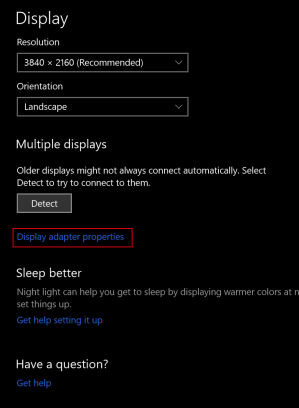
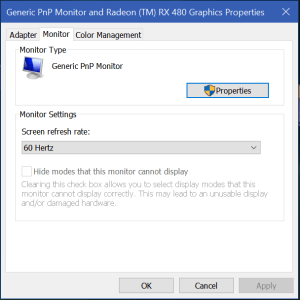
There are a couple of issues that commonly occur with the XP-Pen tablet drivers. First is the screen flickering. If your screen flickers on and off, it is most likely happening because the refresh rate of the XP-Pen tablet was incorrectly detected at 59Hz. You need to adjust the refresh rate to be 60Hz. Search for Display Settings, open the app and select your XP-Pen monitor then click the Display Adapter Properties link and use the drop down under the monitor tab to select 60Hz.
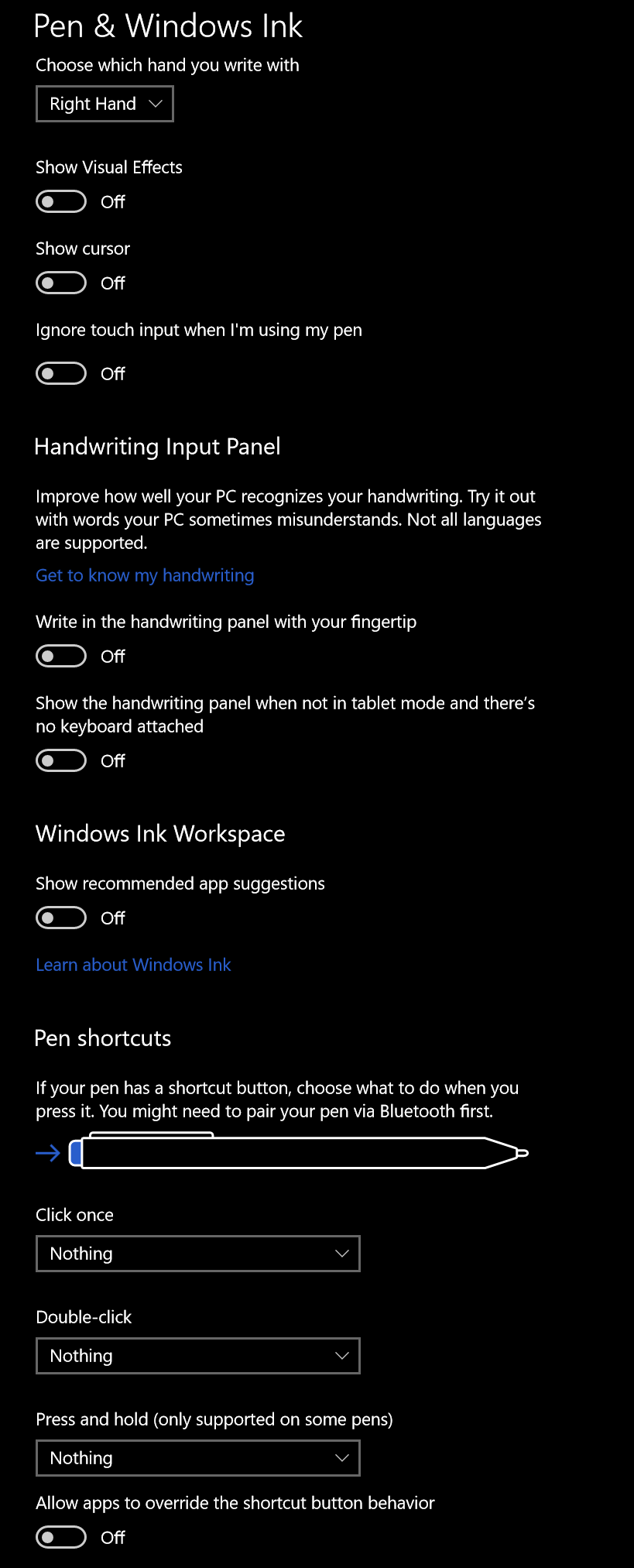
The other common problem with XP-Pen and other drawing monitors is a loss of pressure sensitivity during long drawing sessions. I’ve had luck in stopping the drop-outs by adjusting the Windows Ink driver settings. Search for Pen Settings and open the app. Disable all of the switches and select Nothing in all of the drop downs. This will keep Windows from interfering with the drivers that control your pen. Your mileage may vary.





 techbloggingfool.com