Python Programable Robots with LEGO?

A few years back, I picked up a Lego Mindstorms kit when they went on sale. My family had fun building all of the robots that the kit provides instructions for. We also tried several of the designs people have published on-line.

Mindstorms are comprised of Lego bricks, gears, shafts, wheels, and other various pieces similar to those found in the Technic sets. In addition to the bricks they also have motors, sensors, wiring, a remote, and a brain box to programmatically control your creations via a simple to use drag-n-drop app on your mobile or PC.

ourbot

Once we’d had our fun with them, they went back in the box. Fast forward a few years, my now teenage son, approached me saying that he wanted to learn how to code in Python. He asked if I had any ideas for a project he could use for motivation. Having just gone through a bunch of items to put in the neighborhood garage sale, I thought of the Mindstorms. I had recently read an article regarding a Python runtime someone had created for the control box. “Let’s build a robot.”, I answered.

He thought of building a Roomba like bot, that could navigate its environment. We would need to write software to tell the machine to make a reverse J-turn when either the forward or downward facing sensors detected an obstacle. He used the TRACK3R plans from LEGO as the basis for the vehicle. Basically, we built a tank with a sonic sensor facing downward and an IR sensor facing forward.
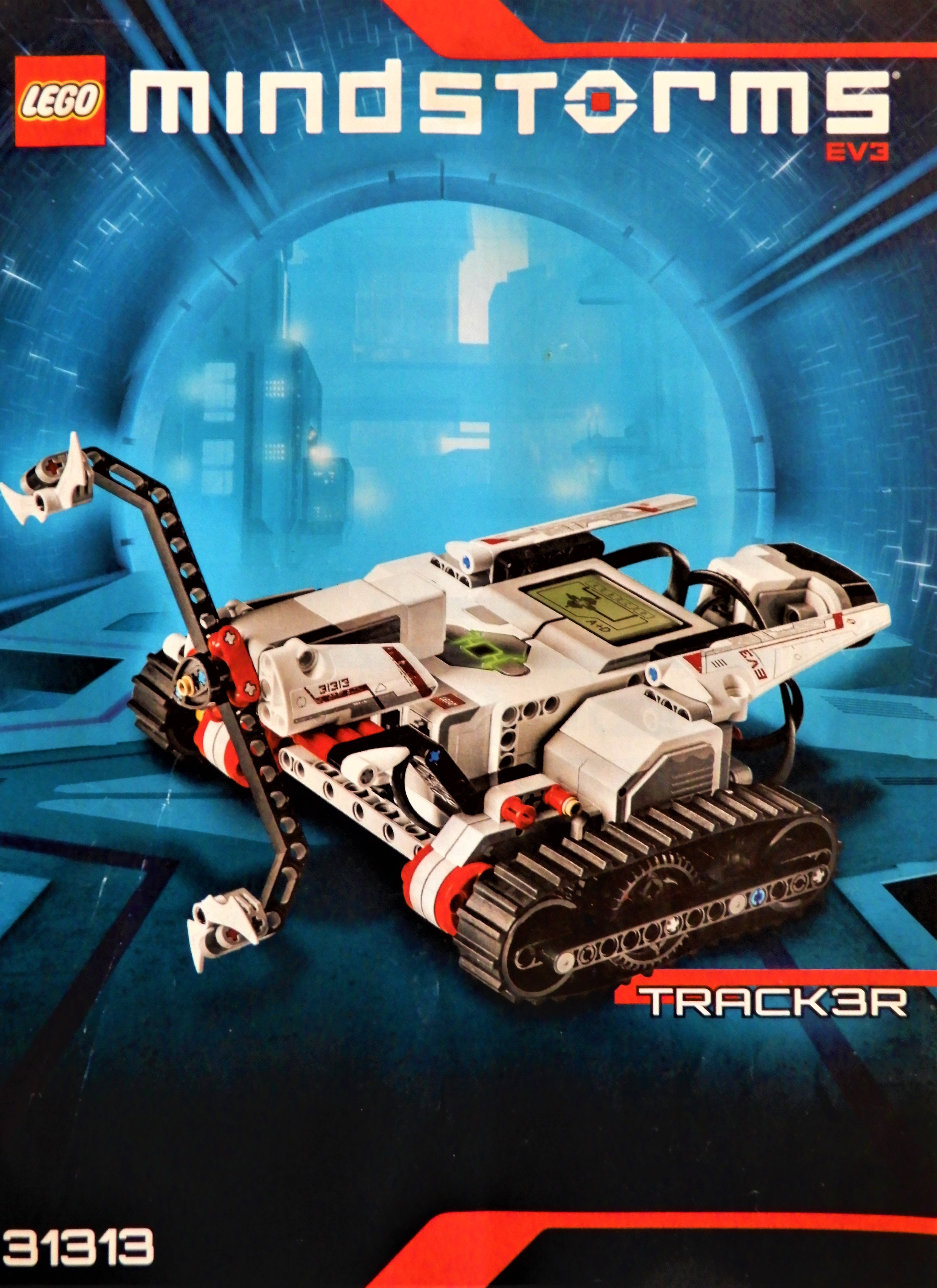
Track3r

Once he had assembled the bot, the next step was to load the Linux based OS onto a MicroSD card. We followed the well written instructions on the Lego education site and at Ev3Dev.org to get our controller to dual boot Linux with an embedded Python framework. If you are planning a similar project, the best advice I can give is to be patient, go slow, and follow each instruction exactly.

There is a extension for Microsoft’s Visual Code IDE that makes getting up and coding a breeze. The Ev3DevPython site has some great documentation for installing and using the extension. They also have some sample code, video instructions, and a lot of other useful information. I would suggest visiting the site before starting your own build.
2019-06-09

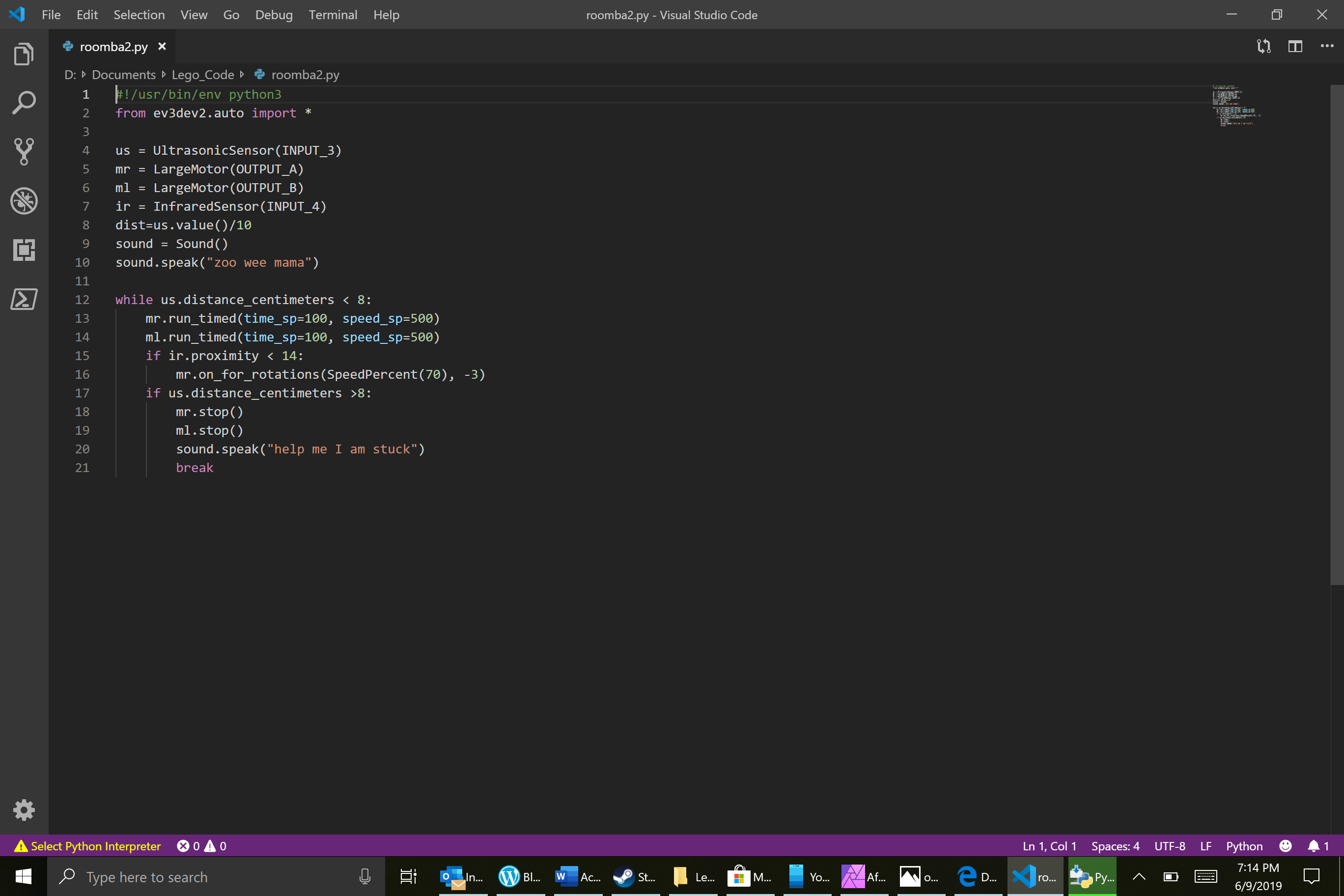
After all the moving parts were sorted, we began testing various solutions for the code that would allow our bot to autonomously drive around the house. At first, we struggled trying to get the tank to run straight. We were trying to use the “MoveTank” method, but couldn’t keep it running in a loop. We solved the problem by running each motor, individually, in a while loop. The finished “Roomba” code is below. Feel free to use it in your own projects. You may need to change the Output ports to match the way your bot is wired.

#!/usr/bin/env python3
from ev3dev2.auto import *

us = UltrasonicSensor(INPUT_3)
mr = LargeMotor(OUTPUT_A)
ml = LargeMotor(OUTPUT_B)
ir = InfraredSensor(INPUT_4)
dist=us.value()/10
sound = Sound()
sound.speak("zoo wee mama")

while us.distance_centimeters < 8:
    mr.run_timed(time_sp=100, speed_sp=500)
    ml.run_timed(time_sp=100, speed_sp=500)
    if ir.proximity < 14:
        mr.on_for_rotations(SpeedPercent(70), -3)
    if us.distance_centimeters >8:
        mr.stop()
        ml.stop()
        sound.speak("help me I am stuck")
        break

PowerShell; Find and List All Active Directroy Nested Sub-Groups with Get-ADNestedGroups

Recently I needed to reduce the licenses we were consuming with a particular cloud service. I was told that a couple of Active Directory groups served as the service’s ACL. All the accounts in question were disabled but the disabled status didn’t synchronize to the cloud service provider. I needed to remove all disabled user accounts from the ACLs in our AD. My first thought was, “I love it when I get the easy ones”. That should always be a sign that something isn’t going to be easy, LOL.

I immediately opened PowerShell, imported the AD Module and ran a recursive Get-ADGroupMemeber query on the two groups I was told about. I added all the returned objects to an array and then populated that array with the disabled user account’s SamAccountNames. I made another array and added the groups/sub-groups to it. Finally, I used nested foreach loops to remove each user from each of my two AD groups.


Import-Module ActiveDirectory

$allusers = @()
$group1 = Get-ADGroupMember -Identity "Name of Group 1" -Recursive
$group2 = Get-ADGroupMember -Identity "Name of Group 2" -Recursive
$allusers += $group1.SamAccountName
$allusers += $group2.SamAccountName

$users2remove = $allusers | % {Get-ADUser $_ |Select samaccountname, DistinguishedName, enabled|where enabled -ne "true"}

$removes = @()
$removes += $users2remove.samaccountname

$subgroups = @()
$subgroups1 = Get-ADGroupMember -Identity "Name of Parent Group1" |Where {$_.ObjectClass -eq "Group"}
$subgroups2 = Get-ADGroupMember -Identity "Name of Parent Group2"| Where {$_.ObjectClass -eq "Group"}

Foreach ($group in $subgroups) {
     Foreach ($remove in $removes) {
     Remove-ADGroupMember -Identity $group -Members $remove -Confirm:$false
     Write-Host "Disabled Account $remove removed from $group"
     }
}

I ran my script, watched the output, marveled at my own genius, and sent my boss a list of the users I had removed.  An hour or two later my manager pinged me to say that when he looks in the application’s portal he sees that most of the disabled users are gone but there are a couple hundred that still show up as having a license. Hmmmmm.

I reviewed my logic and found the problem. I didn’t do a recursive search on the sub-groups. I opened ADUC and looked, sure enough, there were a ton of nested sub-groups under the two I was told about and some of the users appeared to be in multiple groups. So even though I had removed them from the top-level they were still consuming a license through their membership in a nested group.

“Easy enough to fix”, my internal dialog told me. I just added the -recursive parameter to my sub-group searches and ran my script again.  Well, that didn’t work. After some trial and error, I was able to determine that the recursive parameter of the cmdlet does find all of the user objects no matter how deep they are. However, it only returns the first layer of group objects. Now what?

I needed my code to say, “if a group is returned run the search again” in a loop until no more groups were returned. I was disappointed that none of my Internet searches turned up working code. I ended up writing the function below. If you have landed on this page from similar circumstances, I hope it helps you out of your jam.


## Get-ADNestedGroups
## Author: Kevin Trent, https://whatdouknow.com, kevin-trent@hotmail.com
## Distribute freely but please leave author's information attached

function Get-ADNestedGroups {
[CmdletBinding()]
param (
[Parameter(Mandatory)]
[string]$Group
)

## Find all parent group objects
$members = Get-ADGroupMember -Identity $Group

## Array to hold each child group
$ChildGroups = @()

## Foreach loop to find all objects in child groups
## If any objects are groups we call the function again
## Will loop until no more groups are found
## Displays each group name on screen and adds to childgroups array

     Foreach ($member in $members){
          If ($member.objectClass -eq "Group"){
          $ChildGroups += $member.name|where {$_ -ne $null}
          Write-Host $member.name|where {$_ -ne $null}
          Get-ADNestedGroups -Group $member
          }
      }
#Outputs the contents of the childgroups array to text file
$ChildGroups|out-file $env:userprofile\documents\SubGroups.txt
}

P.S.

If you are trying to run the first script I started my story with; replace the subgroup arrary and variables with the function. Then change the subgroups variable in the nested foreach to childgroups.