Nreal’s Nebula App Is Available for Windows and Patched for MacOS 13.3

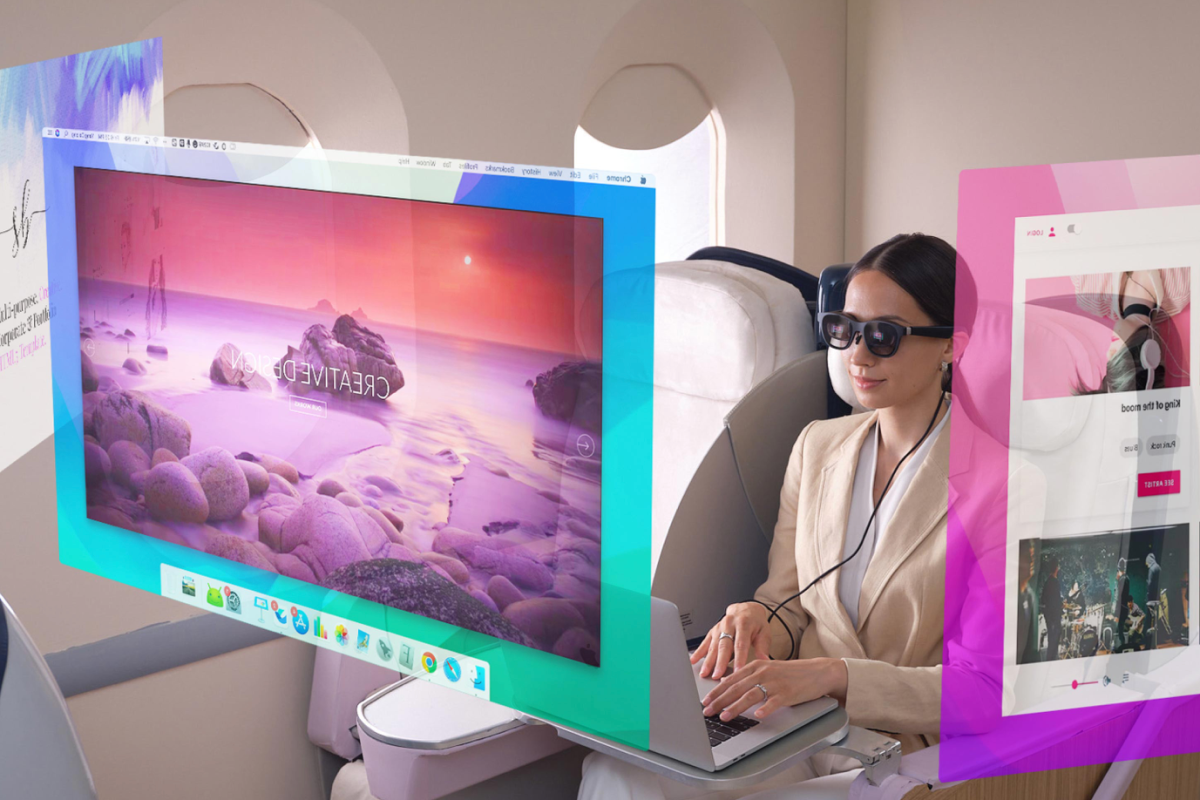
When it rains, it pours in software development. Nreal has made progress with their Nebula app on a couple of fronts this week. First, the bug that prevented multiple monitors in MacOS 13.3 or higher has been patched. Just connect your glasses and launch the software, it will prompt you to install the update.

If you have held off updating MacOS past 13.2 like I did, I recommend that you install the Nebula update and then update your operating system. Once everything was fully updated the software worked just as it did before. There are no new features or functions that I could find, it looks and works exactly the same.

The other, and perhaps more exciting, news is that the Nebula App for Windows is available in a semi-open beta. Semi-open meaning that anyone can get it, but you have to sign up. They’re giving away a Steam Deck handheld console to the person that tests the software on the most qualified systems. To get started visit their Reddit post at: https://www.reddit.com/r/nreal/comments/1306xqs/nebula_for_windows_test_has_finally_begun_join_us/

Downloading the software requires a Discord account. It also requires some pretty beefy hardware at the moment. They are suggesting Nvidia 1650 or higher GPUs. I installed it on my gaming laptop (3070) and it ran without too many issues.

You need admin access to install the virtual monitor driver. The driver is signed with a certificate from a public CA but most of the properties are in Chinese so it is difficult to read. The software is not “installed”, you launch the exe from the folder you extracted the compressed download to. It is an RAR download so you will need 3rd party software to decompress it in Windows (7-Zip, WinRAR, WinZip, etc.).

Once you have it up and running you’ll be able to choose from one, two, three, or a single ultra-wide monitor setup. It has crashed a couple of times on me while trying to play games, other than that it seems to work well on my hardware. You’ll want to carefully arrange all of your monitors once you have made your choice and have the app running. The mouse layout can be odd until you do.

Speaking of games, the refresh rate is 60 FPS and you should enable V-Sync. You cannot set the glasses as your main display so you’ll need to move the game to your glasses after it starts the first time. This can be tricky depending on the game itself, look for a “Windowed” mode in the game’s settings. This should get you a title bar to drag it by.

It is “beta” software in every sense of the term. If you are not used to testing mostly finished software, there’s a good chance you won’t enjoy the current state of this app. As I mentioned, it has crashed a few times, the layout needs to manually adjusted, and there’s an issue where the screen can stop responding to clicks that requires a restart. Happy testing.

Solved Internal Email Forwarded To Outlook Junk

A colleague got me involved in an interesting case recently. When one Microsoft 365 user emailed another, the message was automatically forwarded to the recipient’s Junk folder. Both mailboxes were in the same tenant and had primary email addresses in the same domain. Since the messages were from an internal sender to an internal recipient, none of the email perimeter protection mechanisms should have been engaged.

I verified nothing was flagging or scoring the messages. Exchange’s message trace system showed the email being delivered to the recipient’s inbox. There were no flags or indicators of re-direction in the message’s header. To me this indicates the issue was happening after the message reached the recipient’s mailbox.

To make a long story short, I opened OneNote and jotted down a list of everything I could think of that had the ability to direct a message to the junk folder. On that list I included “native phone apps”. I decided this was the next thing to check. I logged on to the Microsoft 365 Azure Active Directory Admin Console and checked the sign-in logs for the user. Sure enough, I could see that the Samsung Mail App was authenticating on a regular basis.

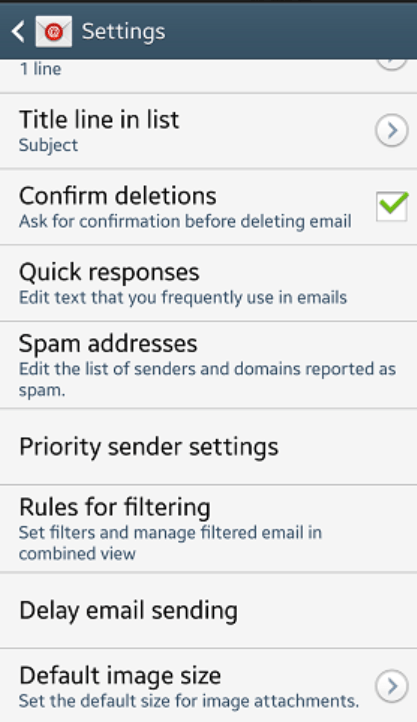
The Samsung Email app has its own SPAM and rules engine just like Outlook does. Open the app, click the menu button, then settings, scroll down and you will find SPAM settings. Lo-and-behold, the sender’s email address was in the blocked list.

If you’re struggling to understand how your messages are moving around when there are no rules in Outlook and your security systems aren’t interfering, check for native phone apps. There are more of these out there than you might think. Smartwatches, phones, tablets, even smart cars have native email apps capable of their own rules and settings. These application’s actions are not always immediately evident in message logs and tracing.

Possible Historic Test Flight of Earth’s Most Powerful Rocket Live Early Monday Morning (4-18-23)

If things go according to plan, SpaceX will launch “Starship” on its first test flight. SpaceX is planning on going for it around 9 a.m., but the schedule is “dynamic and likely to change”. If it does go off, you can stream it live on multiple YouTube space related channels. The official one is @: https://youtu.be/L5QXreqOrTA . The Rocket is being built to send people back to the moon and eventually on to Mars.

Buff Aging Twenty Series GPU’s HDMI Connectivity

I jumped on the 2080 Ti soon after it launched. Like everyone who purchased one in those early days, I paid more than I should have for the then cutting-edge hardware. Surprisingly, it lived up to the hype. At more than four years old, the 2080 Ti is still a strong card.

The limitations of its HDMI 2.0 connector prevent it from fully utilizing the newer models of 120 Hertz, 4K TVs. Of course, this only matters if you are using a HDMI 2.1 enabled TV in the first place. The HDMI 2.0 spec holds 4k performance to sixty frames per second and doesn’t work all that well with variable refresh rates either.

HDMI SPECMax Throughput (Gigabits per second)
1.04.95 Gbps
1.310.2 Gbps
2.018.0 Gpbs
2.148.0 Gpbs

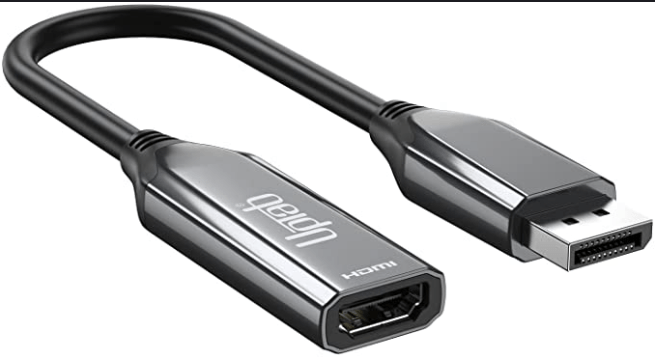
I decided to try a DisplayPort to HDMI adapter to allow the 2080 TI to push my screen to its full 120 frames per second. I picked up a UPTab adapter for fifty bucks on Amazon. There are less expensive models available, but I’ve had good luck with UPTab in the past and decided to stick with them.

The adapter works great except for two minor issues. The first is that it gets very hot. To the point that it suffers from performance issues. To correct the problem, I point a fan at it. The other issue is that, at least in my case, it does not support variable refresh rates. So, I leave v-sync enabled to compensate.

Outside of those two issues, the adapter lets my 2080 Ti run at 4K 120 FPS with HDR enabled. I imagine the fifty dollars I spent on the adapter will get me at least another year or two of use from this GPU. Other adapters with the same function may produce better results, but I am happy with this one. https://www.amazon.com/gp/product/B01B6ZOMIS/ref=ppx_yo_dt_b_search_asin_image?ie=UTF8&psc=1

Nreal Nebula Software Breaking From MacOS Update 13.3

If you use the Nebula software with your Air glasses to emulate free floating monitors, you should be aware that the latest MacOS update is not compatible. The glasses will connect and work as a single display. Launching the software results in a black screen.

The developer is aware of the issue according to comments in several Reddit threads and their own community forums. They are working on a fix, for now the only option is to downgrade to a version prior to 13.3. https://community.nreal.ai/t/nebula-fail-to-work-after-macos-upgrade-ventura-13-3/3778/2

PowerShell: Restore Soft Deleted Exchange On-line Mailbox To New Microsoft 365 User

Recently, I encountered a situation in which a Microsoft 365 account had been deleted. Then, a new account with the same name was created and synchronized from the local domain. The user’s local profile and other software were linked to the new account and everything was working. The only issue was the mailbox missing all of its content.

Believe it or not, this isn’t an uncommon situation in my line of work. I looked online for a script and found lots of examples. Much to my surprise, I struggled to get any of them to work. Rather than try to troubleshoot and fix one , I opted to write my own. While writing it, I believe I discovered the issue. Exchange Online does not except the ExchangeGUID as a name/value pair. It has to be plain text.

Below is what I came up with. You will need to have the Exchange Online PowerShell Module installed on your computer. Open an Admin PowerShell Session and run the one-liner below to install it. You may also be prompted to update PowerShell itself if your computer has fallen behind in updates.

Install-Module ExchangeOnlineManagement

Save and run the script below. First, it will prompt for the tenant’s modern authentication global admin credentials. Next, it will prompt you for the account your are working with’s identity. You should be able to use the first and last name, UPN, or alias address. The script will use that data to locate the Exchange GUID for the source and target mailboxes. Finally, it will create and run a mailbox restore request and show the status.

# Restore Soft Deleted Mailbox to a new Matching Account in Exchange Online
# Assumes the Alias for both accounts is the same

#Sign in to Microsoft 365 Exchange.
#Requires Microsoft Exchang Online PowerShell 
$GlobalAdminUPN = Read-Host "Enter Global Admin UPN account"
Connect-ExchangeOnline -UserPrincipalName $GlobalAdminUPN

#Aquire the ExchangeGUID attribute for the source and target mailboxes
$UserAlisas = Read-Host "Enter mailbox identifier"
$SourceMailboxGuid = [string](Get-Mailbox -SoftDeletedMailbox $UserAlisas).ExchangeGuid
$TargetMailboxGuid = [string](Get-Mailbox -Identity $UserAlisas).ExchangeGuid

#Restore Softdeleted mailbox over the new Account's mailbox

New-MailboxRestoreRequest -SourceMailbox $SourceMailboxGuid -TargetMailbox $TargetMailboxGuid -AllowLegacyDNMismatch

#Check the restore job status
Get-MailboxRestoreRequest | Get-MailboxRestoreRequestStatistics