State of the Switch Address. What to play after the Christmas boom.

My Nintendo Switch is by far the most played console in my collection. The longer I have it the more I like it. The system is so popular with my family that I purchased 4 of them for Christmas this year. Now everyone has their own and they can stop taking mine!

Along with the additional consoles we also picked up a bunch of new games. Mario Odyssey has been a hit in my tribe. Everyone enjoys playing it. The graphics are great, the art style is fantastic, and the play is just challenging enough to keep your interest without serious frustrations. It’s reminiscent of Mario 64 but more advanced.

Rocket League, a game in which you play soccer with cars is both a lot more challenging and more fun than you imagine. I was shocked at how long I had to play before I could score my first goal in a match. Rumble mode adds various weapons and abilities to the vehicles and turns everything into an all out war. Custom cars like the DeLorean from Back to the Future add to the fun. It’s also one of the few online games that is cross platform. People on Xbox, PC, Playstation, and the Switch are all in the same player pool.

2018010920024600-6F4D679ED7D2A016B654B265B956C5F0

DOOM has been my go to game during lunch breaks since Christmas. I played the game when it launched on the PS4 and it was awesome. I was skeptical that it would carry over to the graphically weaker Switch but there’s something infinitely satisfying about being able to play this type of game on the go. Nothing gets my mind off of work like mowing through hell spawn or vanquishing foes in Team Deathmatch for a half hour. As an added bonus, it keeps me from needing to eat out just to escape the office which is great for my budget and staying in shape. The graphics don’t look quite as good as the PS4 or PC versions but on the Switch’s small screen you’ll hardly notice.

2017122515392800-CF035A1DEF1D6DADE285B7ACA9873642

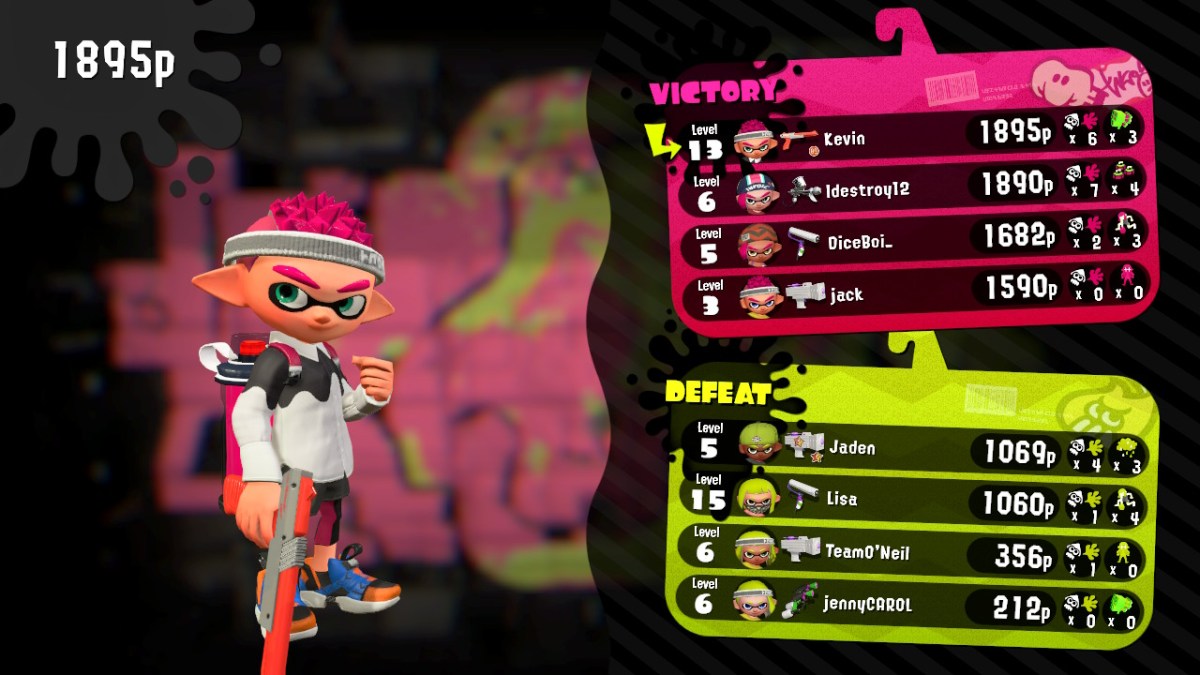
Everyone in my family has a copy of Splatoon 2 now and you can find us battling it out at least one weekend night on the living room couch. Several of our friends have joined us and the game keeps getting better, adding new weapons and maps at a steady clip. Recently we started playing the Salmon Run wave battles as a team. Its good family fun.

2017122517123600-CBA841B50A92A904E313AE06DF4EF71A

I’m still playing Breath of the Wild. I’m around 70 hours in and love the game even more than when I first started. Just when you think you’ve seen it all, something new pops up and blows you away all over again. It really is one of the best video games of all time on any system. Watch out for Eventide Island!

2018011420454600-F1C11A22FAEE3B82F21B330E1B786A39

Skyrim is just as epic on the Switch as it was on the Xbox 360 and PS3. The load screens aren’t too bad, the graphics look better than the 360 / PS3 Gen but not as good as the PC HD version. I haven’t spent a lot of time with this title yet, but overall I’m impressed. Both my wife and son have hundreds of hours in Skyrim in its various forms and they give the seal of approval.

If you’re considering more than one Switch in your circle you might want to consider purchasing most of your games on cartridges that way they can easily be shared. If you started out with a single Switch and need to move user profiles to new devices; its relatively easy to do. Just follow these instructions on Nintendo’s site. You might also want to read through my document about getting multiple Switches to play online with a single Internet connection.


Patchageddon; Microsoft issued a patch to disable Intel’s patch!

If you listen to the silicon valley hipsters and their PR armies; AI is going to be taking over the world soon. Right after they figure out how to stop relativey simple injection techniques from powning every CPU on the planet. I’m sure in their minds, they truly believe that if they can just beat this one last hack everything will be fine.

Humans have an inate ability to destroy what they make. Watch any child with a pile of blocks and you will inevitably witness the joy that comes from wrecking their own creations. I think a certain segment of our technical society revels in being the wrecking ball.

AI will have a difficult time making useful headway into our lives as long as the balls are flying and knocking down all of the blocks. These types of technical disruptions have been part of the computing landscape since the beginning and show no signs of slowing. If anything they are gaining in frequency and ferocity. As people, communities, and nations become more wary of AI; the headwinds it faces will blow stronger.

In the latest round of you build it I’ll break it, Microsoft has released an emergency out-of-band patch that disables Intel’s spectre variant 2 patch. Microsoft believes the patch is ineffective, causing corruption and unwanted reboots, and that this variant has not been seen in the wild. Read KB4078130 for the details and the patch.

The new Surface Pen. Is it worth upgrading?

My kid and I were rough housing, I moved in to tickle him and felt my hand be poked by something sharp. When I looked down, the cap of my Surface Pro 3 stylus was laying on the floor; the batteries had bounced to who knows where. When I picked up the parts I immediately noticed that the cap’s rubber attachment seal that holds it to the battery cover was torn.

It was my fault I should have paid more attention to what was in his hand before I started playing. Oh well, I had been wanting to get the new stylus ever since I’d demoed it at the Microsoft Store and now I had the all important justification for my purchase! Maybe I subconsciously picked the wrong time to wrestle?

My daily driver is a Surface Pro 3. It’s been my favorite mobile computer of all time. I splurged and got the most powerful model that Microsoft offered and I’m nowhere near ready to replace it. That being said, I’ve never loved the stock stylus. Don’t get me wrong it works just fine. It doesn’t fit my hand very well because it is both too short and too thick. I’m not a huge fan of the balance and really wish the top functioned as an eraser. Unfortunately, you can’t just hop on-line and order some other stylus to use with the Surface Pro. The technology is proprietary so unless Microsoft releases a new stylus; you’re stuck.

Lucky for me, MS did exactly that. When they designed the next generation pen for the Surface 4 and Surface Studio line they made it compatible with the previous generations and sold it separately. At $99.00 it’s not exactly cheap. So is it worth the moolah?

The short answer is absolutely! The long anwser is that for me personally, it corrects every issue that I had with the original. It feels like an expensive writing instrument. It’s well-balanced and the dimensions are a much better ratio. Holding it reminds me of a number 2 pencil, the flat edge accentuates the nostalgia and also serves to help you easily find the barrel mounted select button.

Dormant Tree
The first thing I did with my new pen

The stylus tip is made of a softer material than the orignal’s and provides a little more drag as you write or draw on the screen with it. The added drag gives you more control, helping to prevent overshot on connecting planes and tightening handwriting strokes. Speaking of control, the pressure sensitivy is 4 times higher than the original at 4096 points. The device also seems to communicate with the Suface faster and reduces the lag I used to see while drawing in PhotoShop.

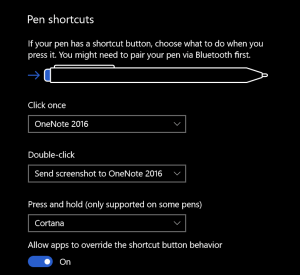
The top button can activate up to 3 programable functions (one for click, double -click, and another for press-n-hold); I have mine set to Take a screenshot, open OneNote and launch Cortana
Pen settings Did you make a mistake while drawing? Just flip the device over and erase; no need to go to the tools menu and select the eraser (such a time saver).  The barrel button is the same as right cliking on your mouse; you press the pen on the screen and hold it there to left click.

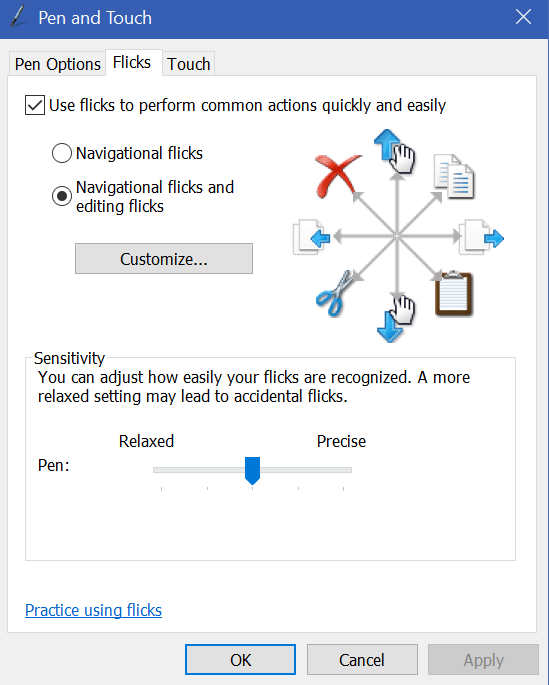
While we’re on the subject of navigation with your pen. Here’s a tip! Windows has a little known feature in it called flicks. Pen flicks let you perform an action by quickly moving your stylus across the screen in various directions. You can find the settings and enable flicks by opening the control panel (search) and selecting the icon for Pen and Touch, then choose the Flicks tab. Flicks

I am really impressed with the new Surface Pen and will be using it for years to come. Microsoft has been at the forefront of digital input devices and this one will go a long way toward keeping them at the top.


Digital Art and the XP-Pen Artist 15.6 drawing monitor

I’ve written about my fondness of pen input on computers and mobiles before. I’m writing this article on my Galaxy Note 8 with the S-Pen in handwriting mode. Some of my posts feature digital sketches and drawings that I’ve done on my Note or my Surface Pro.

My son has also shown an interest in digital art. We share an Adobe Creative Cloud subscription which gives us access to all of their software; Photoshop, Illustrator, Premiere Pro, and even their animation software is included. You can install the applications on two devices but can only use one of them at a time. It’s a good value in my opinion. I don’t think I’d ever drop the thousands it would cost to purchase all of the apps independently. They also give you a synchronization solution and 100GB of cloud storage so your works can be accessed from any of your devices at any time.

There are lots of free or inexpensive art and photo editing apps like Mediabang and Paint.Net, the built-in Microsoft Paint, and more; they’re good enough, but not the same caliber as Adobe’s software. In the same way that Open Office is good, but not quite as great as Microsoft Office. They make a great place to start if you want to make art, edit photos, or try your hand at animation while keeping costs down. They’re also great for learning how digital tools work.

Things like layers, lassoes, and pixel cloning are going to be new concepts if you’re used to paper. It’s features like these that separate digital and analog art techniques. For example; in the sketch of a truck that I’m using throughout this article, I only needed to draw one tire and then copy/paste. The truck is a seperate layer from the background and color which would let me easily do something else with it. When I drew the hood scoop, it was a little off-center. I didn’t need to start over. I  just had to use the lasso tool to move it.

TruckSketch

When we started out with digital art, my kid had decided on a Wacom Intous Draw tablet. This tablet is like a mouse pad that you write / draw on with a stylus. They are in-expensive (depending on size); I picked up ours at Best-Buy for $79.00 on sale. In terms of art, it works well but there is a disconnect between the tablet and what you’re working on, because your drawing or photo is on the screen but your stylus is touching the pad on a different plane. It works reasonably well after acclimation.

While we’re on the subject, it takes around 40 hours to become accustomed to any input device. Whether we’re talking about a drawing pad, a game controller, a keyboard, or a stylus you won’t have it mastered until you’ve spent about 40 hours working with it. So many of the people I know pick up a tool and judge it a failure if they can’t fully use it in 10 minutes. That’s just not how learning a new motor skill and building muscle memory works. In my opinion, it’s the biggest downfall of stylus input on computers. When the digital tool doesn’t work exactly like a pencil or pen on paper, people get turned off. It’s not supposed to be like paper. The experinece is supposed to be better than paper and if you dedicate the time to gain the skills, I think you’ll be surprised.

The trouble with drawing pads occurs when you lift your pen to connect two lines. For example; when drawing a large square you might lift your pen at the end of each side. Knowing where to put your pen down to start the next line can be a little challenging. The screen will show you where your stylus is hovering but there’s still a disconnect between your hand and your eyes that you just can’t quite overcome at first. There is also some translation happening between the size of your monitor (40″ in my case) and the size of the drawing space (5.7″) that you just can’t quite predict every time. Don’t get me wrong, if you spend the afore-mentioned 40 hours working with the device you’ll get the hang of it, but when working on complex shapes with minute details, it can be slower and become bothersome if you’re working on a long project.

The next step in digital art tools is a drawing monitor. Of course the primary difference between a drawing pad and a drawing monitor (aka pen display) is that the drawing surface is also a screen. The Cadillac of drawing monitors is the Wacom Cintiq line. Wacom popularized the technology first and owns several patents around the technology. Their screen based products are quite expensive, especially if you’re not using them for professional reasons. My son and I are not able to spend thousands of dollars on a digital art device so we needed to find an alternative. Lucky for us, several key patents for pen tech have expired or are about to expire. As a result, there are lots of competitors on the market that understand if they want “everyday” people to consider purchasing this type of device; the price point needs to be much lower.

I never purchase a new gizmo or gadget over $50.00 without doing a ton of research first. In this case, I’ve worked with pen displays through-out my career and know several professional digital artists. My experience and their recommendations were combined with hours of research online (lots of YouTube reviews) by myself and my son to produce our short list.

In the end, we chose the XP-Pen because the Huinon was so large that it would always require a stand and sometimes we like to draw on our lap. The Parblo Coast had a lot of complaints on various blogs for driver issues with Photoshop. Although, from their descriptions, I think it was probably a failure to adjust the refresh rates in their video driver.
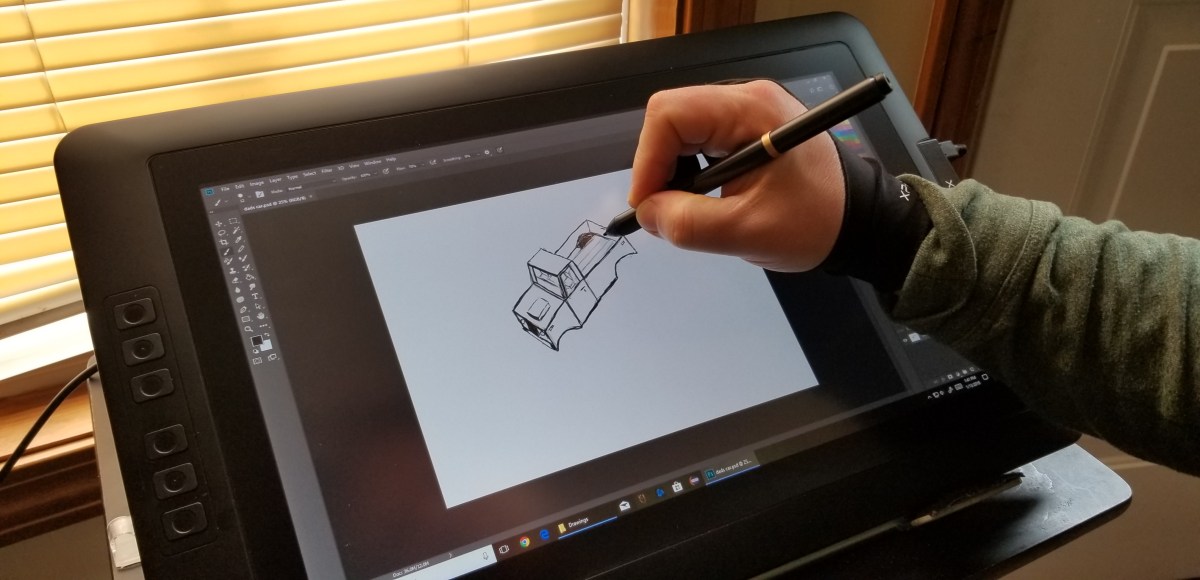
XP-Pen

The XP-Pen was easy to set up; just go to their web-site and download the newest drivers, hook up the included cable(s) and hit the power button. If your system is relatively new you should be able to plug the USB power cable in to one port and the controller cable into another. It comes with a power adaptor and plug fittings for both the US and Europe. It also ships with a mini display-port to HDMI adapter cable. They have drivers for both Windows and MAC so no matter your computer preference, it should work well.

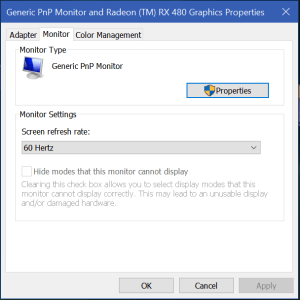
There’s a reported issue with many of these tablet devices blinking or flickering while you’re using them. If this happens to you, try adjusting the refresh rate of your video card to match the 60Hz refresh rate of the screen. For some reason it gets auto-deteced at 59Hz and this causes the flicker. In Windows just search for Display Settings, then click Display Adapter Properties and use the drop down to select 60Hz.
Refresh_Rate

This thing is fantastic. It’s the best overall drawing experience I’ve had to date. Part of the reason behind this is that the graphics are being driven by my Radeon GPU instead of a the Intel chipset my Surface Pro has. Even if that wasn’t the case, the drawing experience itself is better. The screen is not smooth like glass, there is a texture applied to it that offers a little tactile feedback to your strokes. The pen tracks well and suffers very little, if any parallax (pen tip and cursor don’t align). There’s a rocker switch on the side that adjusts the brightness and the colors look good.

The drivers work great. If you’re using it with Windows 10 and want the pressure sensitivity to work you’ll need to enable Windows Ink; search for it to find the settings. I tested it with the Adobe products, Paint.Net, Microsoft’s built-in apps, MediaBang, and Auto-Desk. It worked well on all of them.

My son and I both wish the tablet had more shortcut keys but that isn’t a deal breaker by any means. Also, we already had a tablet stand that we knew would work with this thing. If you don’t, you’ll need to consider buying theirs. There’s a bundle that includes the stand on Amazon or you can order it as an accessory from the XP-Pen website. There are also quite a few inexpensive tablet stands out there that would work well for it and I suspect that you could use a painting easel.

Overall we’re very happy with our purchase and would recommend it to anybody looking to use a digitizer for computer input. At $359.00 with free shipping from Amazon, it’s a bargain. If you’re wondering how that sketch of the truck came out, here it is with the color layer turned on. Thanks for reading.
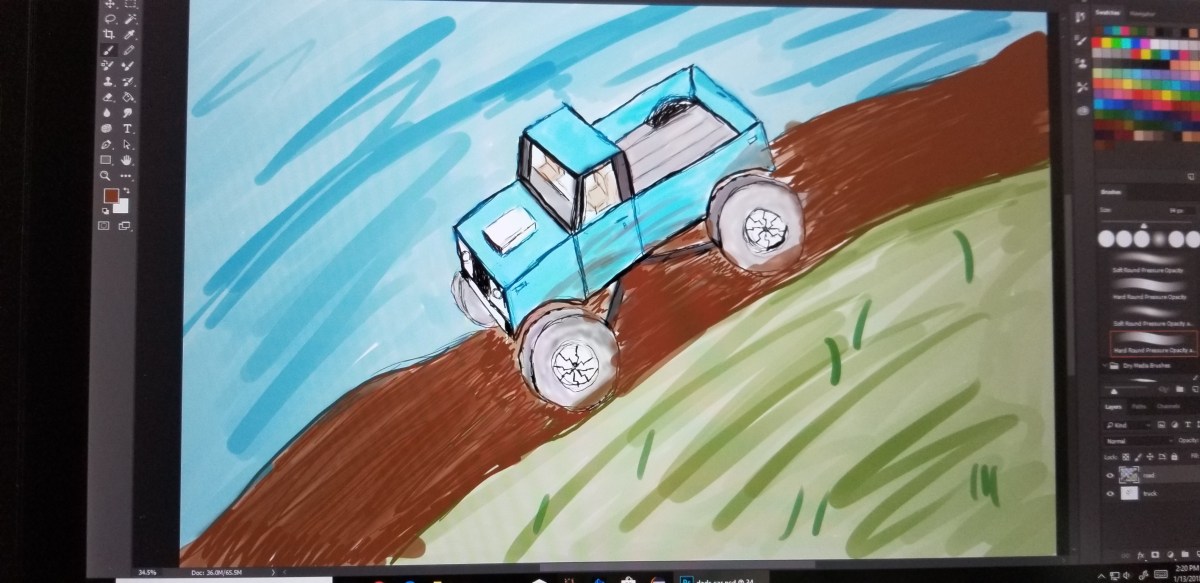
TruckPainting


I have so many fans! The perilous adventures of a CPU cooler upgrade

As I have stated numerous times throughout my blog, I am a gamer. I have custom-built my gaming PC and I’m pretty proud of it. One of the things I like best about Elder-Wand is it’s RGB LED lights that are controlled by my MSI motherboard’s “Mystic Light” feature. As long as the lights that I install are RGB, the motherboard’s controller and app can change them all to the same color with an app on the rig or from my mobile. It even controls my Razer Chroma Keyboard, Mouse, and Headset. This is a fairly common feature among high-end gaming systems now, but they usually don’t go the same extreme.

When I built Elder-Wand, I put most of my fun money into the running components: motherboard, CPU, GPU, M2 SSD, and Vengeance RAM. I skimped on the case, fancy fans, got a no name CPU cooler, etc. figuring I would update those components later. I have stuck with that goal, updating components as my budget allows. I’ve put everything in a nice new case, upgraded all the fans to LED 120 mm PWM, upgraded the power supply and more.

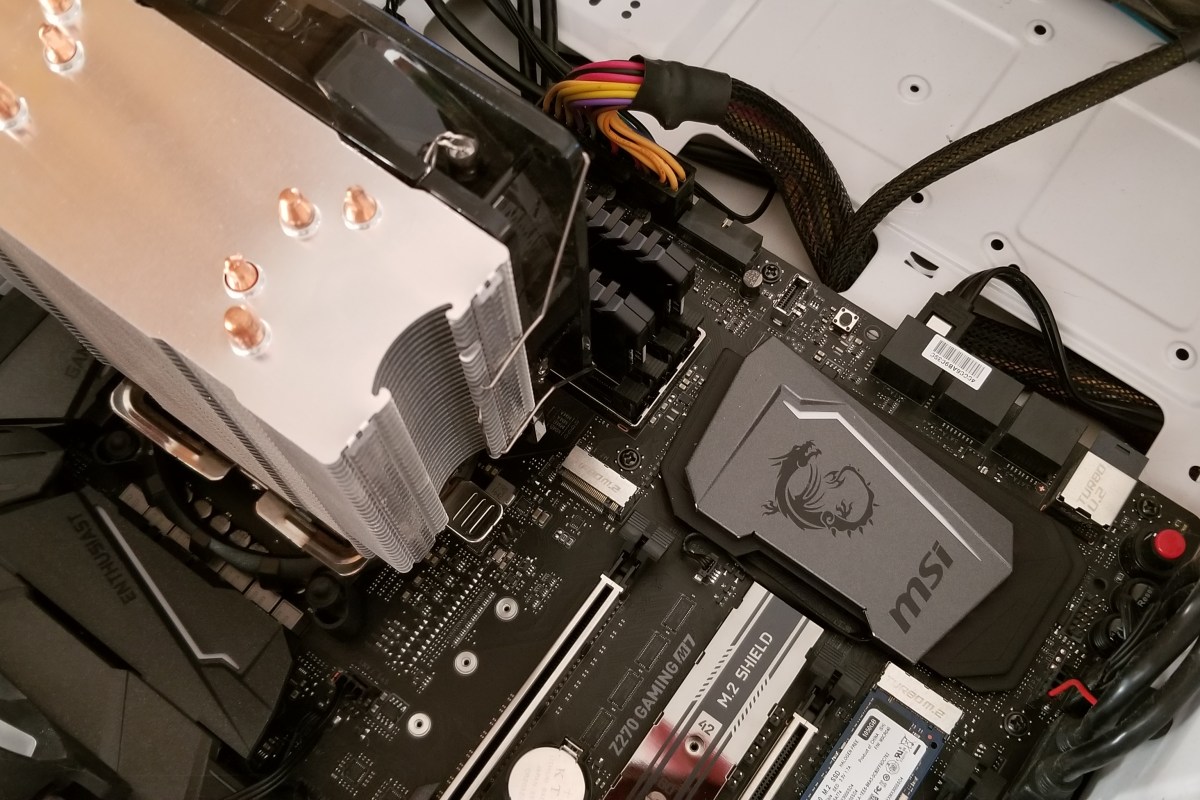
While I was moving everything into the new case, I broke one of the plastic mounting tabs for my CPU cooler. It still worked, but it wasn’t attached in all four corners as it should be so I decided to replace the cooler over the Christmas break from work. This is where my tale begins.

I started my project the same way that I always do, with a ton of reasearch. I wanted something that worked well but it also had to look great. I considered converting to liquid cooling but I don’t need to overclock my system right now, so I settled on copper tube based designs, there are a lot of them out there. One of the most popular units is the Cool Master Hyper 212 it’s been around  a while and has great reviews. It looks nice, but I wanted something with a little more flair. The Noctua Dual Tower looked big enough to chill my living room but was overkill for my requirements. In the end, I chose the Deepcool Gammaxx GT, I thought it would be a good balance of performance and looks.

I had planned on this taking an hour or so, boy was I wrong.

Oldcoolergone
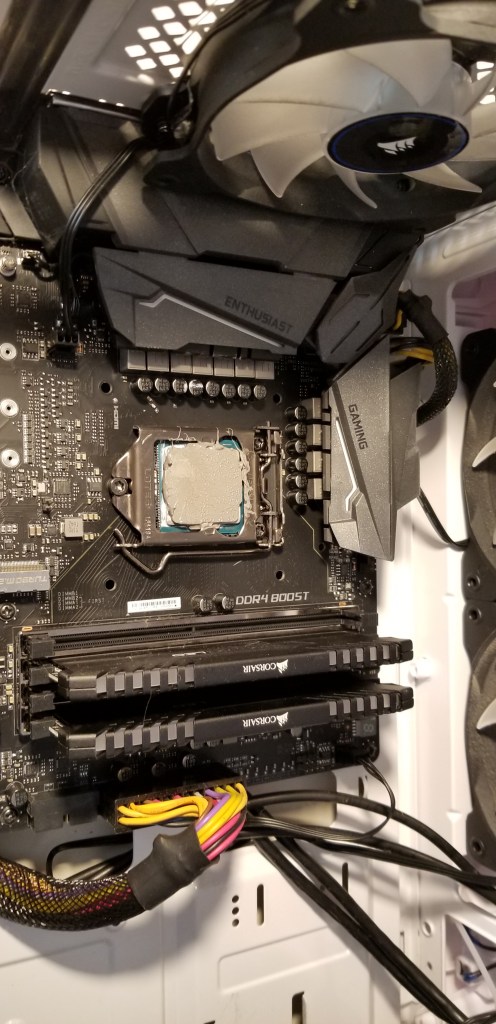
Step 1 is to remove the old CPU cooler. I needed to remove my GPU first.

I used a thermal paste kit that I purchased on-line to remove the grey goop from my CPU and prep its surface for the new paste.

Readytoinstallnewcooler
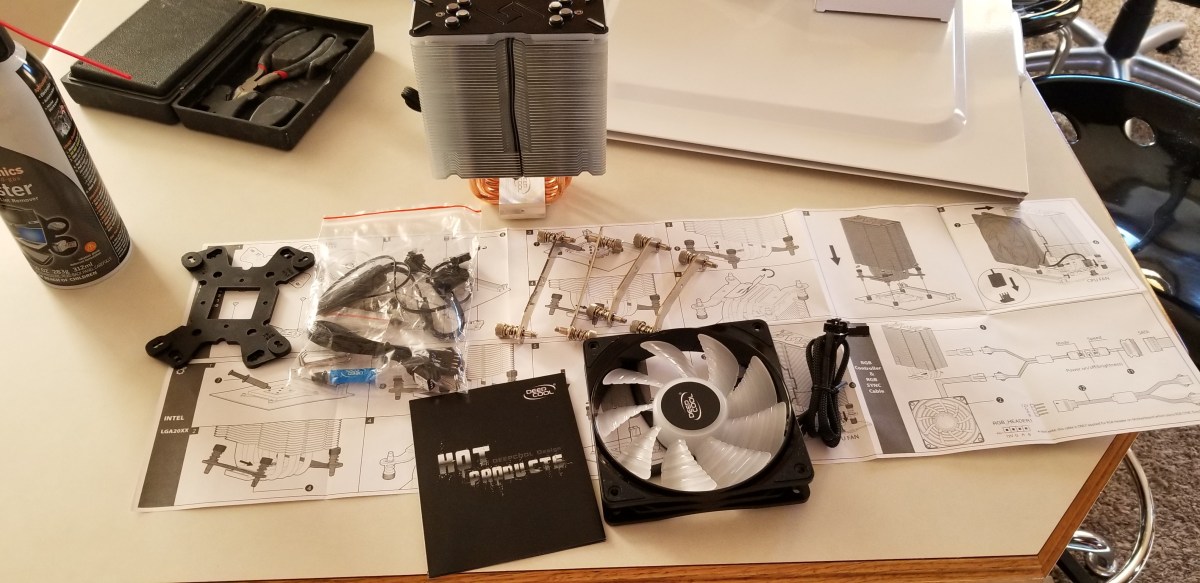
Next, I read through all the instructions for the new unit.

I followed the instructions to insert the nuts into the bracket, mount the brackets, and mount the rails.

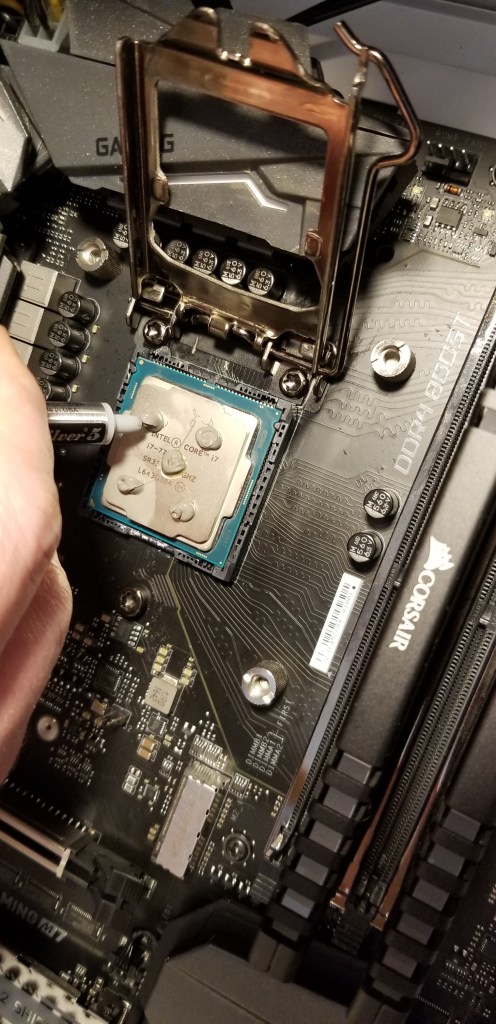
The instructions with new cooler said to place 5 pea size dots of thermal paste on the CPU. I used the paste that came with my kit, Arctic Silver is supposed to be the best you can get and I’ve used it for years.

InstallCPU

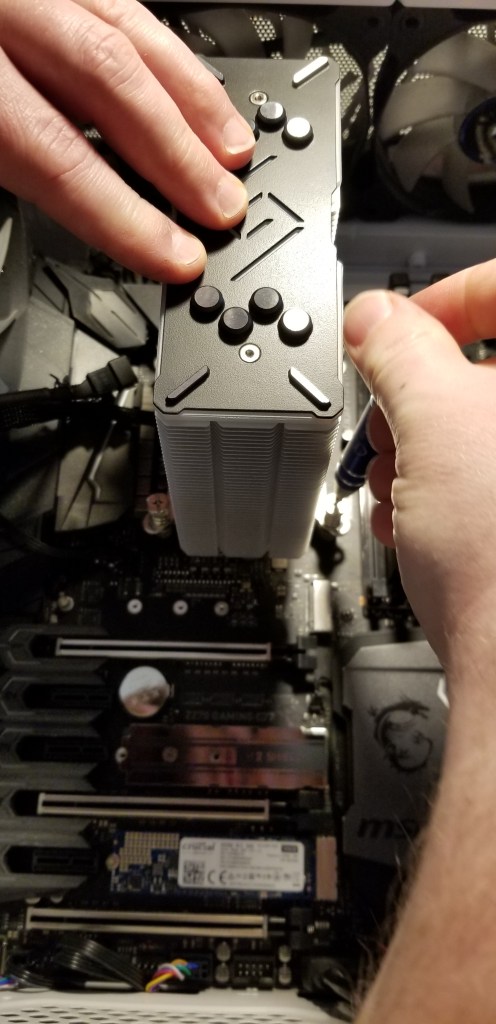
I installed the cooler, connected the cables, installed my GPU and double checked everything.

InstallCooler

When I booted up my PC, I was concerned to see it shutting down almost as soon as it powered up. The fans and board lights would come on for a second or two but then turn off before the BIOS post even started. My first assumption was that I had a partially connected cable somewhere so I took the case back off and re-seated my components along with re-plugging all the connectors.

No go. Still blinking on and then back off. My next guess was that something was amiss with the thermal paste. I took the case back apart, removed the GPU, pulled off the CPU cooler and sure enough, the paste was not evenly distributed. The fan screws in to the mounting bracket and unless you have a 4 screw driver rig of some sort, there’s no way to apply pressure evenly (yes, I did opposite corners a few turns at a time). I decided to clean the CPU and cooler base and try again. This time I applied the thermal paste in an X pattern (what I’ve always used in the past).

I got everything back together, booted up and I almost lost it!!! My system was still blinking on and then back off. I decided to remove the BIOS battery to reset everything. Of course on my board, the battery is underneath the GPU so I had to take everything back apart again. Bye now I am around 4 hours in to this project and my nerves are starting to fray. I got the battery out then re-assembled and tried booting. Yes! Elder-Wand booted up, the BIOS config screen loaded. I set the clock and boot options then saved and exited the BIOS. A quick reboot and my Windows logon screen loaded.

After I got logged on I decided to load my hardware monitoring app and see how the new fan performed while I played a game of Overwatch. Just about the time my match was starting my PC shutdown hard. When I tried to boot it back up I got the blinks back *%^! That was it; I’d had all I could take. I had to work in the morning so I decied to leave my system down and deal with it on the weekend.

Over the next couple of days my mind was turning over all the things that could be causing my issue. I knew the i-7 CPU had built-in thermal protection and so did my board so I was reasonably sure I hadn’t fried anything. I closely examined the pictures above and decided that the thermal paste would work better if I spread it like peanut butter. So I took my system apart, cleaned everything and used a silicone spatula to evenly apply a nice thin coating to the processor. Put it all back together and it booted again. Time to test. This time I made it through a couple of games before it shutdown. I had data though, there was a temperature spike on the processor.

I thought about it for a bit and looked at the pictures some more. I noticed the ridges in the copper cooling plate had gaps that were not being filled by the paste. I decided the paste was too thick to get down in there and was just smooshing out to the sides. I went and dug around in the box my new cooler had come with and found the paste that came with it. So I proceeded to dis-assemble, clean, and re-apply the manufactures paste. Then I put everything back together and booted. After 3 matches of Overwatch and an hour or so of Destiny 2 I felt I was in the clear. My system has been running fine for more than a week now. The new cooler works great and keeps the temp around 5 degrees lower than my previous one did. It looks nice too. The moral of this story is, “Don’t think you know better than the people who made your hardware”.  If you have a system that won’t stay up after a CPU cooler swap; you might try thinner thermal paste.

PowerShell; All Windows Servers and / or Workstations Storage Report

A lot of companies have monitoring software that will generate a report showing the amount of storage used on all of your systems. Smaller organizations may lack this type of software and occasionally even if you have monitoring, it won’t provide the specific data you require.

You can use PowerShell for all types of system monitoring and reporting. By calling WMI (CMI) we can access nearly any component of a system and obtain its status. If you’re planning on following the instructions below from your workstation you’ll need to install the appropriate RSAT package from Microsoft or use PowerShell remoting to connect to a domain controller and import a session for the Active Directory module. It may be easier to run the script from a Domain Controller.

The first step our script needs to accomplish is to build a list of the systems we want to report on. For most windows networks that means importing the Active Directory PowerShell module and using its Get-ADComputer function.

Import-Module ActiveDirectory
$domains = (Get-ADForest).domains
$dcs = Foreach ($domain in $domains) {
Get-ADDomainController -DomainName $domain -Discover -Service PrimaryDC
}
$servers = Foreach ($dc in $dcs) {
Get-ADComputer -Properties * - Filter {(OperatingSystem -like "*Windows Server*")}|Select DNSHostname -ExpandProperty DNSHostName
}

The snippet above will find all the primary domain controllers in your AD Forest and then scan them for all computer objects who’s operating system properties contain the words “Windows Server”. It will store the dns hostnames of those systems in a variable named $servers. If you wanted to scan workstations instead (or add them to your report) you just need to alter the filter or add a line.

$workstations = Foreach ($dc in $dcs) {
Get-ADComputer - Properties * - Filter {(OperatingSystem -notlike "*Windows Server*")}|Select DNSHostName -ExpandProperty DNSHostName
}

Now that we have our list of systems to scan the rest is just a matter of using WMI to find the drives and their status. We’ll also toss in a little math to make a report that’s easier to read.

$report = Foreach ($server in $servers) {
Get-WMIObject Win32_Volume -Filter "DriveType = 3" -ComputerName $server|Where-Object {"Label -ne 'System Reserved'"}|Sort-Object Freespace|FT -Property @{Name = "Mount Point"; Expression = {$_.Caption}}, @{Name = "Capacity (GB)"; Expression = {[math]::Round(($_.Capacity/1GB),2)}}, @{Name = "Free Space (GB)"; Expression = {[math]::Round(($_.Freespace/1GB),2)}}, @{Name = "% Available"; Expression = {[math]::Round (($_.Freespace/$_.Capacity)* 100)}} -GroupBy SystemName -Autosize
}

Combine the snippets above into a script and you’ll have full functioning storage report. You can add a SendMail command and schedule it with the Windows Task Scheduler to create an automated report. It also wouldn’t be difficult to output the results to a HTML page somewhere to create a dashboard. There are a lot of possibilities once you understand the data collection techniques. For another alternative look at my Exchange storage report, its essentially the same script but finds and filters for your Exchange email servers.

PowerShell; Office Add-ins and Plug-ins report for Office 365 implementation

If you’re considering implementing Office 365 in your company, you need to know that some add-ons and plug-ins for Microsoft Office applications will not work. There’s not really a good way to tell which ones will or will not work other than trying to upload them to the plug-in page in the admin tools section of the portal. Before you can do that you’ll need to know what plug-ins are being used across your enterprise. That’s where PowerShell comes in, we can scan the registry and generate a nice HTML report from either each machine on your network or just from a select few.

The code below will create an email an HTML report from whatever machine it is executed against. This comes in handy if your network security blocks WinRM.

$userinfo = $env:USERNAME+" "+"on"+" "+$env:COMPUTERNAME+$env:userdnsdomain

Function Get-Plugins {
$searchScopes = "HKLM:\SOFTWARE\Microsoft\Office\Outlook\Addins","HKLM:\SOFTWARE\Wow6432Node\Microsoft\Office\Outlook\Addins", "HKLM:\SOFTWARE\Microsoft\Office\Word\Addins", "HKLM:\SOFTWARE\Wow6432Node\Microsoft\Office\Word\Addins", "HKLM:\SOFTWARE\Microsoft\Office\Excel\Addins", "HKLM:\SOFTWARE\Wow6432Node\Microsoft\Office\Excel\Addins", "HKLM:\SOFTWARE\Microsoft\Office\MS Project\Addins", "HKLM:\SOFTWARE\Wow6432Node\Microsoft\Office\MS Project\Addins", "HKCU:\SOFTWARE\Microsoft\Office\PowerPoint\Addins", "HKLM:\SOFTWARE\Wow6432Node\Microsoft\Office\PowerPoint\Addins"
$searchScopes | % {Get-ChildItem -Path $_ | % {Get-ItemProperty -Path $_.PSPath} | Select-Object @{n="Name";e={Split-Path $_.PSPath -leaf}},FriendlyName,Description} | Sort-Object -Unique -Property name
}

$style = "BODY{font-family: Arial; font-size: 10pt;}"
$style = $style + "TABLE{border: 1px solid black; border-collapse: collapse;}"
$style = $style + "TH{border: 1px solid black; background: #dddddd; padding: 5px; }"
$style = $style + "TD{border: 1px solid black; padding: 5px; }"
$style = $style + ""
$report = Get-Plugins|ConvertTo-Html -Head $style|Out-String
Send-MailMessage -SmtpServer yourmailserver -From yourreport@yourdomain.com -To youremail@yourdomain.com -Subject "Office Plugins for $userinfo" -BodyAsHtml:$true -Body $report<span id="mce_SELREST_start" style="overflow:hidden;line-height:0;"></span>

If you are able to use WinRM to access all of your computers you can expand this script to invoke the function on every workstation in your AD Forest by scanning for the domain controllers, the using Get-ADComputer with a filter to find all of the workstations. After you have all the workstation names stored in a variable you’ll just need to use “invoke-command” against them to create a comprehensive report.

Import-Module ActiveDirectory 

$domains=(Get-ADForest).domains
$dcs = foreach ($domain in $domains) {Get-ADDomainController -DomainName $domain -Discover -Service PrimaryDC|select -ExpandProperty hostname
}

$systems = foreach ($dc in $dcs) {
Get-ADComputer -properties * -Filter {(OperatingSystem -like "*Windows*") -and (OperatingSystem -NotLike "*Server*")} -Server $domain |select DNSHostName
}

$userinfo = $env:USERNAME+" "+"on"+" "+$env:COMPUTERNAME+$env:userdnsdomain

Function Get-Plugins {
$userinfo = $env:USERNAME+" "+"on"+" "+$env:COMPUTERNAME+$env:userdnsdomain
$searchScopes = "HKLM:\SOFTWARE\Microsoft\Office\Outlook\Addins","HKLM:\SOFTWARE\Wow6432Node\Microsoft\Office\Outlook\Addins", "HKLM:\SOFTWARE\Microsoft\Office\Word\Addins", "HKLM:\SOFTWARE\Wow6432Node\Microsoft\Office\Word\Addins", "HKLM:\SOFTWARE\Microsoft\Office\Excel\Addins", "HKLM:\SOFTWARE\Wow6432Node\Microsoft\Office\Excel\Addins", "HKLM:\SOFTWARE\Microsoft\Office\MS Project\Addins", "HKLM:\SOFTWARE\Wow6432Node\Microsoft\Office\MS Project\Addins", "HKCU:\SOFTWARE\Microsoft\Office\PowerPoint\Addins", "HKLM:\SOFTWARE\Wow6432Node\Microsoft\Office\PowerPoint\Addins"
$searchScopes | % {Get-ChildItem -Path $_ | % {Get-ItemProperty -Path $_.PSPath} | Select-Object @{n="Name";e={Split-Path $_.PSPath -leaf}},FriendlyName,Description} | Sort-Object -Unique -Property name
}

$style = "
BODY{font-family: Arial; font-size: 10pt;}"
$style = $style + "TABLE{border: 1px solid black; border-collapse: collapse;}"
$style = $style + "TH{border: 1px solid black; background: #dddddd; padding: 5px; }"
$style = $style + "TD{border: 1px solid black; padding: 5px; }"
$style = $style + "

"

$report = Foreach ($system in $systems) {Invoke-Command -ComputerName $system {Get-Plugins|ConvertTo-Html -Head $style|Group-Object $system|Out-String}}
Send-MailMessage -SmtpServer yourmailserver -From yourreport@yourdomain.com -To youremail@yourdomain.com -Subject "Office Plugins for $userinfo" -BodyAsHtml:$true -Body $report

Either way, you’ll end up with a nice report that will help you obtain and test all the plug-ins being used in your company.

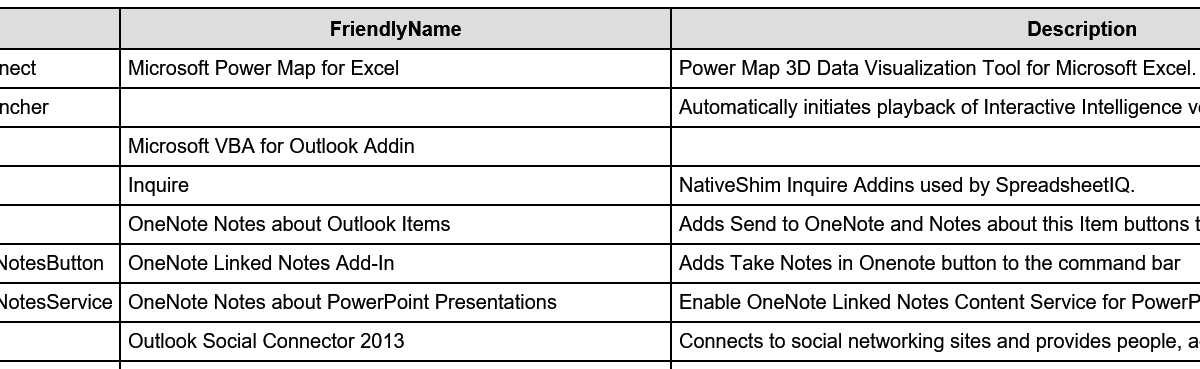
Name FriendlyName Description
ExcelPlugInShell.PowerMapConnect Microsoft Power Map for Excel Power Map 3D Data Visualization Tool for Microsoft Excel.
InteractionVoicemail.OutlookLauncher Automatically initiates playback of Interactive Intelligence voicemails.
Microsoft.VbaAddinForOutlook.1 Microsoft VBA for Outlook Addin
NativeShim.InquireConnector.1 Inquire NativeShim Inquire Addins used by SpreadsheetIQ.
OneNote.OutlookAddin OneNote Notes about Outlook Items Adds Send to OneNote and Notes about this Item buttons to the command bar
OneNote.PowerPointAddinTakeNotesButton OneNote Linked Notes Add-In Adds Take Notes in Onenote button to the command bar
OneNote.PowerPointAddinTakeNotesService OneNote Notes about PowerPoint Presentations Enable OneNote Linked Notes Content Service for PowerPoint
OscAddin.Connect Outlook Social Connector 2013 Connects to social networking sites and provides people, activity, and status information.
PhishMeOutlookReporter.AddinModule PhishMe Reporter PhishMe Outlook Reporter
Search.OutlookToolbar Windows Search Email Indexer Windows Search Email Indexer
TFCOfficeShim.Connect.15 Team Foundation Add-in Team Foundation Add-in
UCAddin.LyncAddin.1 Lync Meeting Add-in for Microsoft Office 2013 Lync Meeting Add-in for Microsoft Office 2013
UCAddin.UCAddin.1
UmOutlookAddin.FormRegionAddin Microsoft Exchange Add-in Exchange support for Unified Messaging, e-mail permission rules, and calendar availability.
VS15ExcelAdaptor Visual Studio Tools for Office Design-Time Adaptor for Excel Visual Studio Tools for Office Design-Time Adaptor for Excel
VS15WordAdaptor Visual Studio Tools for Office Design-Time Adaptor for Word Visual Studio Tools for Office Design-Time Adaptor for Word