Sneak Attack! Proxy Malware; What it is, How to Find It, and How to Remove It

There’s a new trick up the Internet bad guy’s sleeves and it’s a doozy. Instead of installing keyloggers or other capturing tools they install a proxy server and set your browsers and other web apps to use it. A proxy server is a tool that re-directs web traffic to the proxy which then forwards it on to the site you asked for. For example, when I open google.com at work my browser asks the office proxy server for the page which checks against a list of allowed sites and then sends my computer google.com (assuming its allowed and safe). It’s a man in the middle. Advanced programming techniques have allowed nefarious characters to package an entire proxy server into a small easily executed file.

Once the proxy has been enabled on your system all of your traffic gets directed to it, which then forwards to the dark web servers so the bad guys can see the bank site and password you typed in. Here’s the rub, you don’t usually know this is happeing. Their system is a true proxy and is returning the pages you’re asking for. You might notice a delay or you may get errors when you try to go to certain sites that say “Proxy Error”. The other problem is that this type of software is a legitmate tool so most Anti-Virus or Anti-Malware software doesn’t detect or flag it.

How do you know if you’ve been hit by this type of malware? Besides the afore mentioned “Proxy Error” you may notice unusual delays in your browser or web apps. The first thing to check is your Browser’s proxy settings. These are different for every broswer and every Operating System so Google “My browser proxy settings” and “My Windows Version” to see where to look on your system. When you get there, you should not see an address of 127.0.0.1, if you do this is an indication you’re a victim of a proxy attack. You’ll know for sure if you turn the proxy setting off, reboot, and find it turned back on (assuming your not on a mananged PC where you IT staff is doing this).
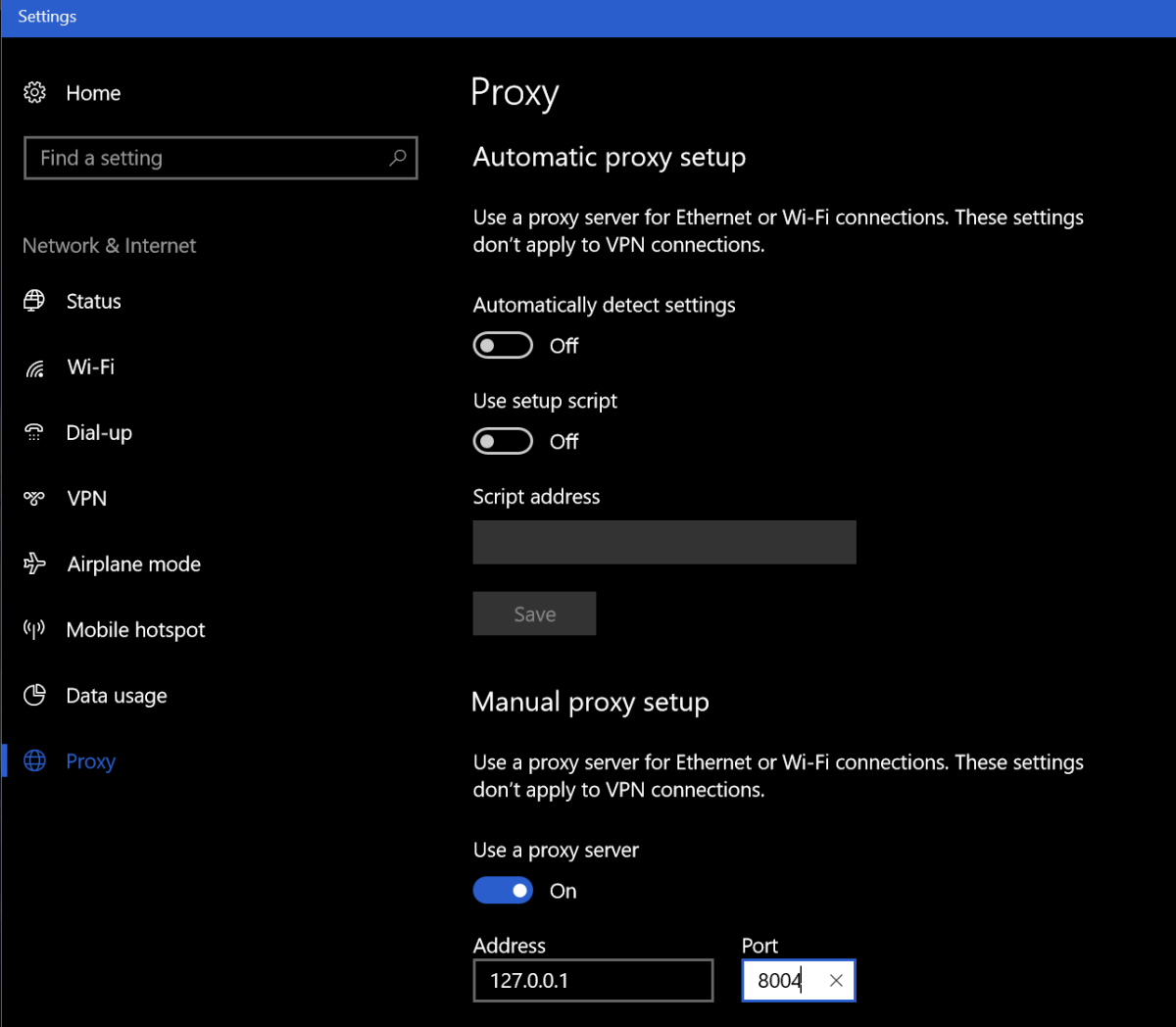
Windows10_Proxy_Settings

You can also go to a site like http://www.ipchicken.com and see if the public IP address it shows you matches the one on your internet modem / gateway’s admin page. If it doesn’t this is proof your web traffic is being re-routed through a foreign IP.

You’re being proxied, now what? Follow the instructions below at your own risk, I’m not in-front of your computer and each situation is unique. This is general advice and you are responsible for your actions, not me or whatdouknow.com. If you have a backup available you should consider formatting your hard drive and re-installing everything.

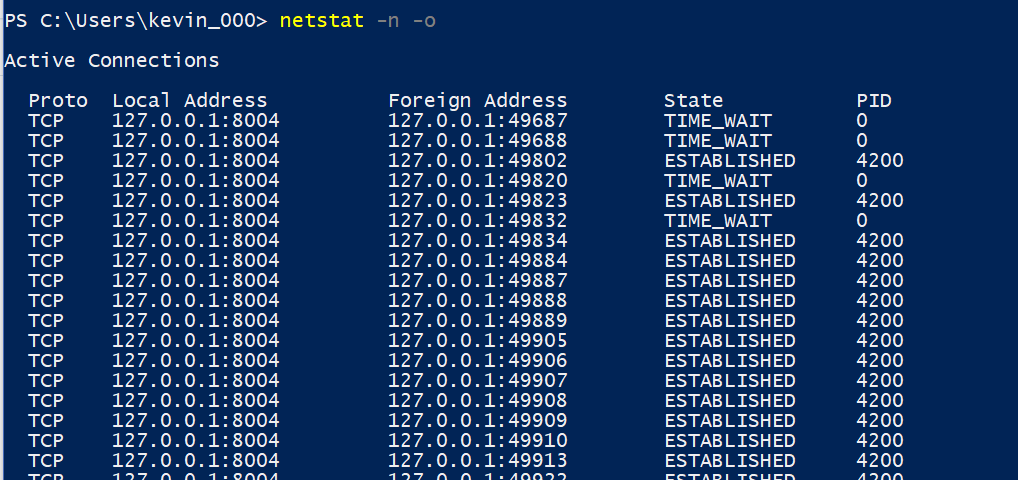
I’m going to assume your operating system is Windows. I’ve not seen this type of attack on Linux or MACs yet. So, first open PowerShell (search for it or find it in the start menu). Once you have it open type: Netstat -n -o and press enter. This is going to show you all the open network connections on your computer and the PIDs (Process ID) for the software that opened them. We’re looking for a line or lines that match what you saw in the browser settings of your computer.

WIndows10_Netstat

Once you’ve found it open another PowerShell session. Type: Get-Process -PID Number where number is the PID number that corresponds to the PID of your Netstat command (4200 in my case). Press enter and PowerShell will show you the name of the process. Write this down or type it into Word or notepad.

Windows10ProcessName

Now open task mananger (CTRL+ALT+Delete, click TaskManager) and find that process in the list of running apps. Right click on it and choose Open File Location, this will launch Windows Explorer and go to the directory that contains this file. Go back to the task manager and right click on the file again, this time choose End Task. Now go to the Explorer window you just opened and delete the entire folder. Just ending the task won’t stop the software from running again the next time your reboot your computer but you can’t delete the file until you’ve ended the task so the order is important here.

Once you’ve killed the task and deleted the file run Netstat -n -o again you should no longer see connections from 127.0.0.1. If you do, you may have more than one copy of the proxy attack installed, keep repeating the process until you’ve gotten them all. Always right down the name of the process. After you’ve stopped them all and deleted all their files we’ll need to clean up the registry.

Type Regedit in the search or run bar to open it. Right click on computer (top left) and choose find and search for the IP and Port numbers you found in your Netscan. If you find a match, delete the value by right clicking on the entry and choosing Modify, then clear the Value box and click OK. Press F3 to keep searching. Repeat the process until you see the “Finished Searching through the Registry” message pop-up. If you found more than one proxy on your system repeat the process until you’ve cleared all of them.

Now we’ll search the registy for the software entries. Right click on computer (in Regedit) and click find. Then enter the name of the process you found when you ran Get-Process in PowerShell. This time instead of deleting the value we’re going to delete the Key (folder) or Record itself. Right click on whatever it is and choose delete, click yes when prompted. Press F3 and keep searching / deleting until you get to the end of the registry. Repeat this process for every copy that you found.

Now go to your Proxy settings and turn it off. Then reboot your computer. When it comes back up everthing should be back to normal. Run the Netstat -n -o command again in PowerShell to be sure you got everything cleaned up. Go change all of your passwords for everything.
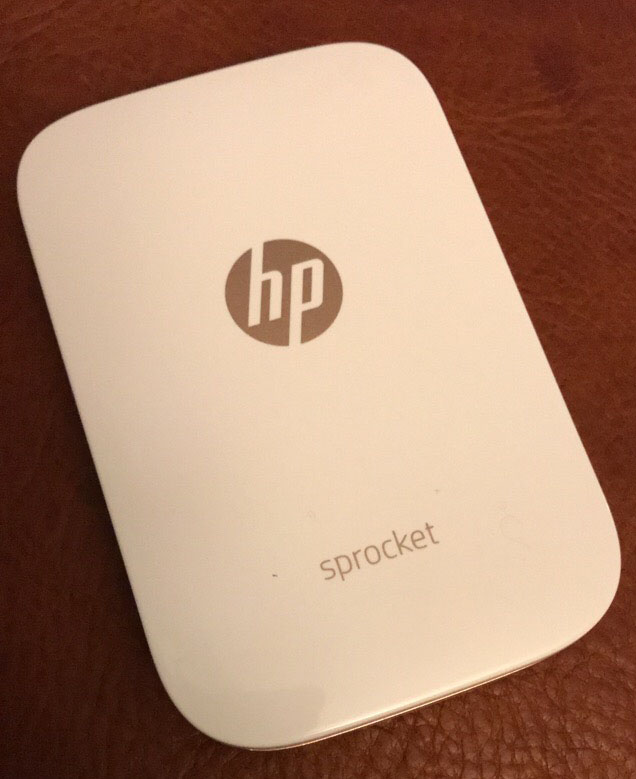


HP Sprocket; the little printer that could….

The only Christmas present on my wife’s list this year was an HP Sprocket printer. I must admit to being a little embarrassed because I had absolutely no idea what she was talking about.  What kind of tech blogger am I anyway?

After she explained what the Sprocket was, I jumped on-line and did some research of my own. The Sprocket is a printer that utilizes ZINK (Zero Ink) paper. Each piece of the paper is a multi layered packet that is impregnated with heat activated dye crystals. The printer contains the heating element, not traditional print heads. These things are the new trend for “crafty” types and most printer manufactures are making at least one model of ZINK printer.

Sprocket

So basically, we’re talking about the digital age version of a Polaroid camera. In fact, the Polaroid company makes one of these things with a camera attached. It’s called the Polaroid Snap. They all have an embedded camera or hook up with your mobile via bluetooth. Most of them spit out 2X3 photos that double as stickers if you peel off the back. I was a little sceptical about how useful a 2×3 photo would be but it was the only thing she really wanted and I always like new gizmos so I dropped the hint to my mother and she ordered one from Best Buy. HP’s model is available in 6 different colors, I went with white.

After the food and present exchange, I offered to set it up for her but it was so easy to get going she’d already done it herself. She had even printed a photo from our celebration on one of the 10 sheets of demo paper that comes with it. I was impressed, the print looked great and the size was better than I had imagined. suddenly a whole bunch of uses for the thing popped into my head. Lables for my gear being chief among them. We travel in an RV and I thought of plastering the ceiling with shots from our trips.
Sprocket_Print

The software is easy to use and apparently HP’s implementation is considered the best by ZINK connoisseurs. It offers easy photo touch ups, frames, stamps, text insertion and more.

I’ll let you in on a little tip. Each manufacturer makes their own ZINK paper but as long as you keep the little bar code card that comes in your brand’s first pack of paper you can use any of them in your printer. Sometime’s Polaroid’s paper is on sale, order it, scan the card that came with your HP paper and insert the Polaroid stack into your printer. On average you’ll be spending about $0.50 per print. It prints a sheet in just a couple of minutes and because its battery-powered and not much bigger than an iPhone you can easily take it with you. We’re taking ours to my son’s birthday party to make stickers for all the kids with their pictures on them.

All in all, they are neat little gadgets. I’m not sure anybody actually “needs” one but if you’ve got the extra money and you like pictures, you can come up with some pretty cool uses for it. For instance my wife, sticks the pictures on her notebook pages.

Sprocket_Scrapbook


Updated- Native IPv6 on Android with Pfsense 2.4.x and Comcast/Xfinity; Fix Facebook, Youtube, Flipboard and more.

I’m an early adopter of most technology. I’ve been running IPv6 (dual stack) since the day my ISP (Comcast) made it available and learning how it works as I go. It has changed drastically from the early days with new protocols like DHCP6 being added to overcome challenges. Most of my devices now prefer IPv6. I vote we get rid of the v and just call them IP4 and IP6 who agrees?

The Problem:

I’ve seen plenty of posts in forums about people struggling to get this working, especially on Android devices. I like to help people with tech, so this article is all about how to make this work. Here’s the deal, Android’s makers have decided not to support DHCPv6 which is how a lot of routers are configured to hand out addresses for IPv6 networks. You can read about that here if the reasoning matters to you; https://www.techrepublic.com/article/androids-lack-of-dhcpv6-support-poses-security-and-ipv6-deployment-issues/

This decision actually causes a lot of trouble if you have IPv6 turned on but not configured correctly. Some of the most common symptoms are slow or failed web page loading, Facebook comments not loading, the Youtube app is slow, etc. If you’re on a mobile phone you can turn Wi-Fi off and everything will work over LTE just fine. In a nutshell, the issue is that you’re trying to go to web services that are IPv6 enabled but your device isn’t using it correctly. You end up having to wait until IPv6 times out and falls back to IPv4 before everything works. This can take a long time.

A lot of posts out there on the intertubes say to disable IPv6; the trouble is you really can’t. IPv6 is baked in to your devices now, you can’t just turn it off. At best, you can block it at your firewall or stop it at your network card, but that won’t stop all of the problems because a lot of the apps you use (even the OS itself) expects IPv6 to be there. Not to mention, the whole world is going to IPv6 right now. Turning it off is the equivalent of saying you want to go back to the horse and buggy until they get those car things figured out.

The Solution:

Router manufacturers have started including or updating firmware to allow an RA mode (Router Advertisement) of “Assisted” meaning it will use SLAAC and DHCP6 in parallel. This gives you the best of both worlds, and is what we need to do so your Android devices can use IPv6 on your network. SLAAC is a process that allows the device to pick its own IPv6 address from a range of addresses provided by your ISP vs. being assigned one from your personal router (DHCP6).

The following information and instructions are based on Whatyouknow.com’s lab which consists of a Comcast Xfinity modem in bridge mode connected to a Pfsense 2.4.2 firewall. The terminology and locations may be a little different for your case, but Bing or Google should be able to help you figure out the exact settings for your equipment.

First, you need to know what prefix delegation your ISP is passing out. Sometimes you can retrieve this info from your cable modem’s admin page, generally under connection status (usually the admin page will be https://10.0.0.1 or https:// 192.168.0.1). If you can’t access your cable modem then try looking it up (Google, Xfinity Prefix Delegation). If you can’t find it on-line then try:

  • Plug an IPv6 capable computer (must be turned on in your network settings) straight into your cable modem.
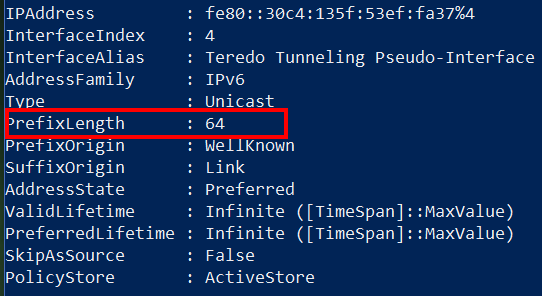
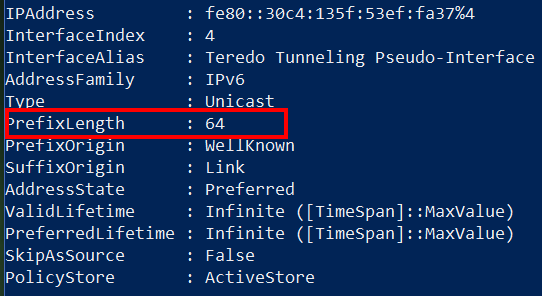
  • Open PowerShell and type Get-IPNetAddress (on Linux or Mac use Terminal to run ifconfig)
  • Find your IPv6 Address and look for the PrefixLength field
    • IPv6-PreFixLength

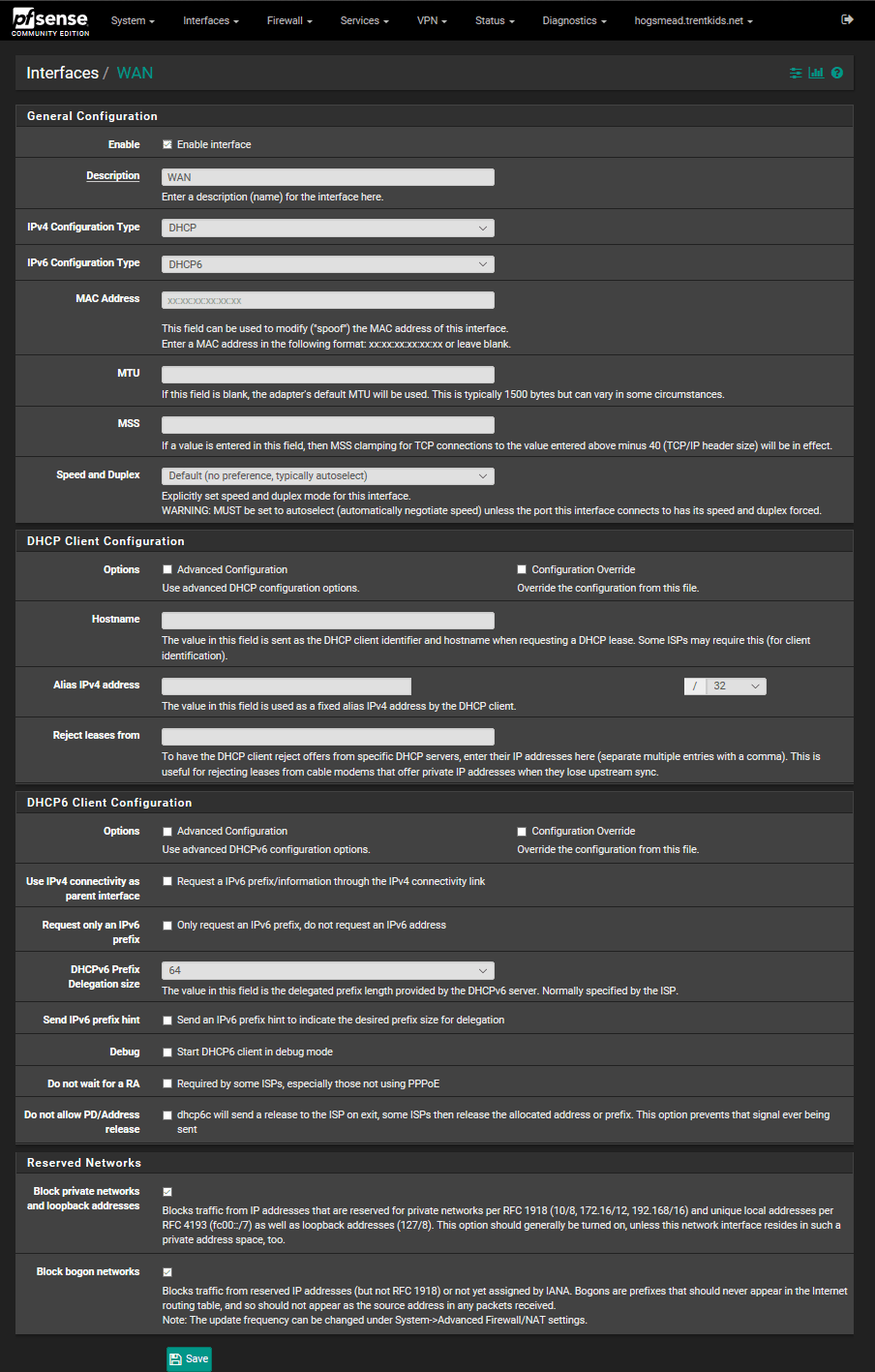
Now that you have the prefix delegation, logon to your firewall and configure your WAN interface to use DHCP6 (for Comcast), and set the Prefix Delegation size to 64. You can probably leave all the other settings alone. Here’s what it should look like in PFSense.

PfsenseIPv6WanSettings

Now we need to configure the LAN interface to get is IPv6 address from your ISP connection. Go to Interfaces, LAN, select Track interface in the IPv6 drop down, then select WAN for the interface to track.

After you have saved and applied these changes, you should be able to go to your dashboard (connection status page if you’re not using PFsense) and see IPv6 addresses listed for both your WAN and LAN interfaces. If you don’t, try rebooting your cable modem and your firewall. If you still don’t see them, then you missed a step in the setup. Start Over.

Now for the Android Magic sauce: we need to configure the distribution of IPv6 to other devices on your network. As I mentioned before, Android is expecting a SLAAC address assignment, depending on the rest of your network equipment it may eventually get one in the current configuration, but setting your RA to “Assisted” will help it along.

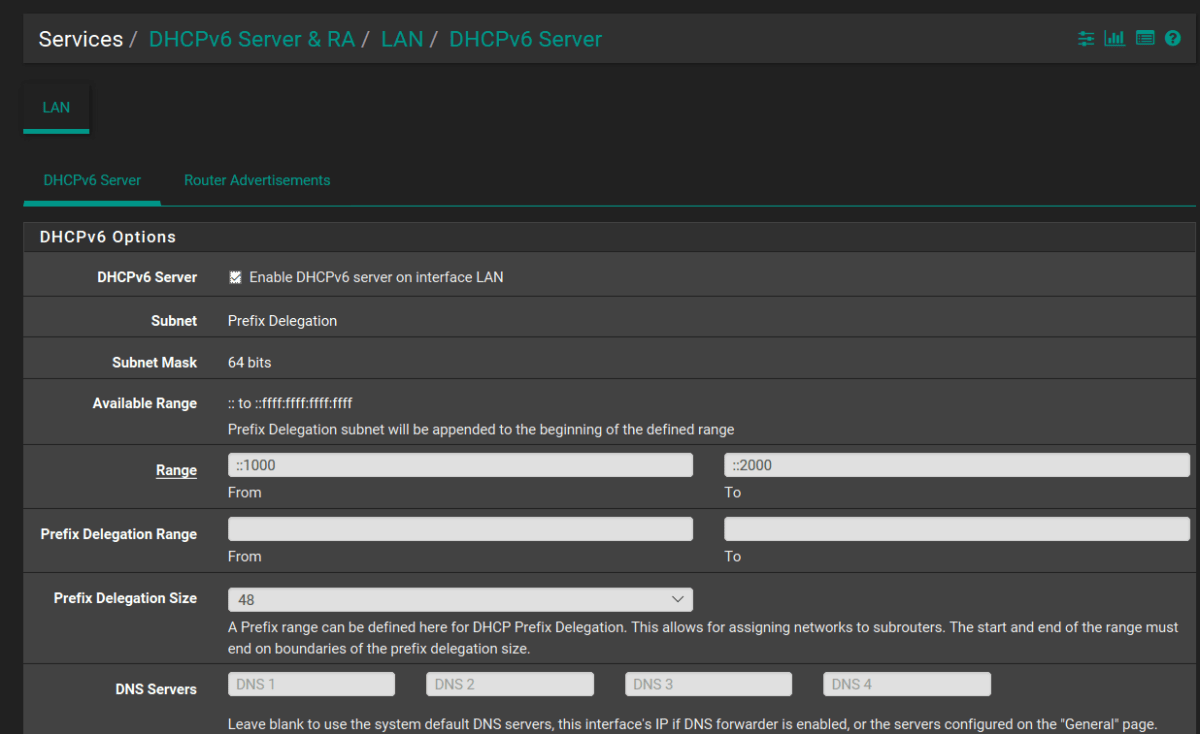
Go to Services, DHCPv6 Server & RA and check the box to enable DHCPv6, save and apply. You shouldn’t need to change any other settings.

PfsenseEnableDHCP6

Now click on the Router Advertisement tab and in the Router Mode dropdown select Assisted RA. This is the magic sauce that will help your Android devices use IPv6 effectively. After you save and apply these settings, I highly recommend that your restart your cable modem and router.

Still Not Working?

While adjusting the settings on our lab equipment to get the screenshots for this article, I noticed something peculiar. I could setup the firewall just as I’ve described above and my Android device still wouldn’t use IPv6. I was still getting the time-out problem when connected to the lab’s WiFi. Our production system was working just fine with these same settings.

I dug into the logs and found that IPv6 wasn’t binding correctly to the LAN interface even though the status page showed that it had an address. I had just upgraded to 2.4.2 to write this article on the latest version and I suspect something got corrupted during the upgrade process. I looked on the PFsense Bug tracker and found a few other posts that matched what I was seeing.

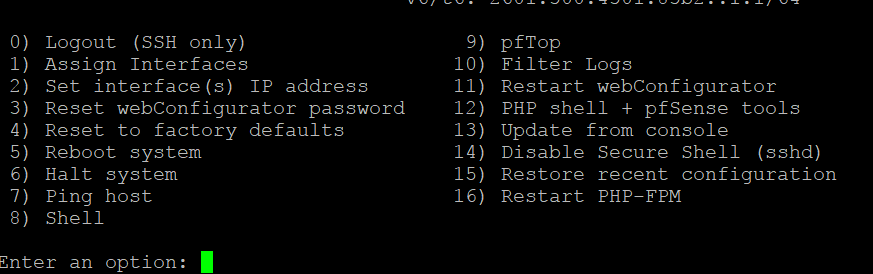
I installed an App named IPv6 and More from the play store on my device and sure enough, I wasn’t getting an IPv6 address at all. I was able to correct this by disabling DHCPv6 (uncheck the box), and turning off IPv6 on both WAN and LAN interfaces. I then rebooted and performed the steps above again and bingo, IPv6 was working. I’m not sure if this is an actual bug or just a glitch for a few of us but if you’re having trouble you might try it. You can also use Putty to connect via SSH (assuming you haven’t turned it off) and pick option 4 from the admin menu to reset everything in the Firewall back to defaults. A word of warning, it does what it says, the IP addresses of your interfaces will be set back to defaults, all of your rules and routes will be gone, all of your preferences and add-on packages will be removed. Make sure you’re in for setting everything up from scratch before going nuclear. Making a backup of your configuration before engaging this option would be a very good idea.
PfsenceSSHMenu

Once you think everything is working open a browser on your Android device and head over to http://test-ipv6.com/ you’ll be able to tell in just a few seconds if everything is up and running.
Update 5/01/18

Since writing this article I have discovered that my Wi-Fi access point’s bandwidth must be set to 40 MHz for IPv6 to function on my Android devices. If the bandwidth is set to 20 MHz or Auto the Android device will obtain an IPv6 address but will be unable to utilize it. I have tested this with ASUS, Linksys, and Ubiquity access points. As of yet, I do not have a satisfactory explanation for the situation
 

Galaxy Note 8 Wallet Case Shootout

As I have said in other articles, I’m not a fan of cases in general. However, if a case can extend the functionality of a gadget, that is a different story. Wallet cases do just that for me. One less thing I have to find in the morning, gets me that much closer to being on-time to work. I’ve been on a mission to find the perfect wallet case for my beloved Galaxy Note 8.  I’ve purchased, carried, and used 3 of the top models and thought my readers might appreciate what I’ve learned.

First Up is the Samsung LED Wallet Case:

You can find this case on Samsung’s web-site, on Amazon, and even at Target. It retails for $59.99 but I’ve seen it on sale for as low as
$41.00 several times. Its available in the same 3 colors as the Note itself and holds two cards (I stuffed 3 in mine). This protector has a pretty cool trick up its sleeve; LED lights embedded in the case display icons for your notifications. There are several default icons and software that will let you create custom ones. The LED section on the front of the case is touch sensitive you can answer calls by swiping on it etc..


I bought this case with my phone and carried it for a couple of months. It barely adds any thickness to the phone and looks great. The LED lighting function is cool to show off but isn’t really all that useful in my daily life. I wear a smart-watch and the notifications it shows are detailed vs. the generic icons the case displays. The LED notifications don’t last very long so if the phone is in your pocket when it buzzes you’ll probably miss the ICON . I constantly found myself wishing I could carry more than two cards. I was disappointed in the durability of this case. After just a few weeks the material started to unravel next to the power button (open the last pick full screen). I put some tape over it but at this price point it should last a lot longer before having these types of issues.

Next I purchased the Burkley Leather Wallet Case:

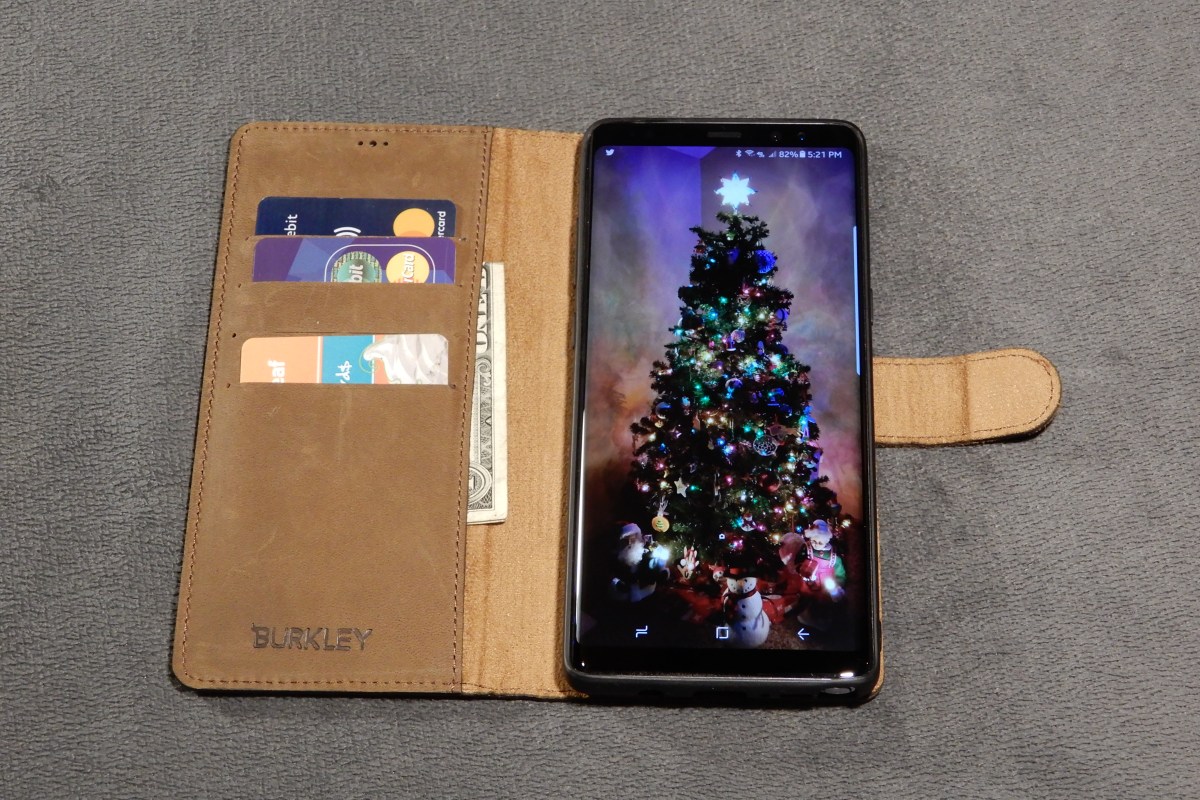
You can find this case on their web site and if you watch the price it will go on sale for around $50.00 (normally $69.99). This thing is gorgeous. It is the nicest looking phone case I have ever owned, period. It feels soft and supple, like the inside of your favorite fuzzy slippers. The case fits the phone perfectly and easily holds 3 cards and some cash. I wanted it to work so, so bad, but it just doesn’t. The magnets that hold the phone in the wallet are in the wrong place and kept the screen from turning off when you hold the phone up to talk on it. The magnetic field also disturbs the auto-brightness sensor and stops it from working when attached to the wallet. More importantly, the entire back of the inner phone case is metal which stops wireless charging from working all together and for me, that is a deal breaker.


I ended up sending this case back. I told Burkley that if they could make it work with wireless charing I would purchase another one in a heart beat and be happy to pay twice as much for it. It is so nice I actually considered keeping it even though it stopped three important functions from working. I’ve never gotten so many compliments from random people as when my phone was in this case. If they can fix the magnet issues this will be the top of the line wallet for your Note 8. Please fix it Burkley, I really like it a lot.

Last is the AMOVO Detachable Wallet Folio:

This is the case I am currently carrying. It’s also made of leather and feels very nice but in my opinion it doesn’t quite look as nice as the Burkley did. It is glossy leather instead of suede. It fully works with the phone. It doesn’t stop any of the features from functioning thou wireless charing is a little finicky. You have to get the phone in just the right position due to the magnets being on the sides but once you get a feel for where it needs to go it works just fine.


It holds 3 cards and cash and the inner case seems like it might protect from drops better than the others. My phone will be living in this case for the forseeable future. You can beat the price either, its only $24.95 on Amazon.

Summary:

  1. Samsung LED Wallet Case
    • Pros
      • Looks Nice (matches phone color)
      • Thin
      • LED display
      • Works with wireless charging
    • Cons
      • Only 2 cards
      • No cash pocket
      • durability issues
      • Phone is always in a wallet, this one doesn’t have an inner case that detaches
  2. Burkley Leather Wallet Case
    • Pros
      • Looks excellent
      • Feels excellent
      • 3 cards and cash pocket
      • Attention getting
      • Makes a stand for watching videos
    • Cons
      • Not compatible with wireless charging
      • Breaks auto-brightness
      • Breaks screen-off while talking
      • Expensive (when not on-sale)
  3. AMOVO Detachable Wallet Folio
    • Pros
      • Looks good
      • Feels good
      • All functions work
      • 3 cards and cash pocket
      • Makes a stand for watching videos
      • Available in multiple colors
      • Half the cost of the others
    • Cons
      • None

If you’re in the market for a wallet style case for your Galaxy Note 8, the winner in whatdouknow.com’s opinion is the AMOVO. It looks and feels nice and doesn’t hinder any device functionalilty. If you have a favorite wallet case that isn’t listed, let me know in the comments.


Stop the Distribution List Apocalypse; Dynamically Populate Outlook Contact Groups with PowerShell

Almost every company that I have ever worked for has an enormous collection of distribution lists; many are duplicates or very slight variations of other group names. This makes group communications difficult to say the least. Do you use the Network Team, Network Support Team, Network Help, or Network HQ list to get in touch with your current network group? Sure, you can check the membership, but at a large company you probably don’t know the correct individual’s names, it’s why you’re using the group address in the first place right?

Where did all these address collections come from? That is a simple question to answer, people ask for them. As a team’s management and membership changes the people in it want a way to email their group all at once. They aren’t sure about the existing lists so they ask IT to make a new one. Before you know it; the company address book is a giant mess with more groups than people in it.OutlookDlOverkill

Not only is having this many DLs confusing to use, it is a security nightmare. Security professionals are finding that controlling who can communicate with whom is almost as important as changing your password. The “Wild West” days of allowing all employees to email anybody they see fit should be coming to an end at your company. Every message that leaves your organization represents it in the marketplace. Each one is a piece of data that can be used by your competition or for nefarious reasons by dark net residents.

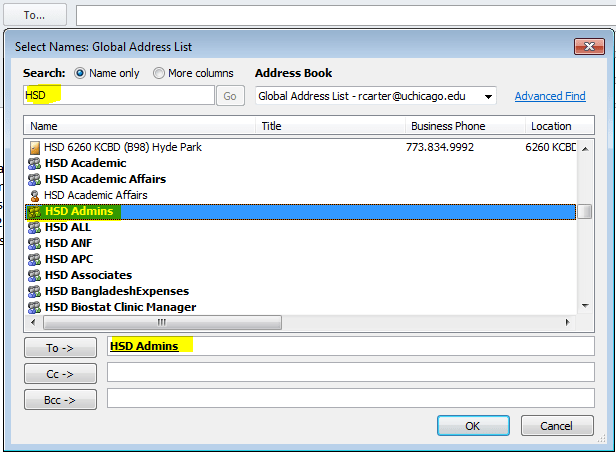
What’s the solution? There quite a few, from commercial DL management tools like ManageEngine and Ensim, to hiring a FTE to manage distribution. If you use Microsoft Exchange you can set security and transport rules to control access to groups and the same is true for Office 365 (How To coming soon). Personally, I think the best solution is to avoid putting them in the Global Address Book in the first place. Personal or small team DLs belong in each individual’s Outlook. Outlook calls its lists Contact Groups.

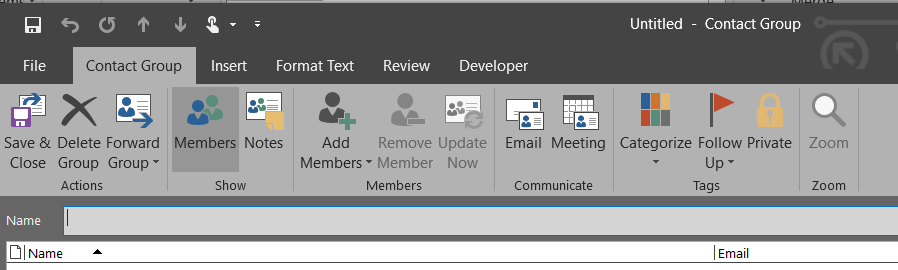
Outlook Contact Groups have a lot going for them. They’re local to the user’s Outlook profile but can be shared, they can auto update email addresses for the members, and don’t require an administrator to update them. So what’s the catch? Why doesn’t everybody use Outlook Contact groups?OutlookContactGroup

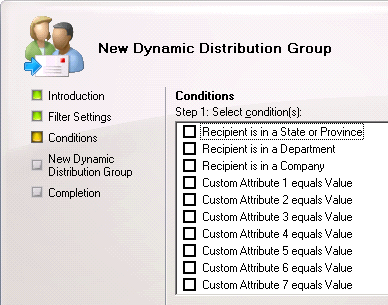
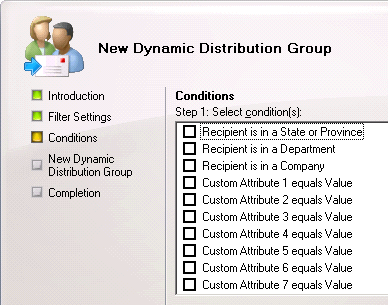
Email address distribution groups in the Global Address List are often dynamically populated. If your company uses Active Directory there’s a good chance that they have filled that directory with employee details like phone numbers, email addresses, physical addresses, and more. Dynamic DLs are formed when an administrator creates a query and filter set in Exchange. This rule searches AD based on the specified parameters and inserts the matching addresses into the desired list, essentially automating the process. Outlook contact groups lack this ability and have to be manually created which is tedious and time-consuming. I believe this is the biggest obstacle to their widespread adoption.

dynamic_distribution_group

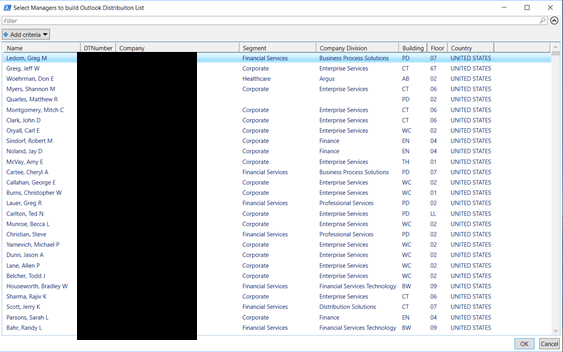
Being the crafty scripter that I am, I decided to see if I could create Outlook contact groups dynamically. Did you know that Active Directory usually contains your entire firm’s management structure? There’s a field in which you can enter an employees manager. If your HR or IT department populated this field you can view the information but there’s no way to create an email list from it. I imagined it would be useful for my company if a person could choose a supervisor from a list and end up with a contact group that contained all that manager’s employees. If you select multiple managers you can create lists that contain entire departments. Unlike most “scripts” this tool has a full GUI. Does that make it an Application? What exactly is the dividing line between script and app?

OutlookDLBuilderManagers
Manager’s List Generated From AD Query Select, Filter, and Sort

The code below is written for Windows 10 and requires the RSAT package be installed. You’ll also need to be sure the Manger’s list is done populating before you select items from it. The scroll bar will stop shrinking when it is done querying all your accounts. If you’re running this on a large distributed directory it can take up to a couple of minutes to complete. If you select a manager and click “Ok” and nothing happens then the scan wasn’t finished. Try again and wait a little longer.

THE CODE:

Import-Module ActiveDirectory
[System.Reflection.Assembly]::LoadWithPartialName('Microsoft.VisualBasic') | Out-Null

$temppath = "$env:userprofile\documents\Outlook_dl_builder_selected_managers.csv"

function Get-Managers
{
Get-ADUser -properties * -Filter {(directreports -ne "$null") -and (displayname -notlike "*test*")  -and (displayname -notlike "123*")}|
Select @{n="Name";e={$_.Displayname}},@{n="Logon";e={$_.SamAccountName}},@{n="Email";e={$_.PrimarySmtpAddress}},Company,@{n="Country";e={$_.co}}|
Out-GridView -Title 'Select Managers to build Outlook Distribuiton List'-PassThru|
export-csv -Path $temppath -NoTypeInformation
} 

function Get-ADdirectReports
{
    PARAM ($SamAccountName)
    Get-Aduser -identity $SamAccountName -Properties directreports | %{
        $_.directreports | ForEach-Object -Process {

            Get-ADUser -identity $Psitem -Properties * | Select-Object -Property DisplayName, SamAccountName, Mail, @{n="ManagerName";e={(Get-ADUser -Identity $_.Manager -Properties displayName).DisplayName}}

            Get-ADdirectReports -SamAccountName $PSItem
        }
    }
}

function OutlookDL
{
    $outlook = new-object -com Outlook.Application
    $contacts = $outlook.Session.GetDefaultFolder(10)
    $dl = $contacts.Items.Add("IPM.DistLIst")
    $dl.DLName = "$groupname"
    $dl.Save()
}

function OutlookDL-Delete
{
    Try {
    $outlook = new-object -com Outlook.Application
    $contacts = $outlook.Session.GetDefaultFolder(10)
    $DL=$Contacts.Items("$groupname")
    $dl.delete()
    }
    Catch {Write-Host "No duplicate Outlook Group found"}
}

function AddContacts
{
    $outlook = new-object -com Outlook.Application
    $contacts = $outlook.Session.GetDefaultFolder(10)
    $namespace = $outlook.GetNamespace("MAPI")
    $DL=$Contacts.Items("$groupname")
    $recipient = $namespace.CreateRecipient("$employee")
    $recipient.Resolve()
    $DL.AddMember($recipient)
    $dl.Save()
   }

function DisplayDL
{
    $outlook = new-object -com Outlook.Application
    $contacts = $outlook.Session.GetDefaultFolder(10)
    $DL=$Contacts.Items("$groupname")
    $dl.display()
}

$groupname = [Microsoft.VisualBasic.Interaction]::InputBox("Enter the name of the Outlook Contact Group to be created or updated:","Outlook Contact Group", " My Outlook Distrobution List")
OutlookDL-Delete
Get-Managers
$managers = Import-CSv -Path $temppath |select Logon -ExpandProperty Logon
$drlist = Foreach ($manager in $managers){Get-ADdirectReports -SamAccountName $manager|select-object -ExpandProperty mail}
OutlookDL
Foreach ($employee in $drlist) {AddContacts}
DisplayDL

Now that you’ve seen the technique at work you should be able to easily adjust the AD query to scan or filter for the fields that are most useful to your organization. You could also use sources other than AD, it would be simple to connect to a SQL database or import a CSV file.

Multiple Nintendo Switches play Splatoon 2 on the same ISP/Network and fix NAT Type D; Pfsense Firewall

In my house there are two Nintendo Switches and we have two copies of Splatoon 2. We like to play the game together but of course we only have one Internet connection. At first it seemed like this wasn’t going to work. We could start two games separately and play just fine but if one tried to join the other’s game (through the friend option in the game menu) then both would get kicked out of the game. I was able to use advanced logging and network captures to see where the problem occurred and come up with a solution.

I use Pfsense for my router/firewall and a Ubiquiti Unifi mesh wireless network. The principal configuration in my solution should be possible on most modern networks but the terms and menu options will be different on other manufacture’s equipment. We’re going to create static IP addresses for each device and then make virtual wireless networks for them as well. This fools Nintendo’s network into treating each device as connecting from a separate network (allows UPnP to set the same ports).

Nintendo network games are notorious for having issues with multiple consoles using the same Internet connection. Some routers deal well with it right out of the box, and some don’t. The steps below outline what I did to get mine working. The same steps allow all my kid’s 3DS consoles to play Mario Kart at the same time as well.

Assign a Static IP Address

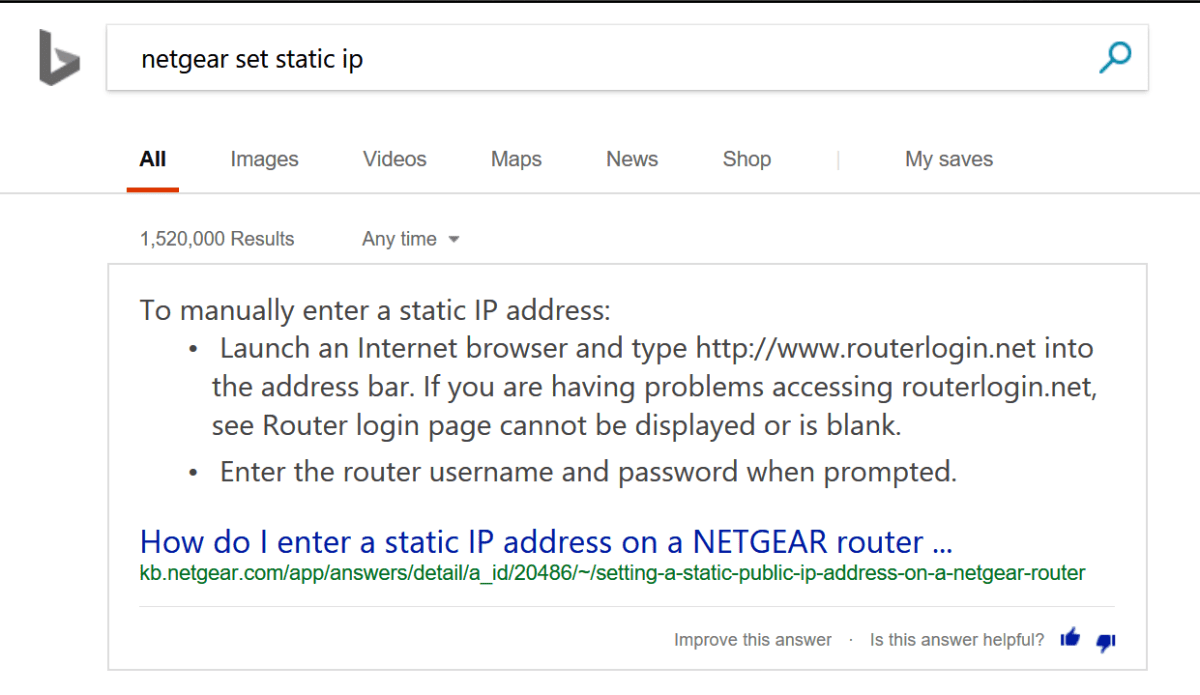
Before you can set special rules for a device on your network you need to assign it a static (never changes) IP address. This is a slighty different process in each type of router/firewall; use Google or Bing to find out how to do it in yours. Just type: “Firewall/Router Model Set Static IP”  BingSetStaticIP

  1. In Pfsense open the web console
  2. Click on Status
  3. Choose DHCP Leases from the drop down menu
  4. Find your device and click the pencil icon at the end of the row. pfsencestaticip
  5. Enter an IP address that is outside of your DHCP range in the IP address box.
  6. Click the Save button at the bottom of the form.

Allow NAT Outbound Static Port

This sounds complicated but most residential firewalls (bought at Best Buy) don’t have this setting in the first place. Advanced (enterprise class) systems randomly scramble the source port to prevent NAT hacking. This has no effect for browsing the web or basic Internet activities but network games cannot handle it. If your firewall or router scrambles the source port on NAT traffic you’ll need to create a rule to stop it for your Switches. Assuming that you have Pfsence;

  1.  Open the web console
  2. Click on Firewall -> NAT -> Outbound
  3. Click the Add button at the bottom of the page. pfsencestaticnatport
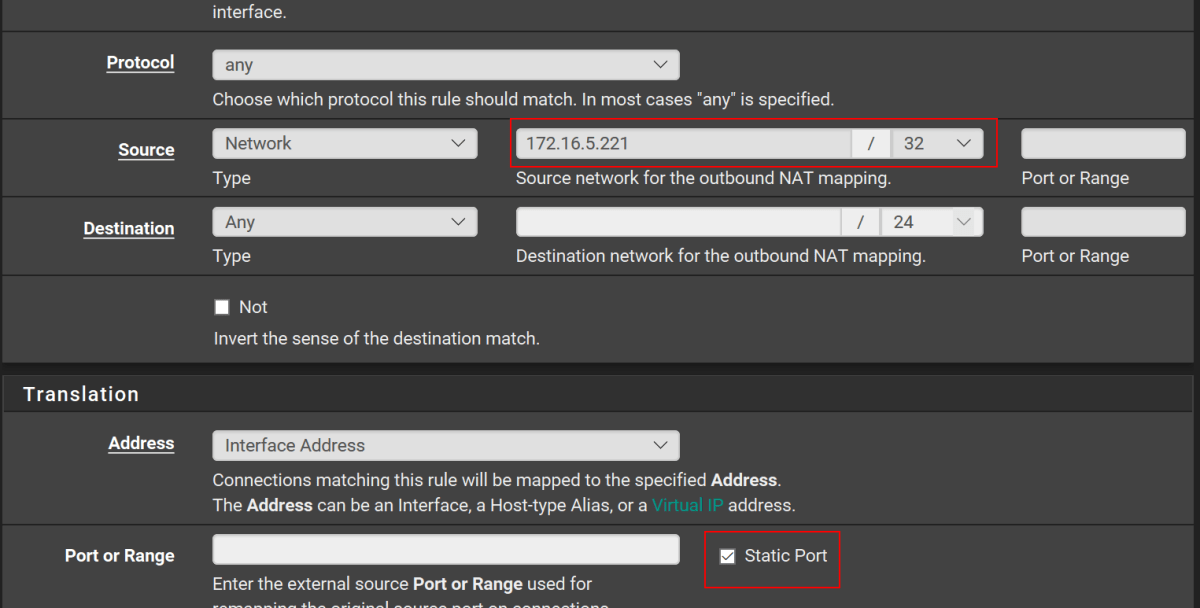
  4. Enter the Static IP address that you created in the seciton above with a / 32 subnet mask and check the Static Port box. pfsencestaticnatportandip
  5. Click the Save button at the bottom of the form. You should not need to change any of the other boxes.

You should configure the two options above for any multi-player gaming device connected to your network. This includes consoles, smart-phones, tablets, PCs, etc. The scrambled source port will keep most devices from connecting properly. It shows in games and “Strict NAT” or “NAT type 3”.

Create Multiple Wireless Networks

UPnP is a service that is already enabled on most modern firewall / router devices. If it isn’t turned on in your edge device you’ll need to enable it; again Google/Bing “Firewall/Router Model Enable UPnP” UPnP is a service that allows your firewall to automatically open network paths from the Internet to your devices. The trouble is, the way it accomplishes its goal can fail when two similar devices are trying to create similar paths on the same network. The way to work around this issue is to create multiple SSIDs and join a Switch to each.

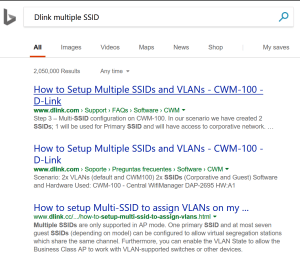
In most wireless access points you are allowed to create more than one SSID or the device will have a guest network. Some systems even have multiple radios and will let you setup one network on each radio. Once again, use Google or Bing to find instructions for your particular setup. The goal is to create and join one wireless network for each Switch that you have. BingMultipleSSID

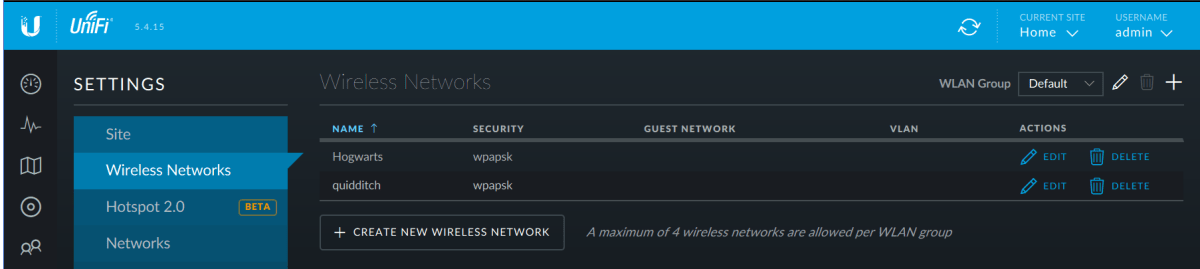
If you have a Unifi wireless network you’ll need to go to settings (the gear icon on the left) and then to Wireless Networks. Click the CREATE NEW WIRELESS NETWORK button and complete the form that opens. UnifiAddSSID

After you join each Switch to one wireless network you should be able to play Splatoon 2 multiplayer; I think you’ll find that most other multiplayer games work now as well. I’ve also adapted the same technique to resolve issues with multiple Xbox One and PS4 consoles. Games like Destiny 2 and Overwatch also use UPnP to establish their network paths and will sometimes not allow multiple consoles to play on the same network.

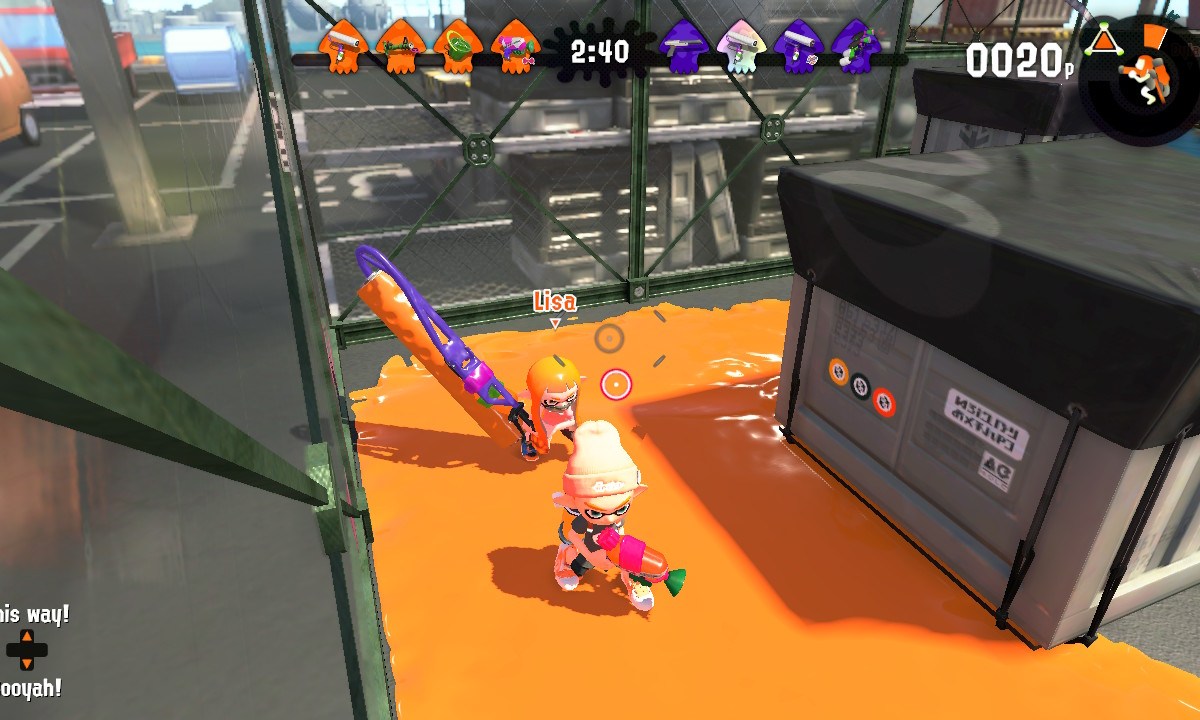
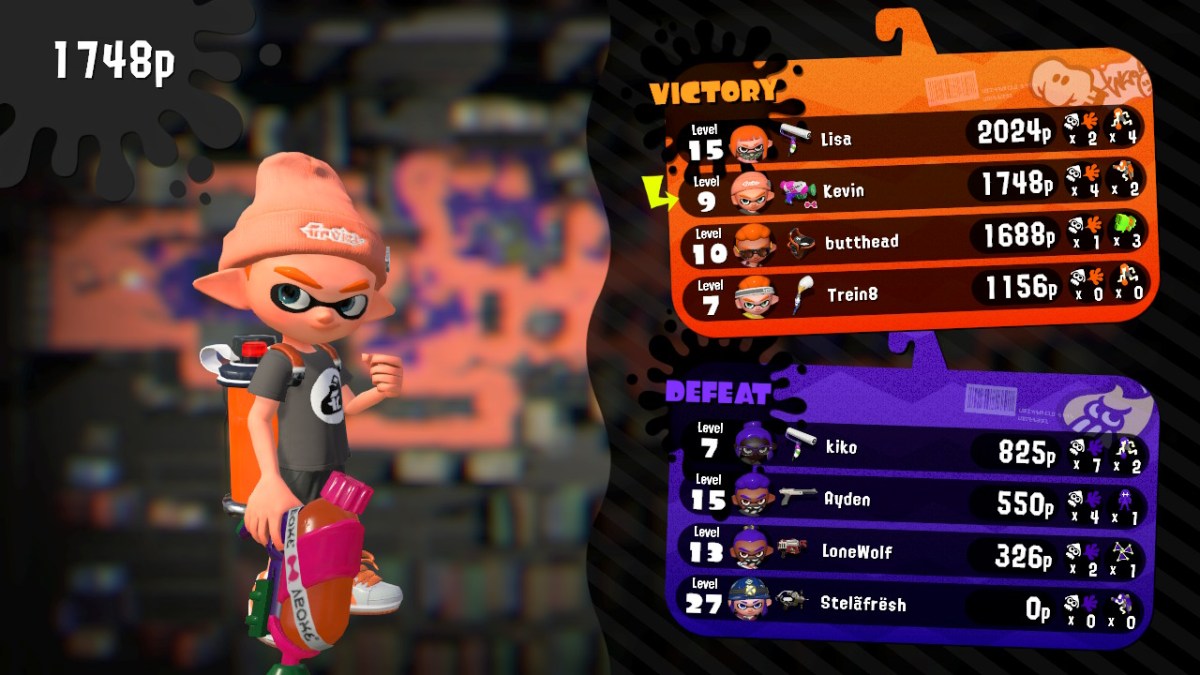
Splatton2LisaandKevinleaderboard
My wife and I are the top two players on the winning team! This game is a blast for couples.

Life with the Galaxy Note 8;  3 months in and going strong. 

I have been a “Gadget Guy” my entire life. Growing up, my favorite stores were The Sharper Image and CompUSA! As soon as I got my paycheck from whatever part-time job I had,  it would inevitably end up in their registers. I can’t say that much has changed, the days of dropping my whole paycheck on some gizmo are gone but I still manage to stimulate the economy. 

Lots of people seem to choose a type or brand of device and then stick with that choice. I’m not one of them, I like Windows, MACs, Linux, and Chromebooks equally. I enjoy switching between Androids, iPhones, and even Blackberry. I think my openess to all technology allows me to give my readers a more balanced opinion of all this stuff. Keep this in mind when reading the following paragraphs.

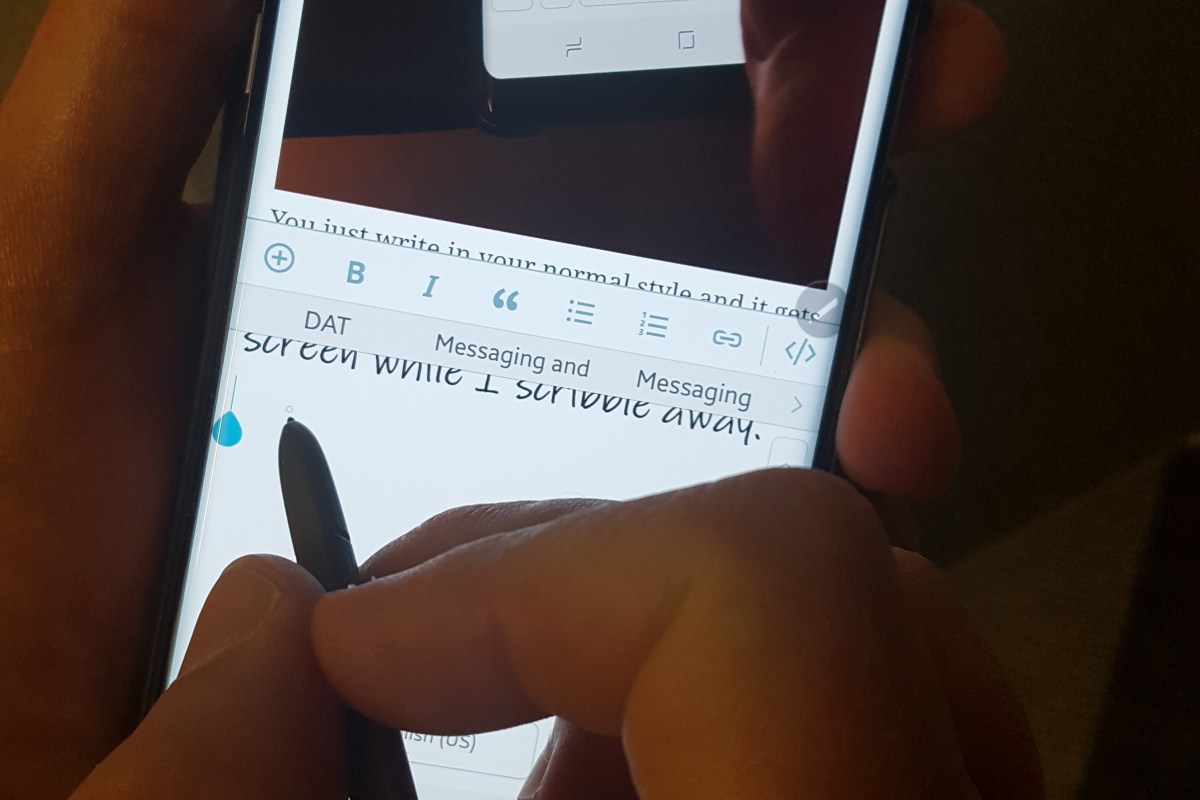
The Note 8 is the best overall piece of tech gear that I have owned period. In a word it is amazing. The engineers that created it deserve nobel prizes. The S-Pen pushes this devices productivity out of the competition’s reach. I am sitting on my couch chatting with my wife, my dog is napping on my lap and I am writing this article. I also just emailed my boss, ordered my son’s Christmas present and did the little doodle below. 

Some where in there I also wished an important person happy birthday on their FB timeline in a pretty unique way. It only took a few seconds to make and post this GIF.

The phone would be fantastic without the pen. It is fast, intuitive, and just the right size. I’ve had mine since launch day and the more I use it, the more infatuated I become. It’s not just the big stuff like the screen and the fast CPU . The little things are impressive too; when using handwriting mode it plays the sound of a pencil dragging across paper. The flashlight mode has adjustable brightness levels. It automatically cleans up old temp files and warns you when an app is draining your battery. 

I’ve been succesful in replacing my laptop with it for on-call type work. I just installed Microsoft Office, Juice for SSH and Telnet, Microsoft’s RDP app, Skype for Business, Web Ex, and Anyconnect. Wallah, no more lugging around a backpack to run errands or go out on the weekends. I just need my phone and RSA token. Last night I fixed an email problem in Hyderabad, India while I was waiting for a diner table at the local steakhouse with my family. The freedom it affords me is easily worth the price. 

I’ll be ordering the Dex dock for my phone soon. This piece of kit turns the Note into a desktop replacement. In the near future it will support full blown Linux while running in the dock. Full Linux on the Note 8 demo video. Watch for my review of this feature soon. 

I normally get bored with new tech gear and am ready for the next thing in less than a month. I can honestly say that isn’t the case with the Note 8. I look forward to having this in my pocket for a long time.