Work From Home Like A Boss

The Internet has drastically altered the way we live and especially the way we work. A result of the hyper-connected workplace has been the realization that a large percentage of the workforce doesn’t require a specific location to work from anymore. The Work From Home or Work From Anywhere revolution has been a long time coming.

If you’re just starting a job where working from home is an option, read on to learn from my experience. I’ve been working from my home off and on for several years worth of my career, including a three-year stint of being self-employed. It can be a great situation for both the worker and the job provider, but is not without pitfalls.

Right Equipment for the Job

You may be under the impression that working from home means sitting on the couch in your PJs with a laptop. Sure, you can do that for an hour to two. However, most of us quickly learn that sitting on an arm-chair or couch doesn’t provide enough support for an eight-hour shift of digital work. Neck kinks, lower-back aches, shoulder pain, wrist pain, and headaches are common complaints from full-time couch jockeys.

Get yourself a real desk and a real office chair. Don’t skimp, you’re going to be using it all day, everyday. The most important feature of the object that your park your computer on, is the height. An inexpensive, height adjustable, laptop stand can be more effective than an expensive desk that is permanently too short or too tall for your body.
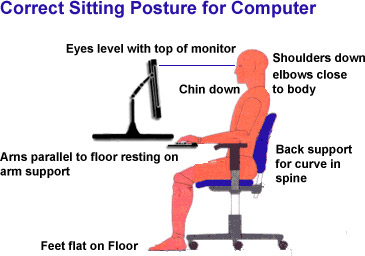
correct-posture-for-sitting-computer

Your shoulders should hang loose and your elbows should not angle up when reaching for your keyboard. In short, you should not be actively engaging muscle to maintain your position. The center of your screen(s) should be just below eye level so that you look slightly down at them. Your chair should be adjustable enough to line up with the desk you’ve chosen.

A keyboard tray goes a long way toward placing the keyboard and mouse at the correct height versus your screens. Placing your keyboard and mouse on the same surface as your laptop or monitor often means the input devices are too high relative to your chair. This causes you to hunch your shoulders and neck which results in fatigue. If your desk or stand doesn’t have one, universal trays that mount to almost anything are easy to find on Amazon.
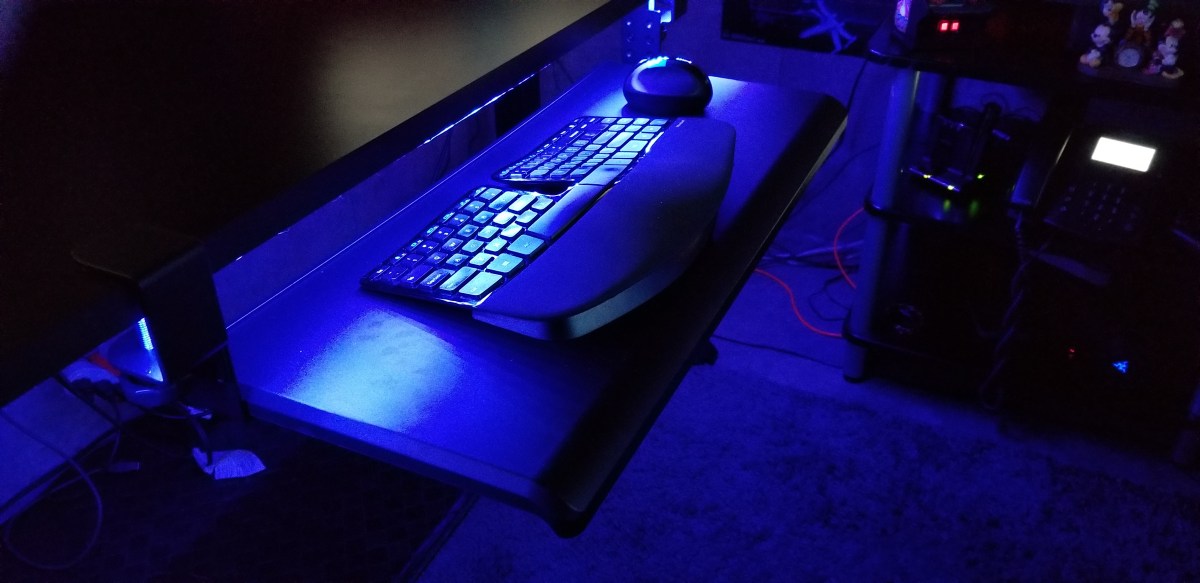
keyboard_tray

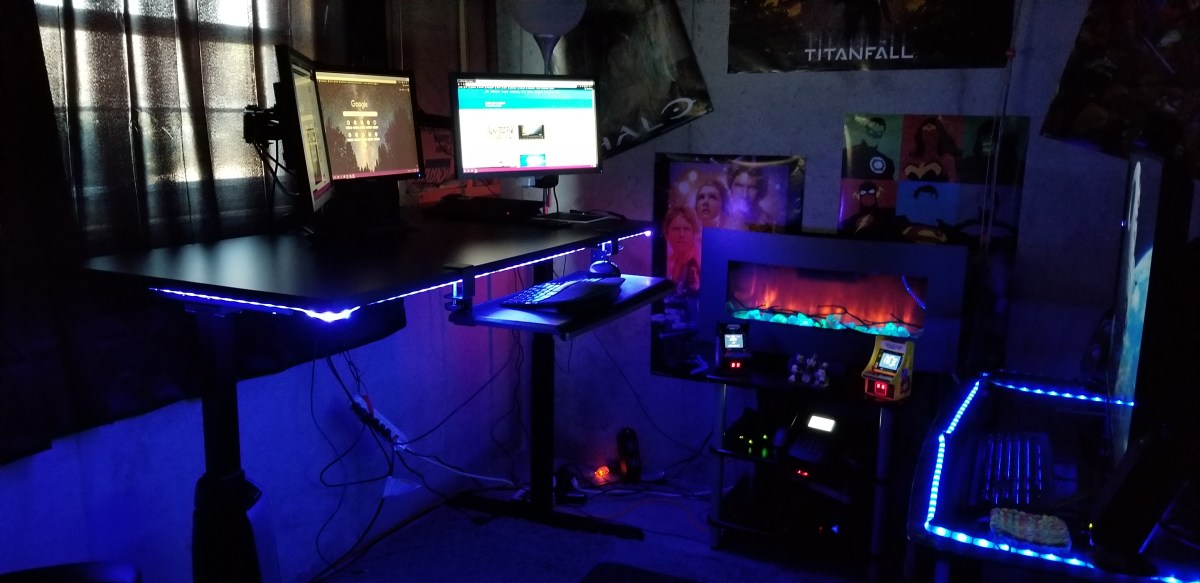
Personally, I picked up a standing desk on-sale for less than $250. I also grabbed a tri-monitor mount and keyboard tray from Amazon for $100 and a mesh chair rated for eight hours for another $120. I put them on cheap area rug from Wal-Mart in the corner of my unfinished basement next to the windows and presto, a private office to call my own.
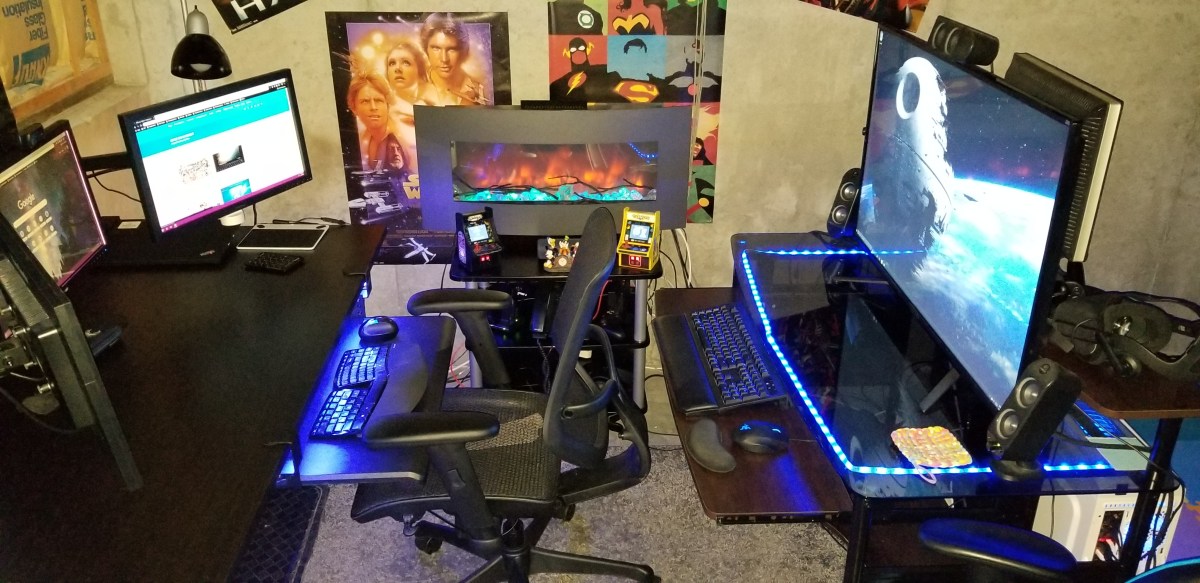
Basement.jpg

Location, Location, Location

Speaking of privacy. How many times have you been on a conference call and heard somebody’s kids or their dog making noise in the background? Did you roll your eyes? So do the rest of us. You don’t want to be that person. Especially now that video conferencing is replacing the audio only variety, you’ll need a private space.

This doesn’t mean you have to dedicate a room to your home office. Although if you can, then by all means do. The rest of us need to find a space that is out of the main traffic areas of our home. Like I said before, mine is in the corner of our basement. I’ve also used the corner of our bedroom, a dining room we never ate in, and a room I built-in the unused portion of a garage.
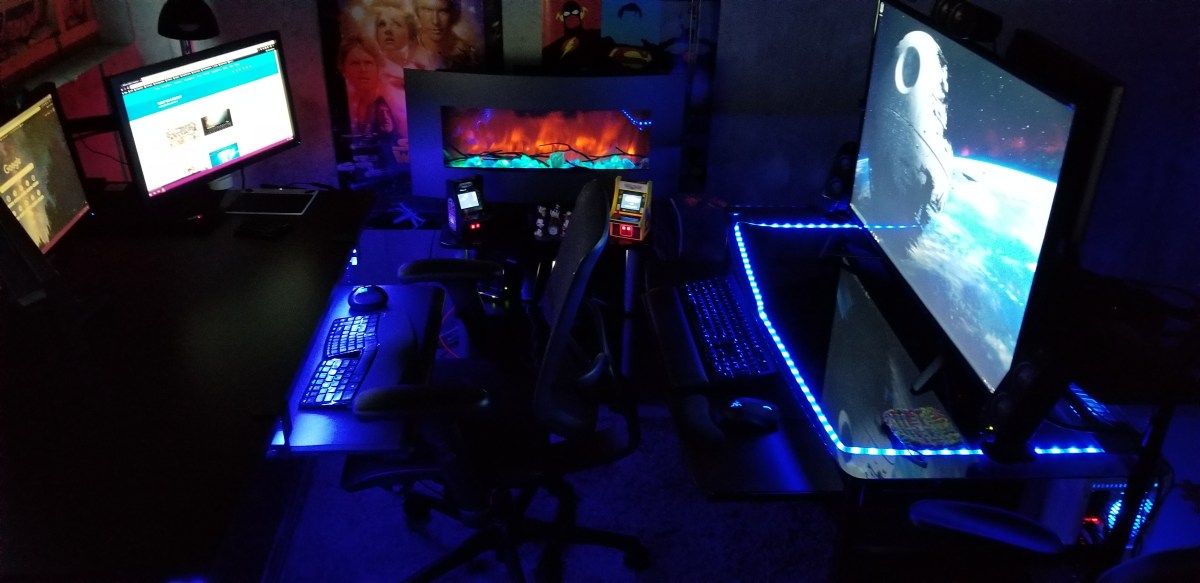
Office1

Natural lighting is a big plus if you have the option. Try to avoid spaces that don’t have decent air flow. Small rooms without good ventilation, like a pantry or walk-in closet, tend to get stuffy and hot when you put a computer in them. A fan and space heater can be excellent accessories for your chosen area.

I suggest that you spend some time personalizing your space. Photos, knickknacks, posters, and the like, go a long way toward making a space comfortable to be in. The concrete walls in my unfinished basement are a depressing grey. I’ve hung gaming and pop-culture posters all over them to add some visual interest.

I’m a lighting geek, all of my lights are RGB, including the electronic fireplace. You can get in-expensive RGB lighting strips from lots of places. Most of them are peel-n-stick, USB powered, and include a remote control. Mine are connected to the RGB controller on my gaming computer’s motherboard. I change their colors to suit my mood. Red is DEFCON 5.
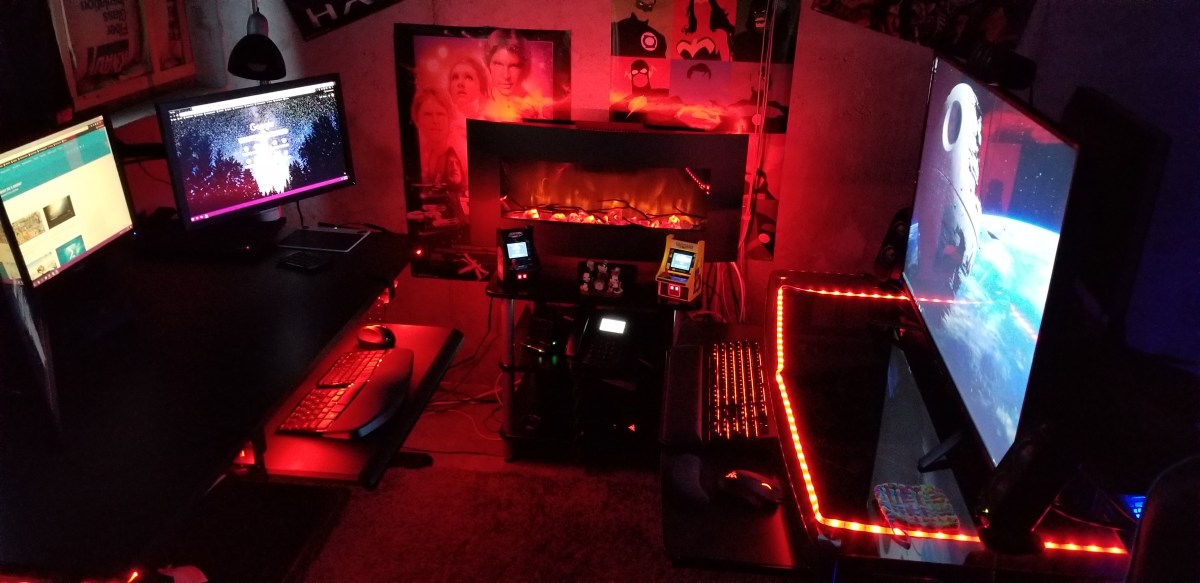
Red Office

Focus and Motivation

Research suggests that standing and moving are important for our well-being. I find that I stand an average of 3 hours per day and move between standing and sitting multiple times. Obviously, a desk system that is easy to raise and lower is needed to facilitate this type of workflow, stay away from the hand-crank models if you can. I also find that padded floor mats are a big plus. For me, the ability to change positions helps me stay focused on the task at hand. When my mind wants to wonder, I change positions for a while.
Office2

Silence is golden, except when you’re working on tedious jobs. I really appreciate the ability to concentrate in silence. It’s one of the biggest benefits of working from a home office. No phones ringing, no loud talkers, no drive-bys, and no prairie dogging allow me to achieve laser focus on complex issues. That being said, when working on mundane tasks that take little thought, silence can lead to boredom and a loss of motivation. I play music, podcasts, and listen to various TV shows to keep motivated. Since I’m in my own space, no headphones are required!

Take short breaks. Multiple studies have shown that taking short breaks from work can actually increase your productivity. Contrary to popular belief, staring at it longer will not make the problem go away. Take a walk, shoot some hoops, play a game, the point is to do something else for a few minutes that lets your mind relax. My best creative solutions are always conceived when I am not actively trying to problem solve.

Get up, get dressed, brush your hair and teeth, wash up, and move to your “office” location. Laying around in your PJs or sweatpants tends to induce feelings of laziness. A lackadaisical state of being can get in the way of productivity. Lets face it, your boss can’t see what you are doing, so they are probably going to pay even more attention to how many tasks you complete.

Communication is Key

video-conference-3

One of the draw-backs of not being in a traditional office is that communicating with your co-workers takes more effort. You can’t just lean over the cube wall and ask, “Hey, got a minute?” Asking for help when needed is something everyone will automatically do but that isn’t what makes a good team.

You need to purposefully make time to just talk with your team mates. Your company’s video conferencing solution is the best option. I know, I know, I don’t like the way I look on camera either, neither do many Hollywood stars if that’s any consolation. Fact is, we are hard-wired to see and that includes during interpersonal communications. Facial expressions communicate almost as much as the words being spoken in a given conversation.

Most companies will have multiple methods of video chatting. My current employer has WebEx and Skype for Business, both can do the job. I’ve found that turning on my camera when chatting or instant messaging with others, encourages them to do the same. My boss has scheduled a team meeting every morning for which video is required. Over time it has become second nature for us to enable our cameras pretty much all of the time.

Wrap it up

Working from home is not for everyone. Some people do better with more social interaction and some jobs require that workers be present in the place of business. IT jobs are often well suited for WFH employees due to the systems they work on being remote in the first place, their tasks often requiring a single person to complete, and little requirement for equipment.

With a little know how, the shortcomings of working from home are easy enough to deal with. When it’s done right, productivity is increased and stress can be lowered. I’m comfortable working either way but if given a choice, WFH is always my preference.


Kansas City Comicon 2019 the 20th Anniversary

Being that I’ve never been to a Comicon, I’m not quite sure what to expect as I stand in line with my family on a snowy spring morning. While we’re on the subject of firsts, I’ve also never tried live blogging. Why not kill two birds with one stone?

20190330_123552 (2)
Giant Dragon, check. 

Rather than having an experience and writing about it later, I’m scripting this post in real-time. The Galaxy Note with its S-Pen is the perfect tool for this job. Snapping photos and writing while walking around a crowded convention center is more challenging than I expected. I find myself using my children as meat shields.

This place is busy. I’m told by several of the patrons and vendors that this is the most people they’ve ever seen at the Kansas City event. I’m surprised at the ratio of those in costume to those that aren’t. I’d estimate that at least a third of the crowd is at least partially dressed as some type of character. Oh look, I almost ran into Ron Burgandy.

20190330_122506
People watcher’s paradise.

I’ve only been wondering around for a little over an hour and have literally run into every pop-culture character that I can think of. From Star Wars to Spaceballs and Princess Peach to Overwatch’s Diva, the cosplayers are awesome. The level of detail that some of these costumes exhibit is jaw dropping. I can’t imagine how many hours of labor goes into making them.

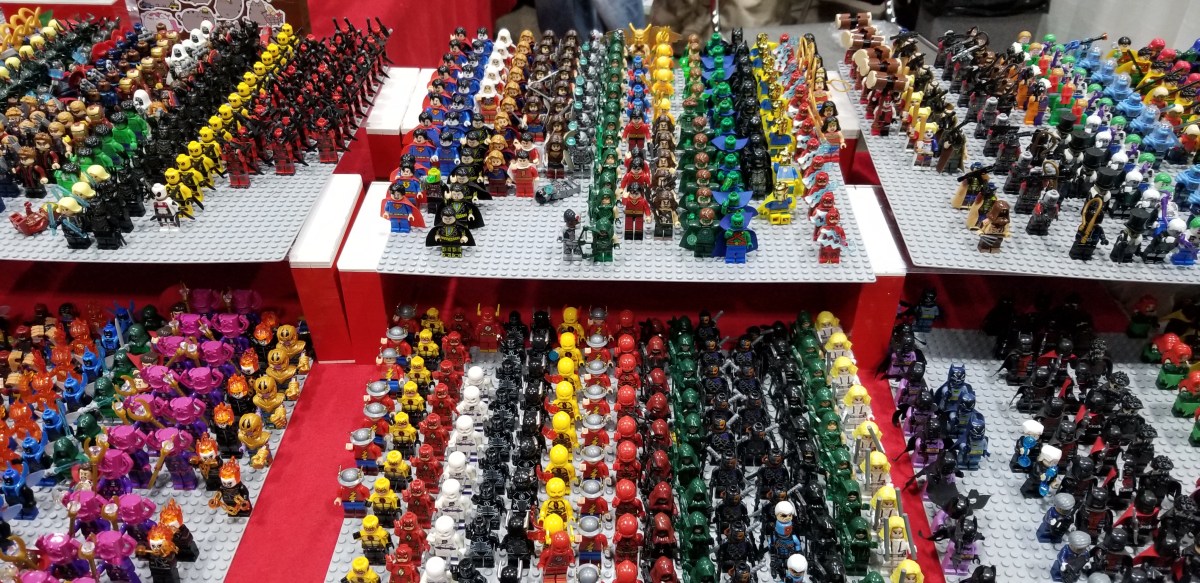
There are booths of every type, acres of them. Comics, toys, games, cards, custom art, collectibles, clothes, and more are all available. The glass blower (FireChild) has some great custom pieces and if you’re missing a mini-fig for one of your Lego builds, I’m pretty sure that I just found it.

20190330_135728
Mini-Figs for Miles

There are an impressive number of artists on-hand. Sculpters, drawings, paintings, and photography are every where you look. Both of my kids added custom pieces to their collections.

If you’re a fan of pop-culture in general and looking for something to do in the KC area, I highly recommend the Kansas City Comicon. We’ve had a great time. I’m tired, hungry, and done with crowds, so it is time to head home. My step counter says I did 3.6 miles and my back and knees agree. I’m sure we’ll be back next year, its been a good family outing.


Six Months In with the Microsoft Surface Go

The Microsoft Surface Go has been my personal daily driver for more than half of a year now. How’s it holding up after all this time? I haven’t replaced it yet and that’s saying something.

I’m the type of person that acts on any excuse to get new gear. When I can walk into my local tech store without immediately wanting to purchase a new system, I know that what I have fits me really well. That’s the case with the Surface Go. It isn’t the most powerful, doesn’t have the best battery, and there are less expensive options, but the Go is a nearly perfect for my requirements.

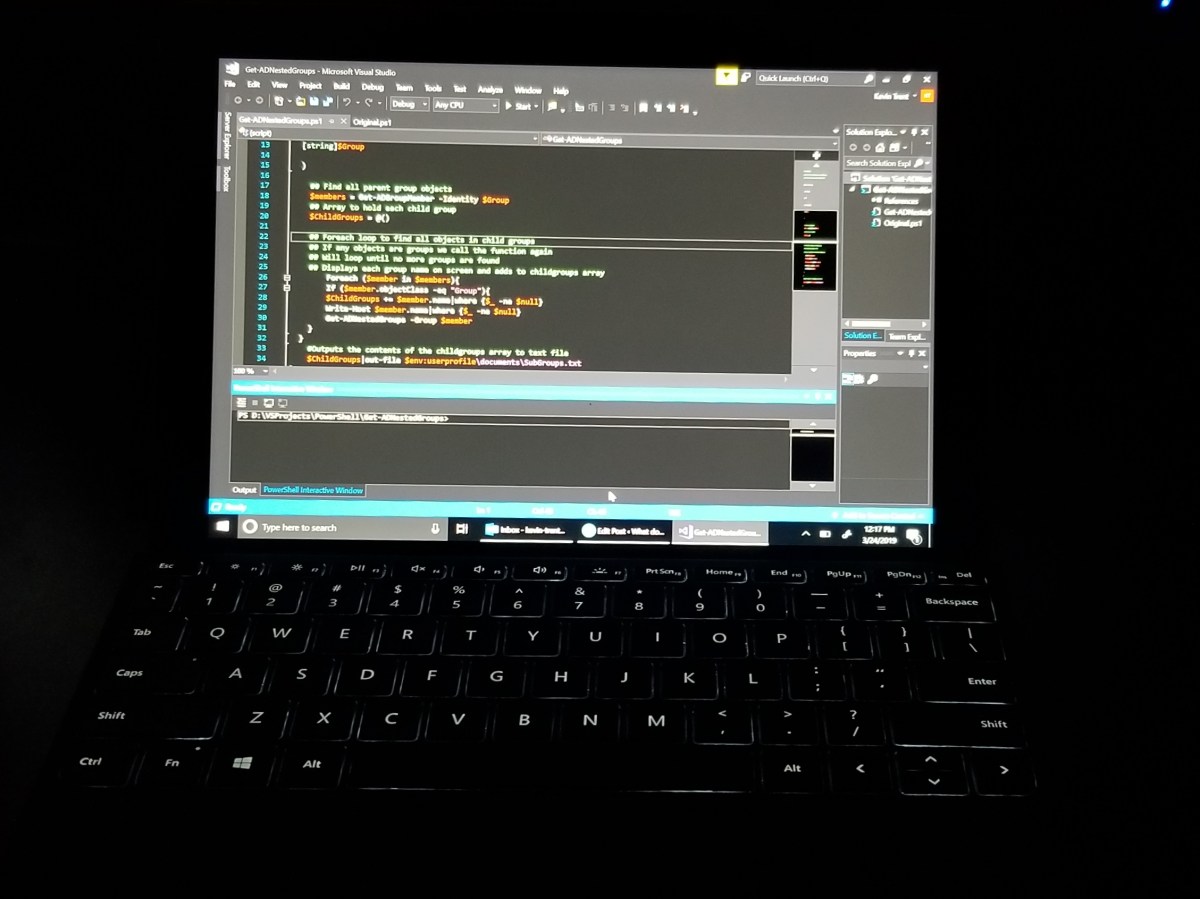
The diminutive size means that when I’m on call, I don’t have to lug a full laptop bag around. I have a small slip case that fits the Go and a phone; that’s all I need to do my job from anywhere. It runs all the applications, network connections, communications and security software that I require to administrate a sizable corporate network. The Go spends its nights plugged in on my bedside table. It is ready in seconds should an after hours emergency arise.

20190324_121803


In addition to being an excellent device for my work life it also fits into my personal world. I’m writing this article on it from the comfort of my bed while an old movie plays in the background. A few minutes ago, I had cast its screen to the bedroom TV so that my wife and I could pick out some new floor mats together. Before I call it quits for the night I plan on streaming a Steam game from my gaming rig downstairs.

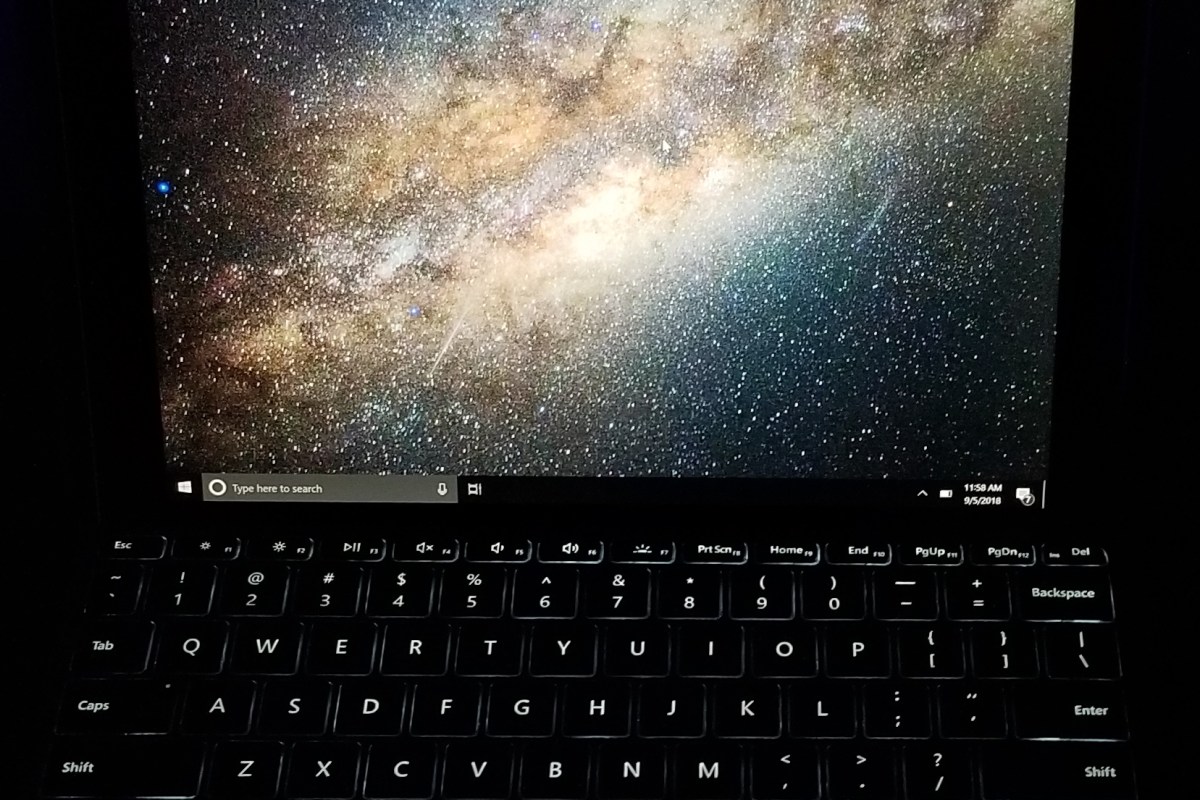
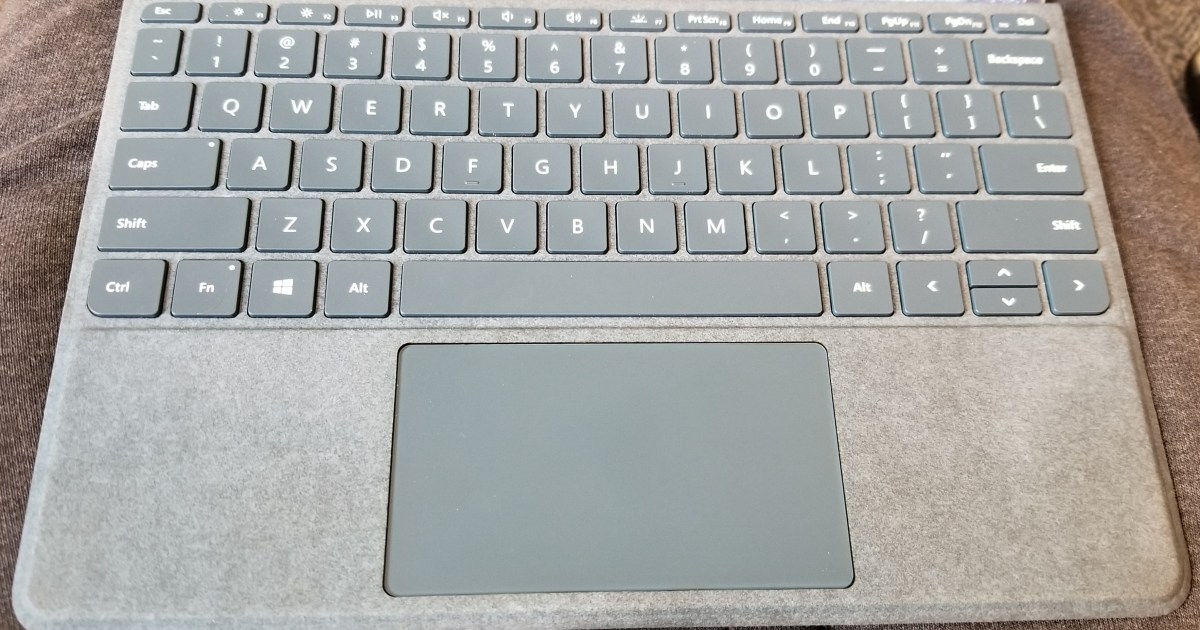
I have typed thousands of pages of text and countless lines of code with the keyboard. It still looks just like it did when I took it out of the box. I wipe it down with a wet-wipe every once in a while, other than that it has been maintenance free. It’s also the perfect size.

20190324_120124

Don’t get me wrong, the keyboard is small and feels cramped when compared to a full-size model. However, I have never used a keyboard as small as this one that does the job so well. The tactile feed back and key travel are great. The backlight is perfect and Microsoft’s fold and stick option for rigidity works spectacularly well. I have several options for attaching other keyboards but never bother doing so.

I have drug my Surface Pen across the Go’s screen for miles. I have scribbled numerous pages with it including portions of this very post. I’ve edited photos, created custom works of art, and whiteboarded complex ideas. The more that I use the instrument, the more I like it. I have said as much in other articles, but if I had to choose between the keyboard and the pen, I would go with the pen. The on-screen keyboard is surprisingly good.

20180901_200524

The little guy is tough too. My Go is sporting a skin from Decal Girl, but I don’t put it in a case or use a screen protector.  It’s traveled from coast to coast, been tossed on chairs, desks, beds, and counters. I’ve dropped it on the plane, my car, and the floor. So far there isn’t a scratch on it.

Microsoft has released the Surface Go LTE edition with built-in wireless access and there are rumors that another iteration is on the way. The device has proven to be very popular, several of my friends and business acquaintances have them now. I excpect the line to continue into the future.

After using the Go every day for more than six months I’m still impressed by it. Out of all the compute systems at my disposal it gets used the most by far. If you’re in the market for a portable computer I highly reccomend it. You would be hard pressed to find a system that truly competes with it’s versatility in its size class. The iPad pro can’t run Visual Studio, end of story.


Shooter Shooter On the Wall, Which is the Fairest of Them All?

Nothing beats booting up your favorite system and jumping into a shooter to kill, kill, kill. For me and tens of millions of others, challenging yourself in a battle of speed, wits, and control is the ultimate form of competition.

Talk to any gamer that enjoys the genre and you’ll find there are some fierce loyalties to particular titles. As with any category of things, there are sub-categories of shooting games. There’s your Run -n Gun, Shoot -n Loot, Battle Royal, War Sim, RPG, and more. I play them all and can attest to their extreme differences.

2018-10-06

Right now, I’m actively playing Apex, Battlefield 5, COD BlackOps 4, Destiny 2, Deus Ex Mankind Divided, Doom (Switch version), Splatoon 2, Shadow of the Tomb Raider, and Overwatch. Occasionally I fire up Titan Fall 2, Gears of War 4, Halo, Borderlands 2, Battlefront, and Uncharted, just because I like playing them.

I often get asked which game is the best.  The truth is that the games are so different from each other, the answer depends entirely on your personal definition of “best”. So here are my personal thoughts on the current generation of games that involve shooting at something.

2018-07-01

Graphics

If by best you mean which game looks the most photo-realistic, the answer is Battlefield 5. Running at 4K, 60Hz+, HDR, on a 2080 Ti with ray tracing, DLSS, and everything cranked up to full, the entire game looks like a CGI generated movie. Not only is it the best looking shooter, it’s the best looking game you can play right now period.

You might be tempted to think I’m stating an opinion. Generally I agree that beauty is in the eye of the beholder, but there are no other games that support the visual fidelity achieved by Battlefield 5 on the market right now. My friends and family that experience it for the first time are taken by surprise when a cut-sence ends and the game starts. They literally cannot tell the difference. The opening sequence of the game takes advantage of this situation by purposefully slipping in and out of cut-sences in rapid succession.
2019-02-24

If you have the GPU, screen, and sound-system  to experience Battlefield 5’s media onslaught at the peak settings, you are in for a treat. I find myself surprised at how good it looks and sounds nearly every time that I play it. It’s also just a really good game. Sixty-four player multi-squad battles with air and ground vehicles, infantry, mounted weaponry, and varying real-world environments will keep you engaged for hours.

Control

Game Feel is the term used by developers to describe how the combination of input, response, context, and aesthetics translates the virtual actions and sensations of a game to the physical world. Publishers invest an extraordinary amount of resources into getting their game feel just right.

Having played countless games over the years, I’ve learned to ignore my initial reaction to the controls of any new game. A new title is usually off-putting at first. Ever pick up what you thought was a Coke only to taste Dr. Pepper? New games cause a similar, “this isn’t right” feeling due to the control interface being the same as what you used to play the last game, but the input and response being different.

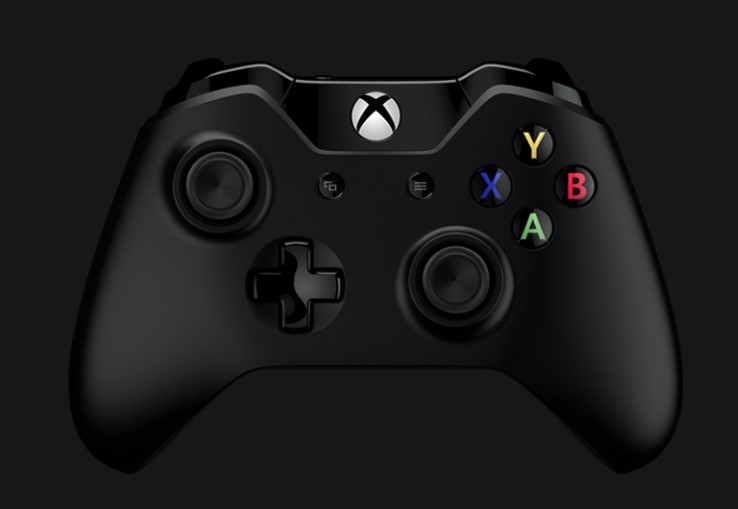
xboxcontroller

That being said, I have favorites like anybody else. The COD and Titanfall (including Apex) franchises have great game feel when played with a controller.  I prefer Battlefield and BattleFront when playing with a keyboard and mouse, although I switch to a controller when operating the vehicles.

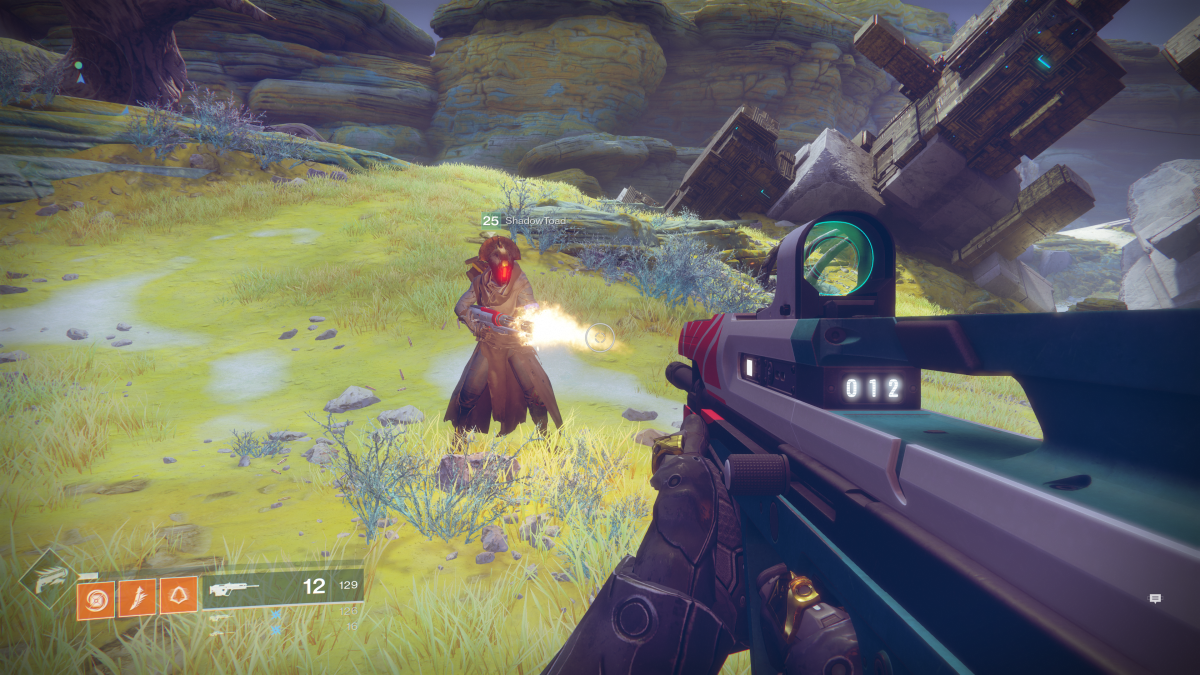
If I had to put my money on which shooter has the best controls, I would have to say the Destiny franchise has it in the bag. Whether you play with a controller or mouse and keyboard, there’s just something about Bungie’s game feel that is quintessential. Perhaps it is because I came into my own playing Halo on-line or maybe it is just the right balance of input and response timing versus speed of the game play. For whatever reason, every time I play Destiny 2, I marvel at how good the controls feel.

2018-05-05 (8)

Story

For some, the story is the most important aspect of a game. It’s what keeps them interested in playing to the end. For others, it has little value and the campaign levels aren’t even looked at. I happen to be in the former camp. I can enjoy games that don’t have a compelling story to go along with the shooting, but I won’t be as emotionally engaged.

The Uncharted series has one of the most epic story lines in modern gaming history. It typically isn’t considered a current generation game though. The reboot of the Tomb Raider series is almost as compelling. Lara Croft and friends have never seemed as real.

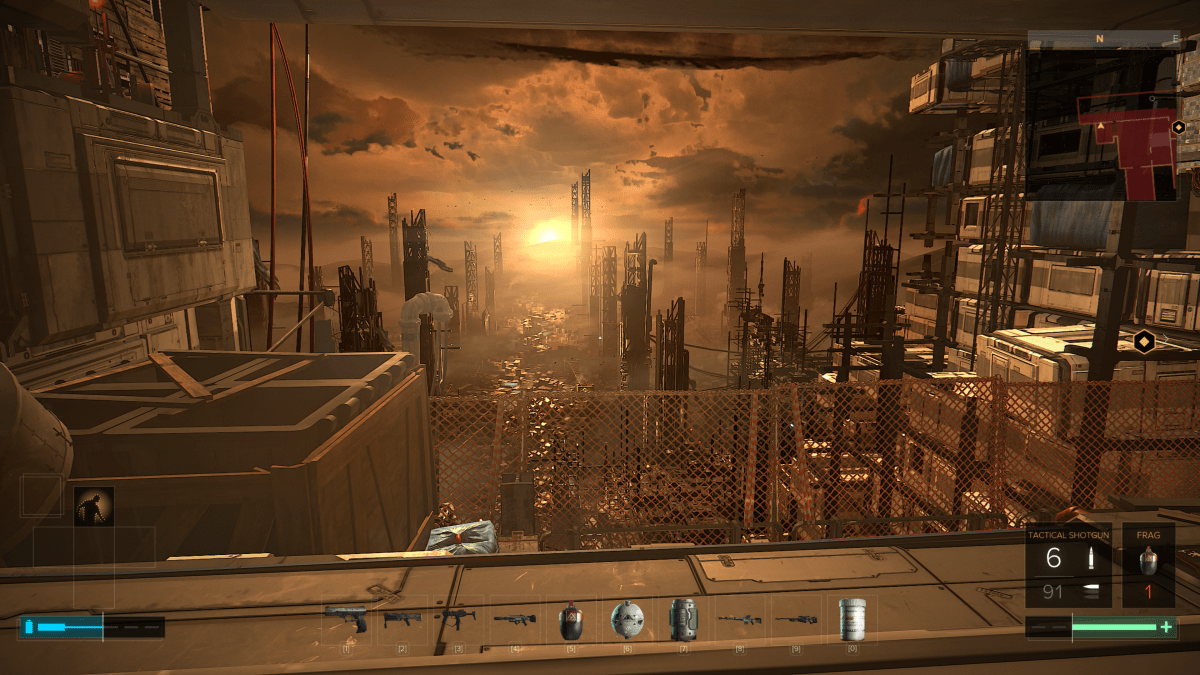
Personally, I am forever a Sci-Fi fan and the Deus Ex franchise really resonates with me. The concept isn’t unique. There have been countless games that featured an android, but the combination of its city sets and the tension between augmented and non-augmented people set Deus Ex apart. In my mind this seems like a possible future state for humanity that may be realized sooner than we expect.

2018-10-15

Playability

For me, playability means how many hours do I stay engaged with a game before I move on to something else. In other words, how much bang for my buck am I getting? For example, I’ve been playing Deus Ex Mankind Divided for forty-six hours and I’m about two-thirds of the way through. I’ve completed every main story and side mission along with most of the points of interest. More than likely I will also play all the DLC missions. I paid $19.99 for the game and will end up spending around eighty hours in the fictitious world.

By comparison, I’ve already spent more than seventy hours playing Battlefield 5. The game has an excellent balance of modes that lend themselves to my availability. Team Death Matches last between ten and fifteen minutes, Conquests can last up to an hour, and Grand Conquests stretch across multiple days of play. This ability to fit in to my schedule makes BF5 one of my go to time wasters.

My Favorite

It’s difficult for me to say that any one game is my favorite. I like them all for different reasons and will always be the kind of gamer that switches between playing multiple titles. However, the point of this article was to name the “Fairest of Them All”. Battlefield 5 is the winner in my book.

When left to my own devices, it’s the game I play the most. In Battlefield, single shots can kill when they hit the right spot, taking cover is not optional, the building you’re hiding in can be destroyed, and there are no perks or ultimates to make up for a lack of experience. Ranking up weapons and player categories are slow and methodical until the pay-to-play packs are released. Above all else, I enjoy being challenged.

2019-01-05 (7)


PowerShell; Find and List All Active Directroy Nested Sub-Groups with Get-ADNestedGroups

Recently I needed to reduce the licenses we were consuming with a particular cloud service. I was told that a couple of Active Directory groups served as the service’s ACL. All the accounts in question were disabled but the disabled status didn’t synchronize to the cloud service provider. I needed to remove all disabled user accounts from the ACLs in our AD. My first thought was, “I love it when I get the easy ones”. That should always be a sign that something isn’t going to be easy, LOL.

I immediately opened PowerShell, imported the AD Module and ran a recursive Get-ADGroupMemeber query on the two groups I was told about. I added all the returned objects to an array and then populated that array with the disabled user account’s SamAccountNames. I made another array and added the groups/sub-groups to it. Finally, I used nested foreach loops to remove each user from each of my two AD groups.


Import-Module ActiveDirectory

$allusers = @()
$group1 = Get-ADGroupMember -Identity "Name of Group 1" -Recursive
$group2 = Get-ADGroupMember -Identity "Name of Group 2" -Recursive
$allusers += $group1.SamAccountName
$allusers += $group2.SamAccountName

$users2remove = $allusers | % {Get-ADUser $_ |Select samaccountname, DistinguishedName, enabled|where enabled -ne "true"}

$removes = @()
$removes += $users2remove.samaccountname

$subgroups = @()
$subgroups1 = Get-ADGroupMember -Identity "Name of Parent Group1" |Where {$_.ObjectClass -eq "Group"}
$subgroups2 = Get-ADGroupMember -Identity "Name of Parent Group2"| Where {$_.ObjectClass -eq "Group"}

Foreach ($group in $subgroups) {
     Foreach ($remove in $removes) {
     Remove-ADGroupMember -Identity $group -Members $remove -Confirm:$false
     Write-Host "Disabled Account $remove removed from $group"
     }
}

I ran my script, watched the output, marveled at my own genius, and sent my boss a list of the users I had removed.  An hour or two later my manager pinged me to say that when he looks in the application’s portal he sees that most of the disabled users are gone but there are a couple hundred that still show up as having a license. Hmmmmm.

I reviewed my logic and found the problem. I didn’t do a recursive search on the sub-groups. I opened ADUC and looked, sure enough, there were a ton of nested sub-groups under the two I was told about and some of the users appeared to be in multiple groups. So even though I had removed them from the top-level they were still consuming a license through their membership in a nested group.

“Easy enough to fix”, my internal dialog told me. I just added the -recursive parameter to my sub-group searches and ran my script again.  Well, that didn’t work. After some trial and error, I was able to determine that the recursive parameter of the cmdlet does find all of the user objects no matter how deep they are. However, it only returns the first layer of group objects. Now what?

I needed my code to say, “if a group is returned run the search again” in a loop until no more groups were returned. I was disappointed that none of my Internet searches turned up working code. I ended up writing the function below. If you have landed on this page from similar circumstances, I hope it helps you out of your jam.


## Get-ADNestedGroups
## Author: Kevin Trent, https://whatdouknow.com, kevin-trent@hotmail.com
## Distribute freely but please leave author's information attached

function Get-ADNestedGroups {
[CmdletBinding()]
param (
[Parameter(Mandatory)]
[string]$Group
)

## Find all parent group objects
$members = Get-ADGroupMember -Identity $Group

## Array to hold each child group
$ChildGroups = @()

## Foreach loop to find all objects in child groups
## If any objects are groups we call the function again
## Will loop until no more groups are found
## Displays each group name on screen and adds to childgroups array

     Foreach ($member in $members){
          If ($member.objectClass -eq "Group"){
          $ChildGroups += $member.name|where {$_ -ne $null}
          Write-Host $member.name|where {$_ -ne $null}
          Get-ADNestedGroups -Group $member
          }
      }
#Outputs the contents of the childgroups array to text file
$ChildGroups|out-file $env:userprofile\documents\SubGroups.txt
}

P.S.

If you are trying to run the first script I started my story with; replace the subgroup arrary and variables with the function. Then change the subgroups variable in the nested foreach to childgroups.

PowerShell; Search all Domain Controller Event Logs for Keywords

Do you need to know the last time a user logged on, or who created an AD account? As long as you have audit logging enabled, the data you are after is in the event logs of your domain controllers. The problem is, if you have more than one domain controller (you should) the record that you need can be on any of them.

At my day job, we have quite a few DCs and I needed to know which admin created a particular AD account. There was no way I was going to logon to dozens of servers and search them one at a time. PowerShell to the rescue!

Import-Module ActiveDirectory

$keyword = Read-Host "Enter Keyword"
$eventid = Read-Host "Enter EventID"
$logname = Read-Host "Enter the name of log you want to search, application, security, etc."

$domains = (Get-ADForest).domains
$dcs = Foreach ($domain in $domains) {
     Get-ADDomainController -Filter *|Select Name -ExpandProperty Name|sort-
     object|get-unique
}
$events = ForEach ($dc in $dcs) {
     Get-EventLog  -ComputerName $dc -LogName $logname -InstanceId $eventid -
     Message *$keyword*|Select-Object -Property *
}
$events|out-file $env:usersprofile\documents\dc_log_search.txt

This short ‘n sweet bit of code will scan your domain and find all the domain controllers. Occasionally DCs run more than one role and show up multiple times in the output of this cmdlet so we drop the duplicate names.

Then it will prompt you for a keyword to search for. In the case of account data you’d enter the samaccount name. You could also enter the name of a workstation or server for example. Next it will ask you for an Event ID Number. Finally it will ask for the name of the log; application, security, system, etc. to search.

The script will loop through each DC and find the events you’ve described. Each matching record will be output to a text file named dc_log_search.txt in your documents folder. It wouldn’t take much effort to turn this data into an HTML report, email notification, or even an archival tool.

Free Exchange Distribution List Memebers Reporting Tool

As and Exchange Architect, I often get asked to report on who belongs to a particular distribution list. It is easy enough to open Outlook or ADUC and find the DL group and view the DL members. If your organization has Skype for Business you can also use it to view the membership of a DL. However, exporting information from these tools can be tricky.

PowerShell makes the export task easier if you know how to use it. A quick run of the get-distributiongroup cmdlet with a pipe to out-file, will get you what you want in a hurry. The problem is that we have few employees that are able to use PowerShell from the console but, there are requests to generate this type of report multiple times per day.

What we need is a graphical tool that anybody with enough AD permissions can use to get the data they need. Sure I could write something in C# but I don’t have the time to develop a full app. I know PowerShell already has everything I need to make the report because that’s what I use every time I get asked for it. What if I add a simple graphical interface to a PowerShell script so that my non PS coworkers can easily use it? In the words of Tim Allen; “It’s Tool Time”.

The script below uses the Grid View to display a list of all the Distribution Lists in your Exchange DL OU (you’ll need to input the correct OU path). The user then uses the grid view to sort, filter, or search for the DL they need data from. When they select it, an Excel Spreadsheet will pop up on the screen with the data.

Modern versions of Exchange Server store their DLs in AD as groups so there’s no need to install or load the Exchange PowerShell module to get the data we’re after. This also means we don’t need to give the people who use our tool any special permissions. We will be using the Active Directory module so you may need to install the RSAT depending on the version of Windows.

Import-Module ActiveDirectory
$groups = Get-ADGroup -Filter * -Searchbase "OU=Distribution Lists,OU=Exchange,DC=yourdomain,DC=com"|
Select @{n="Distribution Group"; e={$_.Name}}, DistinguishedName |Sort "Distribution Group"|
Out-GridView -Title "Select a Group, then click OK"  -PassThru
$accounts = Foreach ($group in $groups) {Get-ADGroupMember -Identity $group.DistinguishedName}
$report = Foreach ($account in $accounts) {Get-ADUser -Identity $account -Properties *|
select DisplayName, EmailAddress, TelephoneNumber, Department, City}
$report|Export-Csv -LiteralPath $env:userprofile\documents\dlgroupmemebers.csv -notypeinformation
Invoke-Item $env:userprofile\documents\dlgroupmemebers.csv

Make sure that you replace the Searchbase path with the Active Directory location for your Exchange distribution lists. After that, the instructions are easy. Save the file as a .ps1 and place it on the user’s hard drive.

The person using the tool will need to follow these directions:

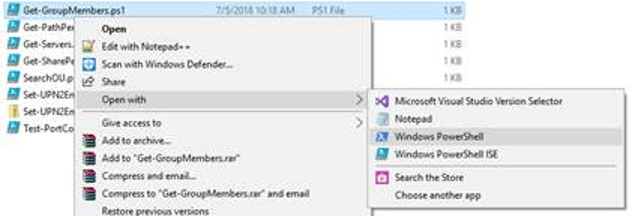
  • Right click on the script  –> Open With -> Windows PowerShell

open with powershell

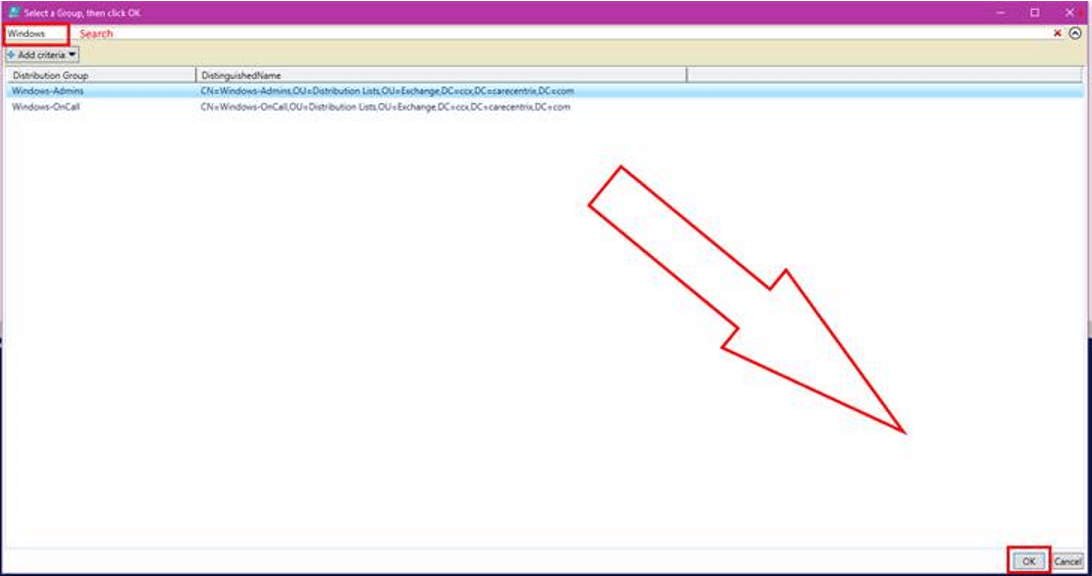
  • Search for or scroll through and click the group or groups (to pick more than one use CTRL + Click).
  • Click the OK button at the bottom of the list.

Grid_View_Select.png

  • A file named groupmembers.csv will be created in the user’s default documents folder and will automatically open with the application associated to that file type (usually Excel).

From the point of view of the person running it, this is a once use app. In reality, its a simple PowerShell script. It wouldn’t take very much effort to convert this report to HTML, use it to cross-referrence mailboxes and other accounts, find the memebers managers, or anything esle you may need. Enjoy.

Powershell; Folder Report with File Count and Size

I was recently asked what tool would be best to report the number of items in, and the size of, every folder in a particular file share. As an IT Architect I have numerous tools at my disposal that would be able to acquire the data my business partner needed. A few lines of PowerShell was the easiest to implement.

If you’ve used PowerShell for long you already known that Get-ChildItem is the cmdlet to retrieve things under a parent. Files, Folders, Items, you can list them all with GCI. Open PowerShell and type GCI then press enter, depending on your PowerShell profile settings, you should see a list of all your user profile sub folders. This cmdlet will form the basis of our report script.

gci

Of course, the full solution is a little more complicated than that. To generate a useful report we’ll use the Get-ChildItem command to get a list of folders in our path. Then we’ll loop through each folder with the same command again to get a list of the files.

We’ll build an array that contains the count and length (size) properties of each file. Finally we’ll export that array to a csv file in your documents folder. With a little more effort you could generate an HTML report and upload it to a web page or embed it in an email. See some of my other articles for how.

# Get-FileReport.ps1
#Author: Kevin Trent, Whatdouknow.com
#Right click .ps1 file and Open with PowerShell
#Enter Filepath or share path.

$location = Read-Host "Enter Top Level File Path"
$folders = Get-ChildItem -Path $location -Recurse -Directory

$array = @()

foreach ($folder in $folders)
{
$foldername = $folder.FullName

# Find files in sub-folders
$files = Get-ChildItem $foldername -Attributes !Directory

# Calculate size in MB for files
$size = $Null
$files | ForEach-Object -Process {
$size += $_.Length
}

$sizeinmb = [math]::Round(($size / 1mb), 1)

# Add pscustomobjects to array
$array += [pscustomobject]@{
Folder = $foldername
Count = $files.count
'Size(MB)' = $sizeinmb
}
}

# Generate Report Results in your Documents Folder
$array|Export-Csv -Path $env:USERPROFILE\documents\file_report.csv -NoTypeInformation


Get Cookin’ with the Third Generation Apple iPad Pro

We recently acquired the new iPad Pro 12.9 and it’s updated stylus. Right off the bat, I’ll say the new system is a massive upgrade, even from the relatively new 2018 iPad 9.7. The new premiere iPad is faster, slimmer, its battery lasts longer, obviously it  has more screen space, not to mention the improvements in the Apple pencil. These advances come with a hefty price tag, is it worth the cost?

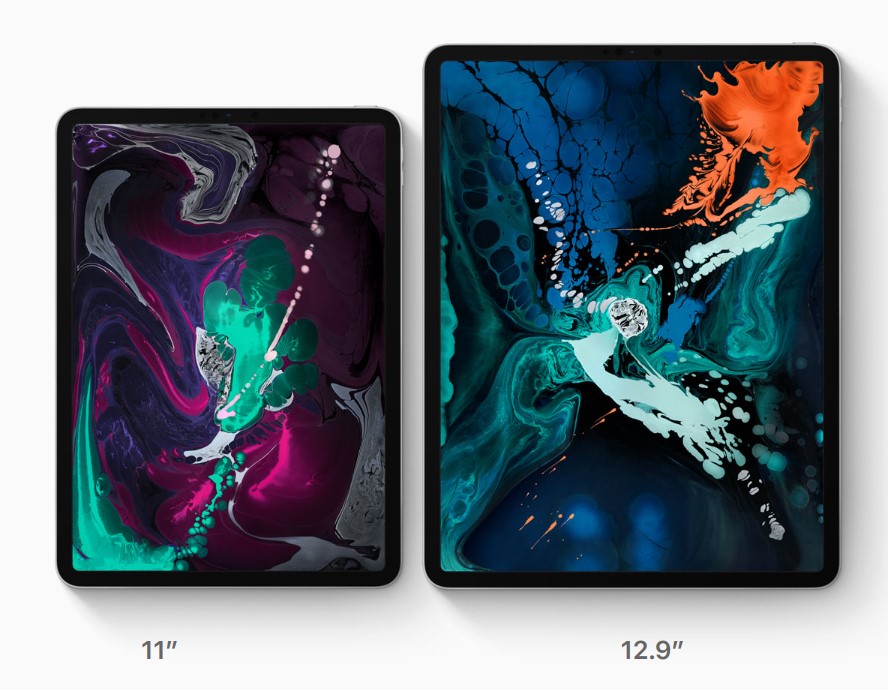
Lisa was coming from the afore-mentioned iPad 9.7 and we decided that she would be best served by the smaller eleven inch model of the Pro. She wanted something that would fit in a bag and be with her throughout her day. We headed to our local Apple store to pick it up.

Once we got to the store we found the iPad table and immediately began questioning our predetermined choice. The the twelve point nine-inch screen on the bigger model draws your line of sight to it like a magnet when you see it in person. We found ourselves on the struggle bus to decision town, again.

11_and_12-9_side_by_side

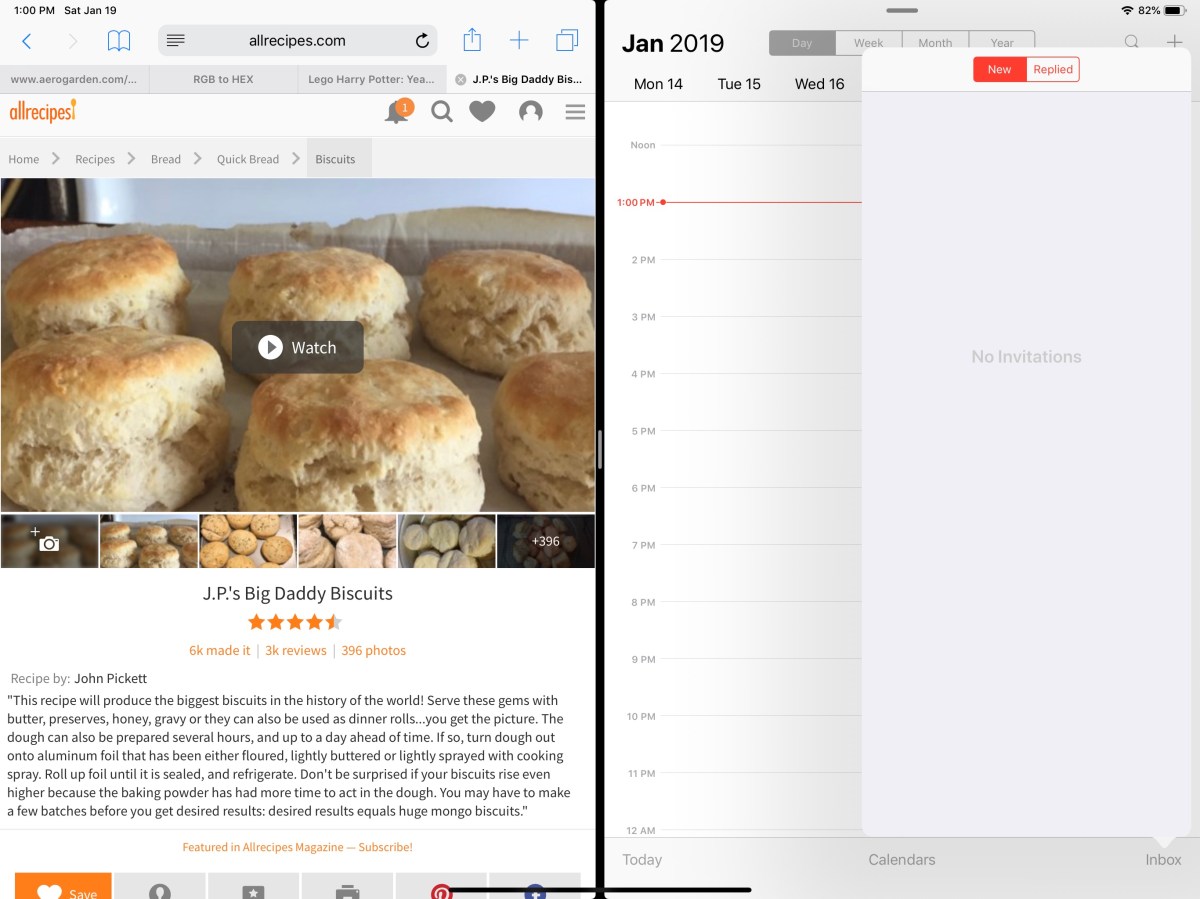
In the end, we reasoned that the twelve point nine-inch model still weighed less than a pound and a half (1.3 lbs) and thanks to the smaller bezel, its physical dimensions were manageable. What really sealed the deal was splitting the screen and realizing that each of the two halves was the size of an iPad mini.

ipad_split_screen
Two iPad mini sized windows make screen splitting truly useful.

We’ve traveled all over the place with it and I can honestly say that you probably won’t notice the difference when it comes to holding it on your lap or carrying it. The only place there has been a slight issue was fitting it on an airplane’s seat table when the person in front was reclined, but even that was doable with minimal effort. Your eyes will be much happier and that outweighs any slight inconvenience you may encounter, in my opinion.

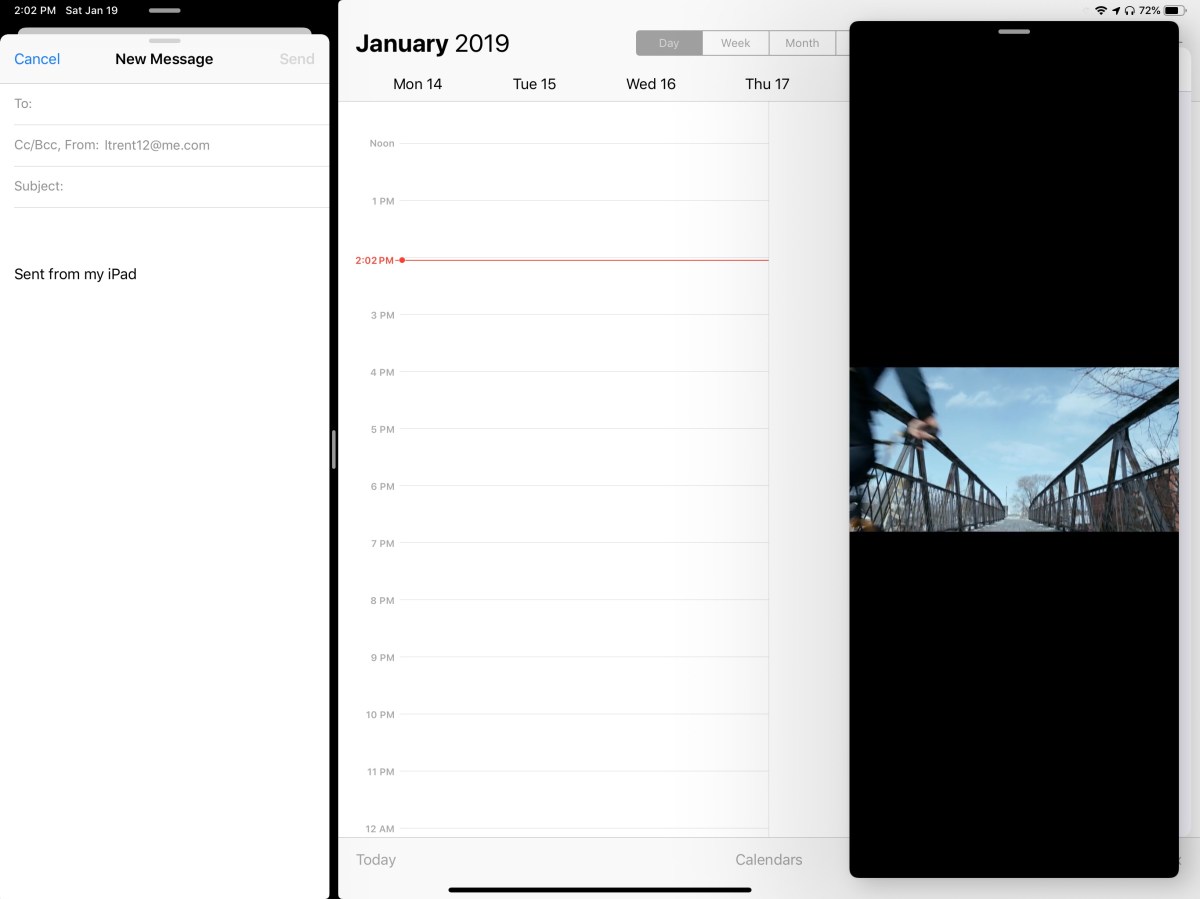
The performance of the third generation devices is spectacular. It’s hard to believe that something this thin and light can be so powerful. Apps open instantly, games run stutter free, even running two apps and streaming a video doesn’t slow it down. The iPad 9.7 suffered from lag when using the pencil to lasso objects in various artistic software, but there isn’t a hint of hesitation here.

ipad_3way

Speaking of the pencil, it’s been re-engineered as well. The most talked about benefit is the magnetic charging. I can’t overstate what a huge deal this is. Not only is it convenient, but the chances of a broken stylus are drastically reduced. For me, the shape and material changes are nearly as important. The second generation instrument feels better in your hand and the flat edge gives your thumb a natural place to rest. They haven’t gone so far as to add buttons, but the double tap feature is a good start. It lets you switch tools without having to click on a toolbar first and is a real time saver.

pencil

The Surface Pen is still my favorite digital stylus. Apple’s lack of native handwriting recognition is just embarrassing at this point. A few developers have taken it upon themselves to add the feature into their individual applications, but this is no substitute for the operating system level version found in Windows and certain Android devices.

Add the keyboard folio case and the iPad Pro becomes something you could replace your laptop with. Microsoft’s Office apps have nearly reached parity with their desktop counterparts and Adobe has announced it will publish the full version of Photoshop to the App Store in 2019. If your business software is iOS friendly, or if your company provides access to some type of VDI environment, you should be all set to ditch the boat anchor you’ve been lugging around all of these years.

To answer the question we started with, the upgrade from the standard to pro iPad is worth the cost if you use your device as a productivity tool. It’s power combined with the new accessories make it something you can easily work from. If you mostly shop on Amazon and watch Netflix, save the almost one-thousand dollars and stick with the original.


Getting started with Zoomnotes. Custom Digital Planners, Infinite Whiteboards, PDF Markup and More.

The new magic of digital notes is the ability to scale up or down to your heart’s content without loosing visual acuity. Microsoft’s OneNote has always been able to achieve this feat but lacks some of the creative features bullet journal users covet. Enter Zoomnotes, an iOS application from Deliverance Software Ltd.

Zoomnotes has the creativity features of Goodnotes with some of the business features you would find in OneNote. Zoomnotes will allow you to use the many PDF planner templates found on Etsy and Pinterest but also offers built-in templates and functionality for more traditional note taking. For example, there’s a wizard that will allow you to build a custom linked view calendar with all your personal preferences.

The software’s infinite whiteboard allows you to write forever without creating a new page or section. By comparison, in OneNote when you fill a page you have to use the add space button on the tool bar to continually expand the note. With Zoomnotes you only need to zoom out with your fingers.

Goodnotes is not able to use custom fonts. This is more than a little annoying. Thankfully Zoomnotes supports any font that you can install on your iPad. This means that digital planner templates look the way the artist intended and everything fits in the designated pages.

Some of the other features you’ll find in Zoomnotes that are missing from other iOS note apps are: Table support, custom color palettes, color matching tool, custom links, and layers.

Lasso any object on the screen; images, handwriting, pictures you’ve inserted, etc. and with a couple of clicks you can add them to your sticker library to make the item easier to re-use. This feature alone is worth the $8.00 purchase price.

stickers

Zoomnotes is one of the most Powerful note taking applications available on iOS. I suggest that you visit their web site and then download the free version to try it out. I’m still a OneNote fan because I need my notes to work across all devices but if Zoomnotes ever adds PC and Android support I would consider switching.

AeroGarden, The Future of Food has Arrived

I never thought that I would consider a garden to be one of my favorite tech gadgets. When I first saw my wife’s AeroGarden l thought something along the lines of, “That’s dumb, I can setup a grow light and some small pots for a few bucks”. I freely admit my initial impression was a big mistake. Do you remember that seen in Back to the Future II when future Marty grabs some fruit from a garden that popped down out of the ceiling?

back-future-part-ii_2

The AeroGarden is that thing, a personal hydroponic garden system. If I were so inclined, I could make a mount to lower it out of the attic through the ceiling and match the movie perfectly. Water and liquid plant food are stored in a resovior and a pump circulates the solution through the plant’s roots on a scheduled basis.  Each seed pod contains a vegetable, herb, or flower marked with the height of the plant, a greenhouse dome, and enough solid growing medium for the roots to take off in.

pod_dirt

All the farmer needs to do is add the water and food as directed and place the pods in the holes. Tall stuff goes in back, short stuff up front. You pop the little plastic domes on top of each pod to keep the temperature up while the seedlings germiniate and you’re off to the races. Within a few days you’ll have baby plants all over the place.

pod_growing

The full spectrum LED lights are mounted on a stalk that allows them to be raised as your plants grow. The model of your unit determines the size of plants that you can grow. The larger farms can handle up to twenty-four plants and have motorized light panels that can raise up to thirty-six inches. The smallest hold two plants and go to twelve inches.


Lights on the front of our unit tell us when to add water and food but some are app enabled. The lights stay on for fifteen hour cycles and we’ve found that purposefully timing it so the lights are on in the evening makes a nice night-light in our kitchen. Our system came as a kit that included six different herbs and the plant food. We had seedlings in four days. I intend on writing a follow up post once we’re able to havest something, so check back later.

Fix Surface Go Brightness Control

I love my Surface Go, I’ve written multiple articles about it. I also spend more time on the “Go” than I do any of my other computer systems. I rarely leave home without it. The only issue I have with tablet is that the graphics driver occasionally flakes out and looses the ability to control the brightness.

The problem seems to be worse when the system is resumed from sleep and is especially bad if the brightness is set to manual vs. automatic. The control is not completely broken on my unit. If I select a setting say, 75%, it will eventually get brighter but can take up to an hour before it does.

I’ve tried to manually install the generic Intel drivers but Windows Update just replaces them eventually. They didn’t fully work anyway. I’ve also made sure I’m on the latest updates from Microsoft, I have my system in the fast ring even. Still no luck.

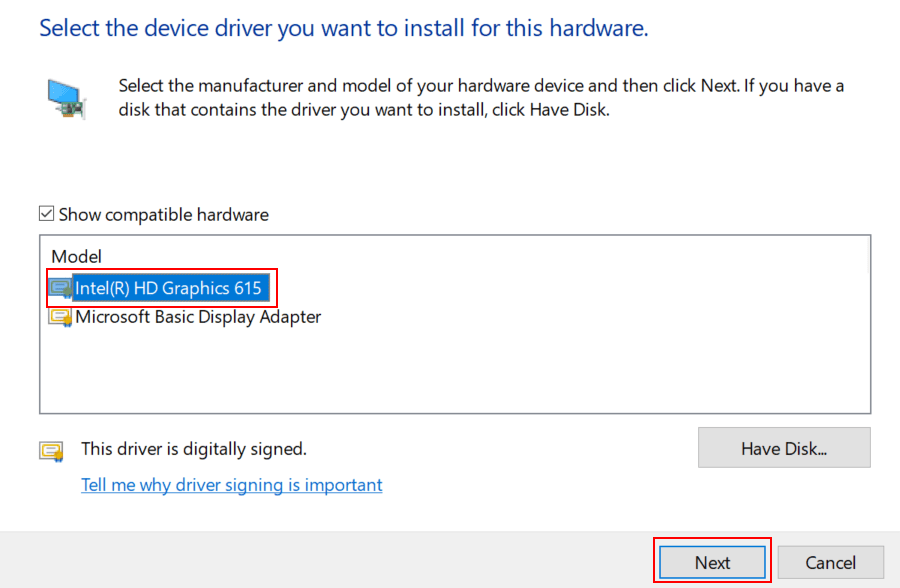
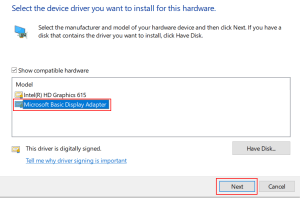
I’ve finally found a fix that worked for me. Maybe it will work for you as well. I used the device manager to switch my drivers to the “Microsoft Basic Display Adapter” rebooted and then changed the driver back to the “Intel HD Graphics 615 driver” and rebooted again. Its been several days now and I am able to change my brightness instantly.

Here’s how to do it.

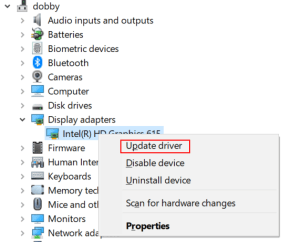
  • Right click on your start button and click Device Manager
  • Right click on the Intel HD Graphics Driver and pick Update Driver from the menu.
    • Update-Driver
  • Click the second option “Browse my computer….”
  • Click the second option again “Let me pick…..”
    • Let-Me-Pick
  • Choose “Microsoft Basic Display Adapter” and click Next
    • Basic Display Adapter
  • Your screen will flicker and you may hear some beeps.
  • Click the close button.
  • Reboot your computer.
  • Repeat the process above but select the “Intel HD Graphics 615 driver”
    • Intel_Drivers
  • Reboot again


Nvidia’s 2080 Ti, The New Hottness

Gaming PCs have been part of my life for as long as I can remember. I like to build them myself and through the years I’ve learned that getting the best quality components is less expensive in the long run. Much like buying your kid a pair of sneakers that is one size too big, high-end equipment has a longer useable life because it is overpowered for the current generation of games and applications.

At well over a thousand dollars for the least expensive iteration, does Nvidia’s new flagship chipset provide enough bang for the buck? Will it offer enough future-proofing at this price point? I’ve read tons of benchmark results, perused many articles both for as well as against, and watched countless review videos. I’ve decided that it is time to find out first-hand. This one component will cost more than everything else in my system put together. It better be worth it!

DSCN1185

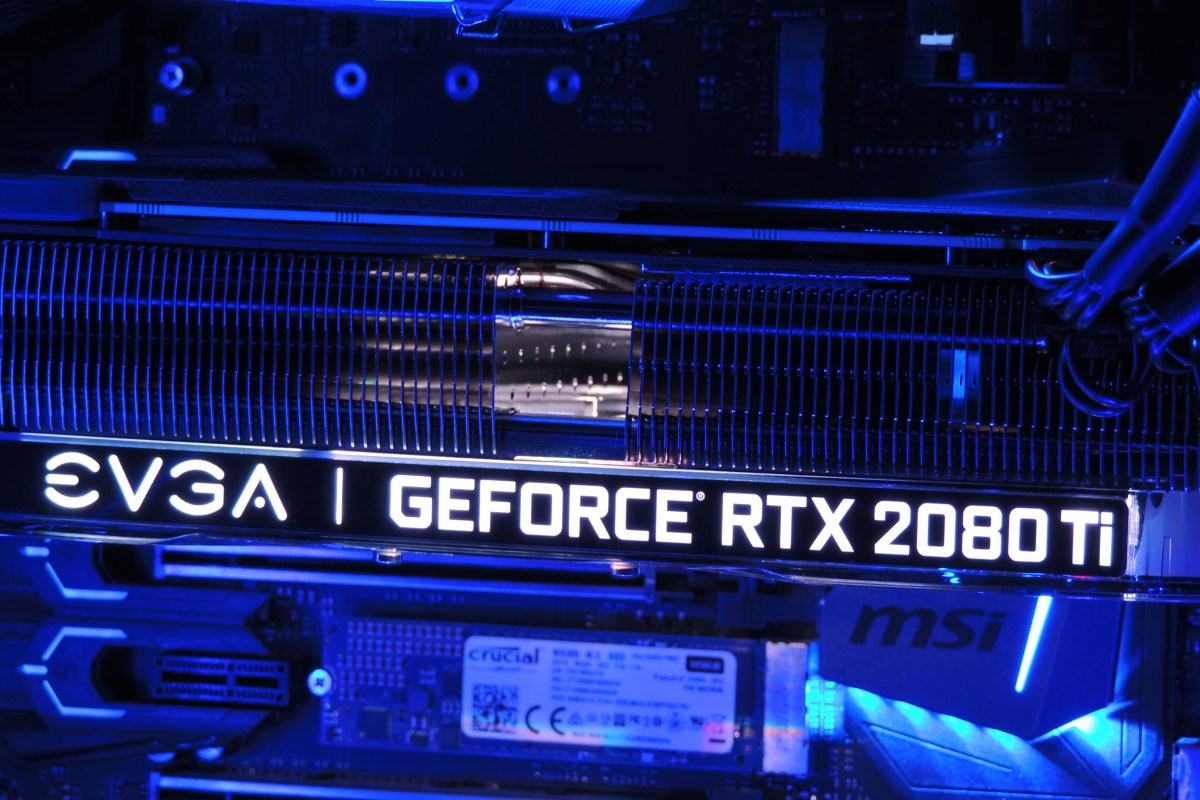
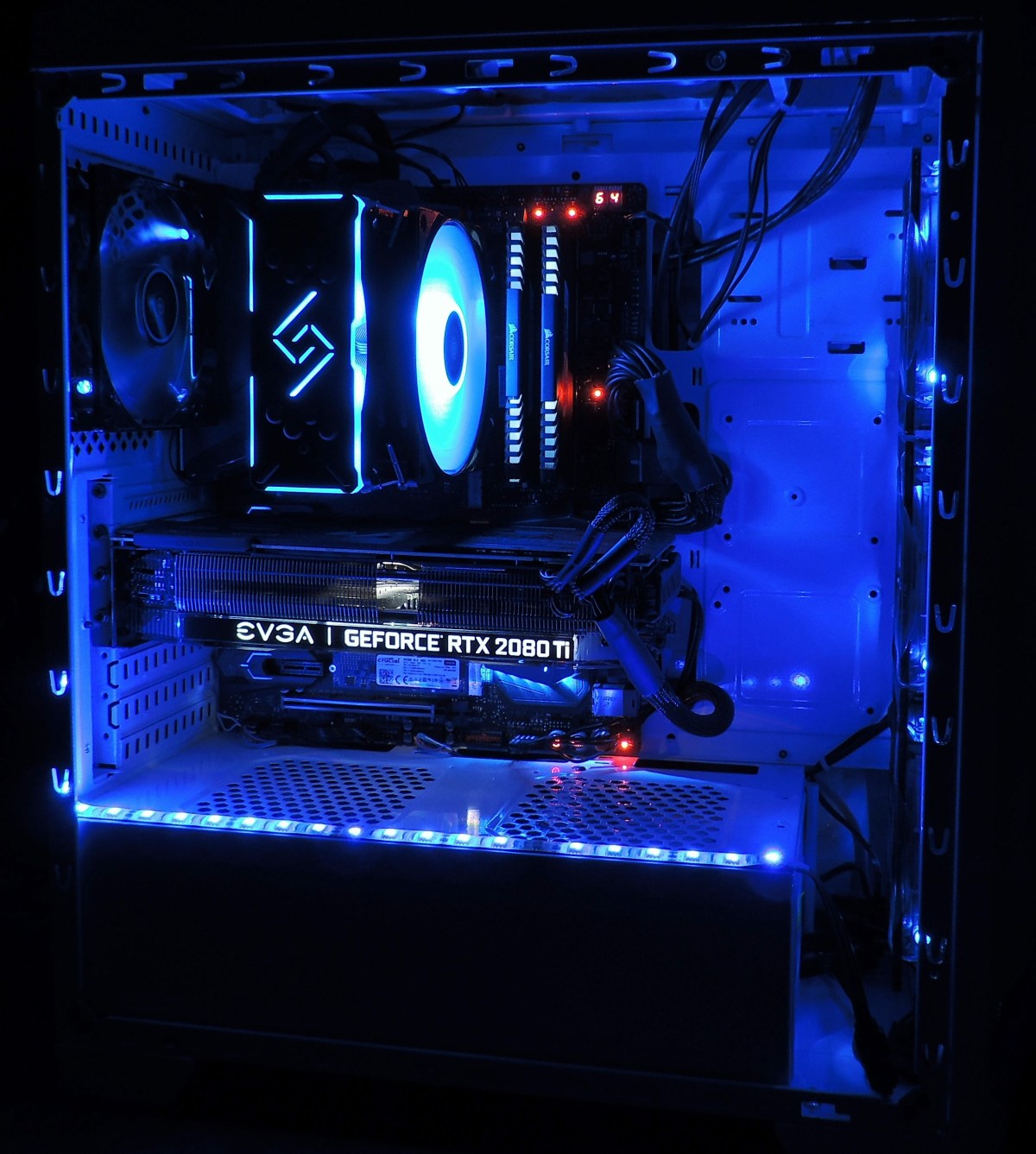
Just deciding which manufacture’s card and which of their ten or more models to get was a project unto itself. The decision was made more difficult by many options being unavailable. Some of my top contenders were back-ordered for as long as six weeks. The various cards differ from each other in a couple of ways. First is whether they have a factory overclock applied or not. Second is how many fans their chassis have attached. Generally speaking, the higher the overclock, the more fans you need to keep it cool. The current generation of these cards come in one, two, or three fan configurations. I ended up with an EVGA Gefroce RTX 2080 Ti XC Ultra Gaming card. It has a slight overclock and two high-speed fans.

Nvidia’s new monster requires dual eight pin power connectors and a minimum of six-hundred and fifty watts. The PSU in Elder-Wand that ran my previous RX-480 had the dual connectors but was rated for only six-hundred watts. I decided to try it with the 2080ti anyway, just to see what would happen. At first I thought everything was going to be ok. The system booted, the Nvidia drivers loaded, and my desktop screen looked great. My web browser and Visual Studio worked well. Everything went sideways when I tried to launch Destiny 2. The fans on the GPU went nuts and my system froze completely. Luckily this was just an experiment and I had a Corsair RM 1000x on deck.

After installing the new PSU, I fired up the same game (Destiny 2) and set all the graphics options to their maximum modes. I went to Earth in the game because the Trostland (EDZ) has a variety of environments and lighting situations in a small area. I was floored. Staring at my 40 inch 4K screen was like looking through a window at an actual church. Albeit one in which odd purple aliens are running around shooting at each other.

2018-12-22 (3)

I systematically set all of the games I am currently playing to 4K ultra and they all preformed flawlessly. The card wasn’t struggling to keep up and 60 FPS (max for my screen) was a breeze. The fans were in cruising mode and it was obvious there’s a lot of head room between what current games are consuming and the power this chipset can bring to bear. I don’t think future proofing is going to be an issue, but the price per year is going to end up on the high side. If the card lasts the typical three years I’m looking at four-hundred per year which is the equivalent of buying a new top-tier console every birthday.

2018-12-23

Besides being the most powerful consumer card on the market, Nvidia’s other claim to fame for the new chipset is being the first to enable real-time ray-tracing. The technique allows the GPU to simulate the path that rays of light would follow in nature, providing a realistic photo like picture. Especially where reflective surfaces like water, clouds, or ice are concerned. Until now ray-tracing required server farms to render and was only used in CG for movies and TV.

2018-12-23 (10)

There are only a handful of games that can utilize ray-tracing right now and it remains to be seen whether the tech will catch on in the main stream. Lucky for me, my purchase came with one of the DRX enabled titles, Battelfield V.  I was impressed with results. You do take a hit to FPS when enabling the feature, but I was still able to stay close to sixty most of the time.

The net result is that surfaces look almost real. I imagine that if I removed the text and in-game overlays from the screen grabs above and below, you would be hard-pressed to identify them as a computer generated images. These were taken in the middle of an on-line multiplayer battle. Notice the superb reflections from the slight dampness in the ditch on the right and the gleam off the weapon’s surfaces and the shooter’s skin in the picture below. The water in the picture above is the best I’ve seen in a game, period.

2018-12-22 (4)

The other gaming function that the 2080ti excels at is Virtual Reality. Current VR goggles are somewhat lacking in resolution and this causes items that are “far away” to appear grainy or digitized. One technique to help minimize the degradation is to enable supersampling. Essentially supersampling tells the system to use multiple copies of every image to fill in the detail; it’s a type of anti-aliasing. This operation takes a lot of horsepower from your GPU especially when you consider that you need to run two displays at 90 frames per second while doing it. The 2080ti was easily able to support 5.0 (highest setting in SteamVR) supersampling for all of my games.

The price of this chipset puts it out of reach for a lot of gamers and that is a shame. The power to run all games at 2160P with ultra everything is intoxicating. The 2080ti lives up to the hype in my opinion. I doubt if it will last long enough to be considered a wise financial decision, but don’t most hobbies end up costing you a lot of money in the the end?

Photographs appearing in this article are courtesy of Tyler Trent.

Kennedy Space Center. A Bucket List Trip for Everyone

I’ve been lucky enough to travel all over these United States of America. My parents and grandparents believed that no amount of reading about somewhere or something was the equivalent of seeing it first hand. Like a lot of Americans, once or twice a year we loaded up in the family truckster and headed out to see the sights.

Family-Truckster

We’ve been to all the major attractions: Yellowstone, The Grand Canyon, Washington DC, the Pacific Northwest, the Rocky Mountains, Hawaii, and yes, even the world’s largest ball of twine. I’ve been fortunate to be able to continue the tradition with my children and this year we visited Florida. Ostensibly our trip was to visit Disney World but we had a couple of days with no specific agenda.

DSCN1244

On one of our free days we decided to make the trek from Orlando to the Kennedy Space Center. Everyone felt that getting away from the lines and crowds for a while would be nice. Disney World is great. Space Mountain is still one of my favorite rides of all time and I really enjoyed the Star Wars street show at Hollywood Studios. I’m usually more impressed by nature and human accomplishment than by roller coasters and impossibly high-pitched voices singing a single chorus over and over until it permeates every synapse in your brain and causes your eyelids to twitch. “It’s a small world…….”

DSCN1214.JPG

When you first pull into the Space Center you’ll probably feel as though you’ve taken a wrong turn and ended up at another amusement park. You enter on a gated drive that leads to a never-ending sea of parking lots and then proceed to a box office that Disney itself would be proud of. Once you buy your tickets, you’ll be stopped by the obligatory park photographer for a picture in front of a NASA globe that is the size of a small house. It wouldn’t surprise you to hear screaming people zoom by on a roller coaster. Everywhere else in Florida seems to have one.

However, after you make your way through security and enter the park; it will be immediately obvious that this place is something different. There are full size rockets on display just inside the entrance. Vehicles that have taken humans to space are everywhere. Some are small and others are huge. To someone who doesn’t care much about technology or space travel I imagine they are interpreted as boring metal tubes.

DSCN1129

NASA knows that not everybody is in love with space and part of the reason the center exists is to help convince people that it is a worthwhile endeavor. They borrow from movies, games, and fun parks to gain and keep your interest. Museum displays are often preceded by a technologically enhanced show that explains the importance of the artifacts that you are about to see. They’re very effective. There are simulators, games, movies and gift shops. Of course there are gift shops, I mean how could you go on vacation without them?

DSCN1127

If you find yourself short on time and trying to decide what to see, I have a couple of recommendations. Toward the back of the complex you’ll find a line that leads to a group of busses. Get on one. This tour is one of the best attractions at the Space Center. You’ll be taken on a narrated trip out to NASA’s and SpaceX’s launch facilities. The sites are historically iconic and the trip ends at the Saturn V “Moon Rocket” exhibit. If you doubt that human beings could make a machine powerful enough to reach the moon, go look at this thing in person and see if it doesn’t change your mind. American’s have seen this rocket in countless videos but they don’t prepare you for the scale of this monster. It isn’t a model, or replica this is the real-deal big boy and you can get up close to every square inch of it. The presentation beforehand is an experience all unto itself.

If the Saturn V and lanchpad tour was all the Space Center had to offer it would be well worth your time and the $60.00 adminission price. They aren’t done with you yet though. The Kennedy Space Center is one of the few places in the world where you can see an actual Space Shuttle. The Atlantis is on display in all her glory, scorch marks and all. Seeing the shuttle is proceeded by a presentation that will probably make you shed a tear with pride at the accomplishment of our scientists, country, and humanity in general. I’ve never felt prouder to be an American. Besides the Shuttle itself there are also several other features of this attraction that you won’t want to miss.

The Saturn V and Space Shuttle are the two most complex machines ever built by humans, period. You can see them both in the same place and much more to boot. If you’ve never visited the Kennedy Space Center I highly reccomend you put it on your bucket list.

Invest in the Stock Market with no fees or minimums.

Most of the stocks I have invested in were purchased through my 401K retirement program. These stocks are mananged by a company and my involvement is limited to picking a few options around how agressively I think they should attempt to generate returns for my account. I am by no means a financial expert, I am not being paid to write this article. Following any advice, or using any software mentioned in the post is a choice you are making at your own risk.

401k

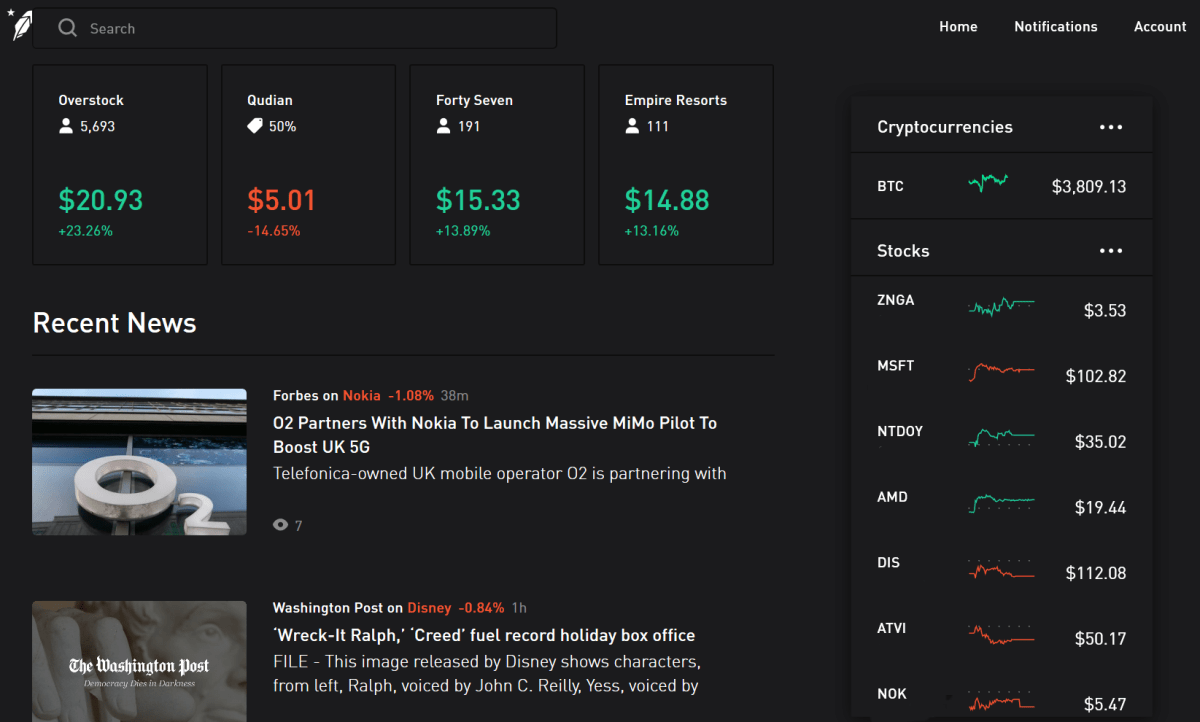
A while back I had decided that I wanted to try my hand at the markets. As my readers know, I’m a gamer at heart and what is the stock market if not a giant game? One that risks real capital, but a game none the less.  My knowledge of the markets was pretty limited so I did what I always do, a bunch of research on-line and pestered the people I know for advice. The consensus at the time was that opening an E*TRADE brokerage account was one of the best ways for a novice person to get started trading on their own.

I liked the tools that E*TRADE offered, the app was fairly simple to figure out, and they had some of the lowest fees in the business. Over time I noticed that I mostly bought stocks and then did little with them. I came to the conclusion that I didn’t like the fees I was dinged with every time that I made a transaction. I wanted to learn how the markets worked by experimenting, but those experiments could be costly.

Home_Page

While discussing the situation with a friend, I learned that he had found another option. He told me that the brokerage he used didn’t have transaction fees or account minimums and that he could buy and sell stock for free. If it hadn’t been a person I trusted, I would have suspected that I was being pitched a scam-ball.

Robinhood really does let you trade for free. Mind that you have to purchase the stocks you want to trade.  Except for the first one that is. If you sign up for an account via a referral from an existing customer you’ll get a free stock. It comes in the from of a game and you have a chance out getting a premium share like Apple. If only you knew someone who would send you an invitation…

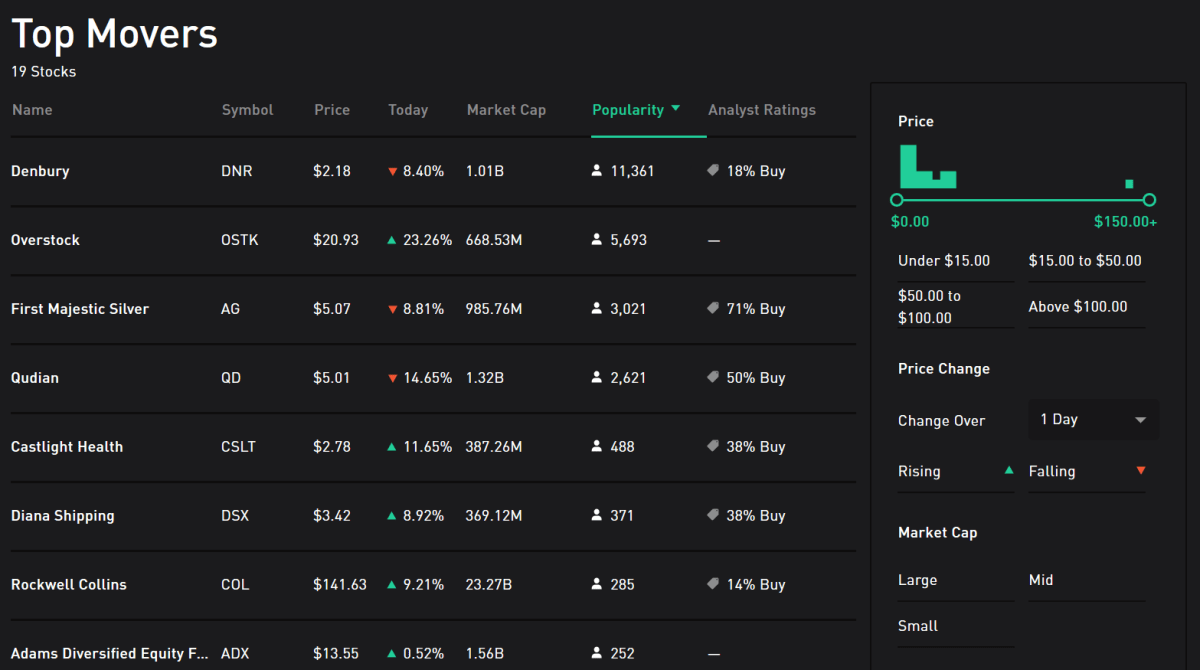
Top_Movers

Setting up an account couldn’t be easier. Download the app from the Play store, App store, or logon to the web-site and click or tap the option to create a new account. If you want to take advantage of the free referral stock, you’ll need to use the link you were sent to start the account. Once you get started you’ll be asked for your financial information: Name, SS#, Phone Number, Address, Employer, Marital Status, etc., you’ll also have to tie the Robinhood account to your bank. After you give them the routing information for your account they will verify it by making  a couple of small deposits. You won’t get your free stock until all of this has been completed.

private-data

While helping a buddy setup his account, he mentioned that he was concerned about Robinhood asking for all of this private information. Buying and selling stocks is a taxable form of income. When you generate a profit or receive dividends, your broker will report it to the IRS so they need the same information your employer does. You link your Robinhood and Bank accounts in order to enable fast financial transactions. If Netflix is low and you want to buy a few shares you wouldn’t want to have to wait for a check to clear before the funds were available in your account. Linking anything to your bank account involves taking some risk but it’s no different from the automatic payments in use by many entities today.

Once your account has been created and your bank account verified (took two hours for me), you’ll be ready to rock and roll. I approach this form of investing in the stock market the same way I do playing a slot machine at my favorite casino. I never invest more than I can afford to lose because loss is inevitable. I never use credit to purchase stocks because paying interest on losses is painful. I also never trade while drinking.

Slots

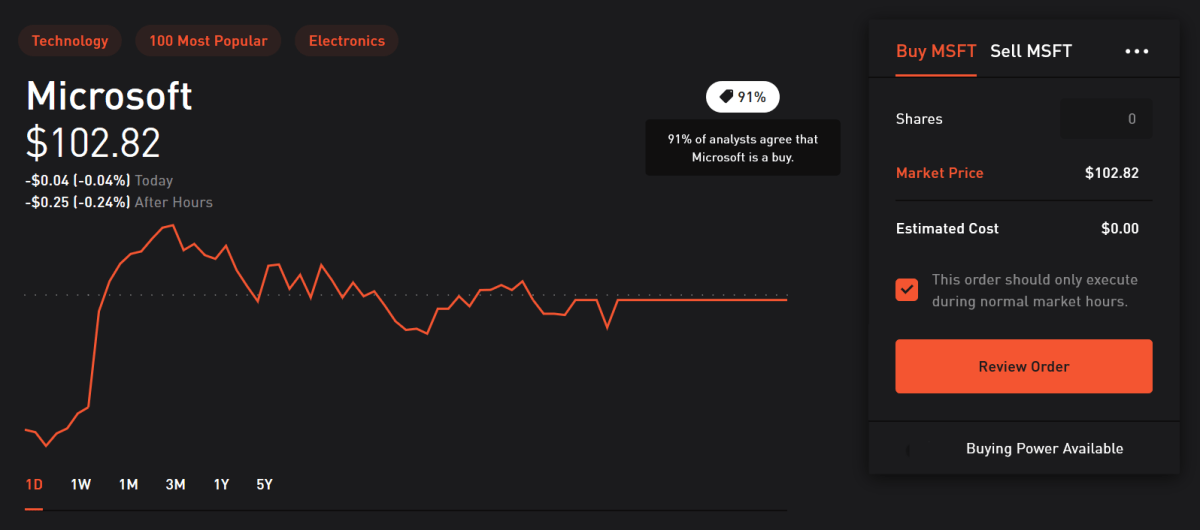
Much like that slot machine, the trick to making money in the markets is knowing when to cash out at move on. To help you make that call, Robinhood provides all kinds of charts, news, analyst’s opinions, and various other tools. Analysis paralysis is a real problem when playing the markets. You can get lost in all the data if you aren’t careful.

Buy_MSFT

I often use the collections tool to find interesting new stocks. This table shows you a category of stocks and basic information about each company. Clicking on any of them drills in to a detailed analysis of that companies’ performance.

Tech_Collection

Most investors suggest that you wait for market prices to fall before you start investing. As luck would have it, that is occuring right now. Getting started is easier than ever, I wish I would have setup a broakerage account years ago. Best of luck if you decide to invest on your own and send any good leads you find my way.

Enterprise IT Monitoring, Alerting, and Dashboarding with Solarwind’s Orion

A while back, I wrote a series of articles on using PowerShell to create a decent monitoring system . It’s nothing fancy, but it gets the job done and costs nothing but time and effort to implement. If your needs continue to grow you’ll be left with two choices: continue to pound out code to expand functionality, or purchase a commercial solution.

Once you’ve reached the time wall and have decided to invest in a commercial monitoring application, the question becomes, which one should you get? In my career as a consultant and IT employee, I’ve setup and worked with countless monitoring solutions, Altiris, Nagios, System Center, BladeLogic, GFI, Spiceworks, Appdynamics, and Cacti just to name a few. One option that never lets me down is Solarwind’s Orion platform.

Solarwinds has been a player in IT for quite some time. Their Network Performance Monitor frequently makes the “best of” lists. I’ve run into their Web Help Desk ticketing and change management application at multiple companies including my current employer. They may be best known in computer worker circles for their free IT tools like Network Device Monitor and Kiwi Syslog Server. Not everyone is aware that they also make a full enterprise monitoring platform.

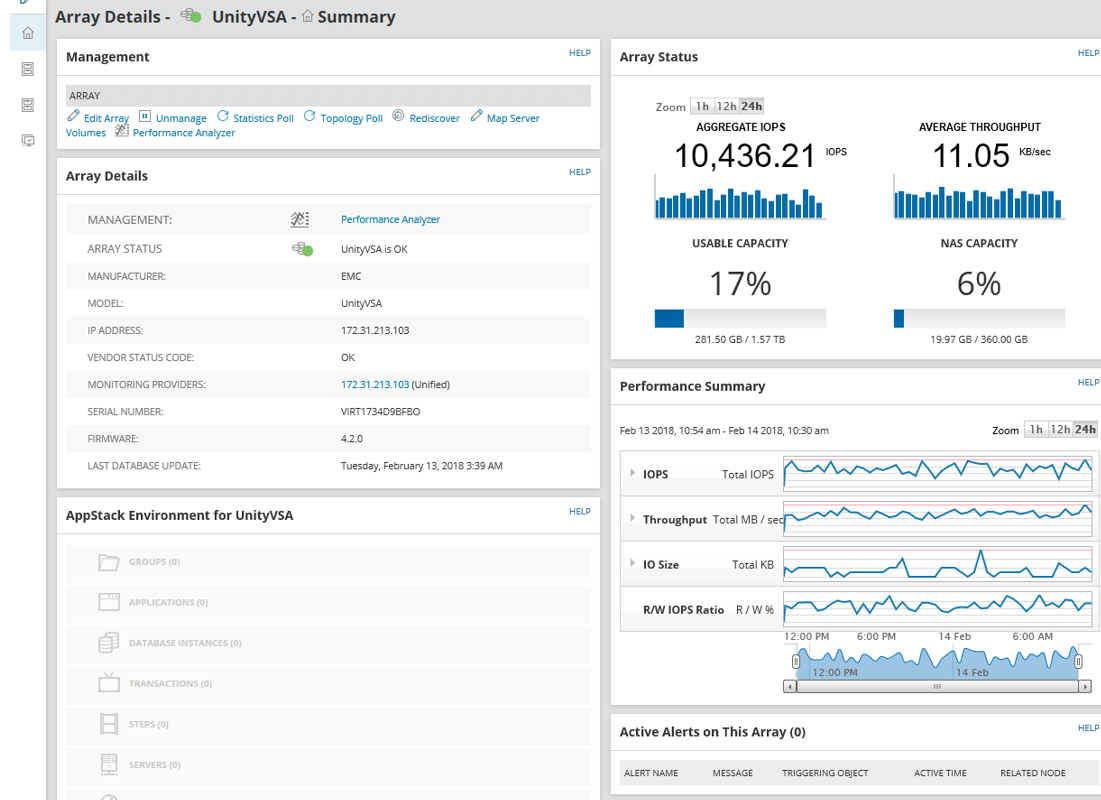
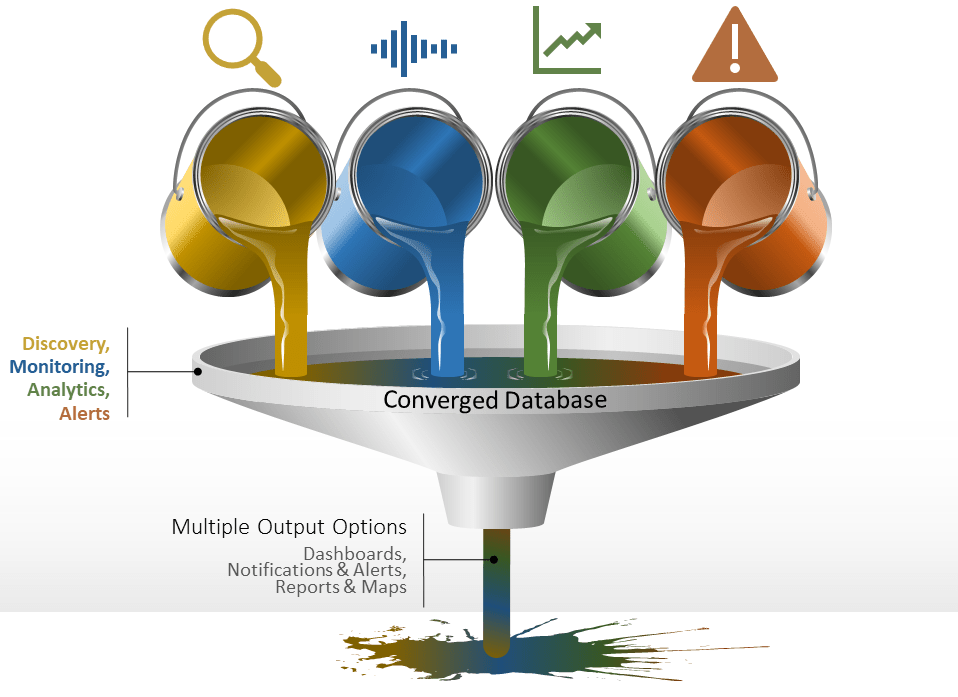
Monitoring Funnel

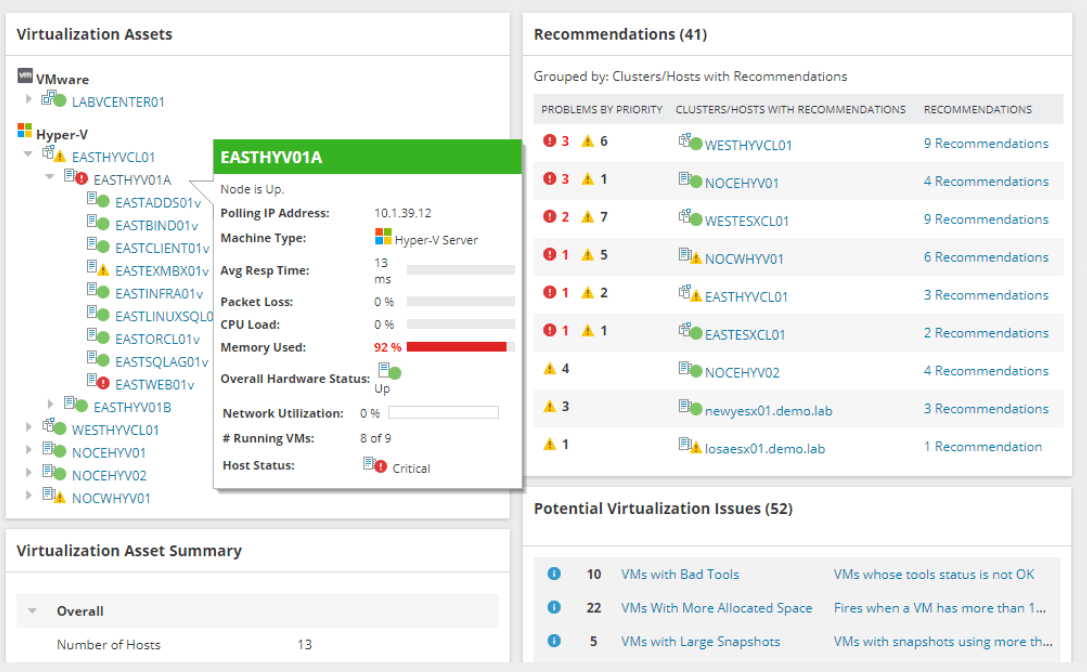
Orion is a platform in the true sense of the word. Modules that you choose plug in to Orion to add functionality. For example, the Network Performance Monitor collects netflow and SNMP data from your switches and routers and adds that information to your Orion databases. The Server Application Monitor uses SNMP, WMI, or an agent to collect data from almost all operating systems and countless applications. Modules also typically include dashboard widgets, reports, alerts, and other useful items that allow you to better utilize the collected data.

I use NPM and SAM at my current employer everyday to monitor and manage our sprawling network. Network equipment, Windows severs, Linux servers, countless SQL databases, Exchange, AD, and even their AS\400 servers are all covered by the platform. Much like golf, it takes a few hours to get the basics (install / discover) and a lifetime to master. The amount of customization Orion offers can be overwhelming but once you get your feet wet, you can accomplish some truly impressive feats. Watch for more articles on Solarwinds Orion in the near future. We’ll be talking about creating custom dashboards, alerts, reports, and more.

Orion-VMware

My journey from drone zero to hero with the DJI Mavic Air. Part 2.

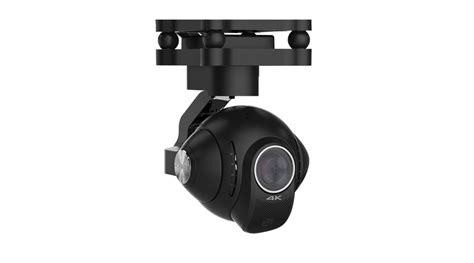
To get stellar shots with a camera drone, it needs to have a gimbal mount. Preferably a three-axis gimbal. This technical marvel will allow your camera to stay steady and level while the drone moves around it. It’s a miniature version of the device you see mounted on the nose of news choppers and attached to Hollywood camera rigs. They come in various versions and styles; some are part of the drone itself and others can be bolted on to any vehicle powerful enough to carry them. My research led me to believe that the bolt on types were more flexible but required more adjustment to get the best results. I have little enough free time already, so I decided to go with a quadcopter that included a built-in gimbal.

gimbal_camera.jpg

Deciding on a built-in gimbal reduced my choices in hardware. There were a few other requirements for my flying camera purchase that cut the list down further. I wanted a true “drone” this time, something that had brains of its own. Features like return to home, follow me, and GPS location were important for my plans. I also needed portability. Monster octocopters with full DSLR rigs are cool, but I wanted something that could easily fit in a backpack or laptop bag.  As always, I did tons of research online and talked to a lot of people, including my brother who is an avid quadcopter pilot. In the end, I narrowed my list down to just two choices.

I’ve had the DJI Mavic Air for almost three months now. I picked it because DJI has an excellent reputation and offers an accident replacement program similar to Apple Care. I was also very impressed by its automatic flight abilities. This drone has followed me down multiple trails in the woods weaving in and out of the trees in an eerie “the robots are taking over” manner. It has sensors on the front, back, and bottom that let it hug terrain and navigate nearly any path. It’s truly amazing to see it fly itself. It also has touch and go flight, touch a spot on your screen and it will go there all by itself.

DJI makes some of the best Gimbals in the business and the one on the Mavic Air is no exception. Pictures and video look like they were taken with a camera on a tripod even when the Mavic is flying at over forty miles per hour.

I ended up getting what DJI refers to as the “Fly More” package. It comes with the drone, controller, 2 extra batteries, a multi-battery charger, extra props, and a very nice carrying case. I’ve been happy with my decision, if you go with this drone you will almost certainly want more than one battery and this package is the least expensive way to get them right now. A single battery lasts somewhere between 15 and 20 minutes in real-world conditions, depending on how fast you are flying and how hard the wind is blowing.

I’ve had the Mavic out in 12 mile per hour winds and it stays steady as a rock. Rather than me tilting into the wind, the drone’s AI automatically does it. It even auto-brakes. As you level off the pitch during a high-speed run, it automatically tilts in the opposite direction until it comes to a hover all on its own. Where was this tech back in part 1 when I was bouncing my micro-drone off the walls?

created by dji camera

Flying the Mavic compared to the micro-drone I started out with is like comparing a Yugo to a BMW.  I will say that before the Mavic, the piloting was all me. Avoiding the wall, my dog, and my wife’s face while screaming down the hallway at what seemed like mach two, was all my skill. Much like modern supercars, the Mavic can do the same with or without my input. It’s onboard AI is a better pilot than I am, but that doesn’t stop me from shifting the the switch on the remote into sport mode and fully controlling it by myself.

The Mavic Air isn’t the fastest drone on the market but something this size traveling at forty miles per hour is astonishingly quick. You will want to leave the drone in beginner mode which limits the speed and distance the vehicle can travel from the controller until you get the hang of flying. I also suggest turning on the AVS option which is the vision based obstacle avoidance.  In the video below you can see this system keeping me from hitting the trees. Watch it work out how to exit the dry creek bed and make its way to the road I touched on the map.

Now you know what drone I chose and why. At this price point, it met all my requirements and exceeded my expecations. The software, camera, and drone itself are all impressive. Watch for the next post in this series in which I’ll do a full review of the Mavic Air including shots of its software, features that aren’t commonly discussed, and more. I’ll finish the series with an article discussing useful things you can do with a drone that you might not have thought of.

My journey from drone zero to hero with the DJI Mavic Air. Part 1.

Growing up I really liked remote control vehicles and toys. They’re what I asked for almost every Christmas and I was a regular pest at the local hobby store. As a young adult, I got more serious about the pastime and ended up with several gas-powered and electric models. I’ve always been interested in RC flying too, but the expense and learning curve of scale model planes and helicopters have kept me on the ground until recently.

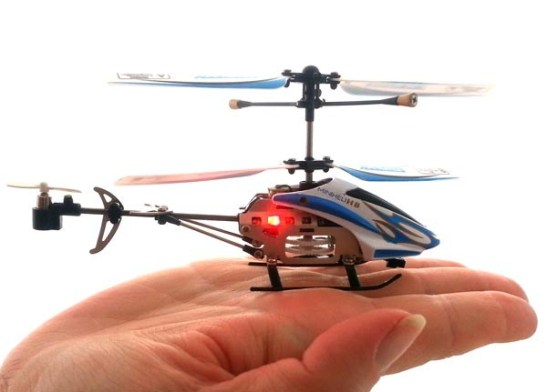
I realize that gyro helicopters have been on the market for a long time. I’ve had several of them. In my opinion they have a few drawbacks. Chief among them being no good way to change pitch to generate thrust. My dual rotor HC “swims” through the air by wiggling its tail back and forth and barley achieves walking speed. Some models have a tail rotor that can lift the rear to change pitch, but I found them awkward to pilot and only marginally effective. Scale RC helicopters with a full collective and tail-rotor are fairly expensive and have a massive learning curve to fully master. I watched my novice neighbor shatter his bird into a thousand pieces on our street after a botched take-off; even with the safety spokes attached.

gyrocopter

Quadcopters and multi-roter drones are the great equalizer amongst flying vehicles. They typically have a gyroscope that keeps them balanced which makes them easier to fly. They change direction by varying the speed of their rotors rather than by changing their wing shape like a traditional plane or helicopter. This results in more precise control and the ability to fly in any direction equally well.

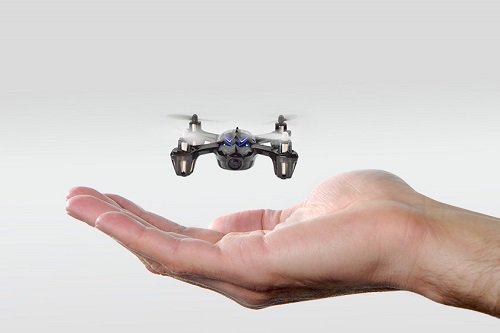
When I started out with quadcopters, I knew that I eventually wanted to do areal photography and videography. I didn’t want to risk crashing an expensive camera drone right out of the gate so, I decided to learn in stages. First I purchased an in-expensive indoor micro drone for less than $15.00 .This little rocket can cover the entire length of my home in just a few seconds. In addition, it can do flips, impossible turns, and other impressive maneuvers that take a lot of practice to get the hang of. They really are quite fun to buzz around the house with, most can stay in the air for five to ten minutes on a charge and include a simple controller.

Minidrone

At first, piloting a quadcopter was difficult. The smallest input on the controls would lead to the little machine bouncing off a wall or careening to the floor at break-neck speed. I learned to hold the sticks between my thumb and index fingers rather than with just my thumbs. I also discovered that throttle control is paramount to keeping your vehicle in the air. In all, it took somewhere around twenty hours of practice before I could fly around my home with confidence.

After forty hours and a bag of replacement props, I could do flips, fly in and out of door-ways at full speed, circle the ceiling fan, and buzz my pets like a fighter pilot on a bombing run. Speaking of pets, if you have any, you’re going to want to keep a pair of tweezers handy. Almost every time that you crash, you’ll need to pull hair or carpet fibers off of the prop shafts before you can fly again.

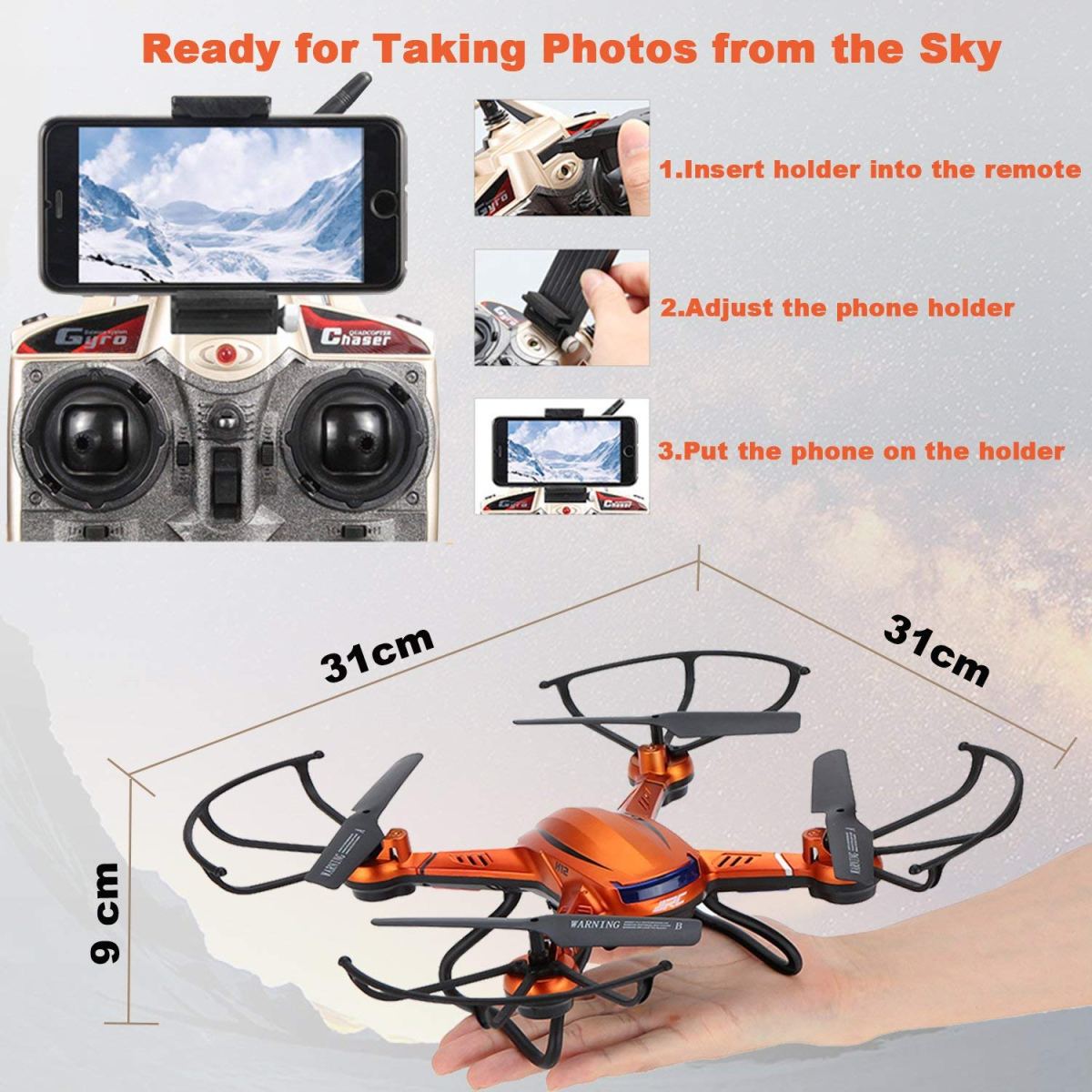
Once I had mastered the micro-drone, I upgraded to a slighty larger and more powerful indoor/outdoor model that included a camera. At less than $100.00 it wasn’t overly expensive but it was faster and therefore more difficult to control. I could pilot it indoors right out of the box, but the first time I took it out to my backyard the wind blew it over my neighbors fence right after takeoff.

medium_drone
I’m pretty sure this won’t handle the mountains shown on the phone’s screen.

It turns out that balancing against the wind is a skill unto itself. You learn to tilt the drone into the wind and then back off when it lulls. It requires quickly reacting to changes in the machine’s pitch that you know you didn’t initiate. React too harshly on the sticks and the over-correction will cause a crash or mess up your shot. The upside is that I got to know my neighbors better from having to knock on their doors to retrieve my toy from their yards.

After I was comfortable flying in my yard, I began to push the flights higher and faster. It wasn’t long before I could comfortably fly over my whole neighborhood above tree level faster than most kids can ride a bike. The camera worked and it was neat to see the jittering low quality video and grainy pictures. With no gimbal, every twitch in the air resulted in a jerky, out of focus, picture. Still, I could see enough potential to dream of the areal shots I would be getting with my next upgrade.

Eventually, I got too brave and suffered a fly-away. This is when the wind blows your rig so far that you can’t find it. Wind blows different speeds at different altitudes. I was a couple of hundred feet up, trying to get a picture of a small lake, when a gust took hold and carried my baby out of sight. Since it didn’t have a GPS locator I had no chance of finding it. I was ready to upgrade anyway. Or, at least that’s what I told myself. Continue on to part two for the rest of the story.

Who needs a keyboard and mouse when you have a pen?

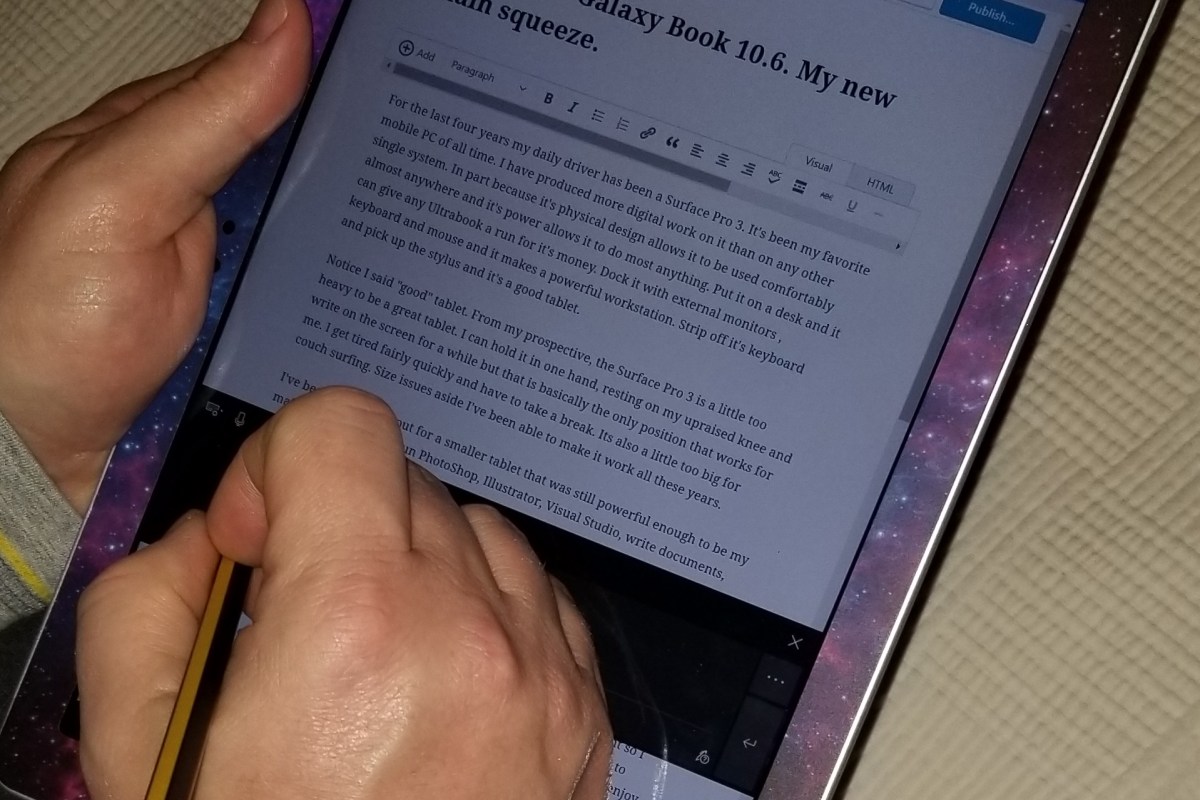
I frequently take my tablet to a park, museum, or other public space to get inspiration for my work. When I’m out with my Surface Go, I rarely have the keyboard attached. The Surface Pen is my primary input and control tool. Occasionally, someone will notice and ask how I am able to fully use my computer with just the pen. “What about selecting, copying, right-clicking, and all the other things you need a mouse for?” is an inevitable question during these conversations. Generally a statement like, “I can’t stand the way it feels,” also makes its way into the discussion.

The first thing most people need to address in order to be comfortable using their stylus, is the “feeling” of writing on a screen. There’s far less friction between glass and silicone than there is between paper and graphite. Some of us actually prefer the slicker strokes, but most people do not care for it, in the beginning at least. If you don’t like the slide, there are a few things that help. If your stylus has different tips, try them. Some are softer and offer more drag. They also change the contact patch size which further alters the experience.

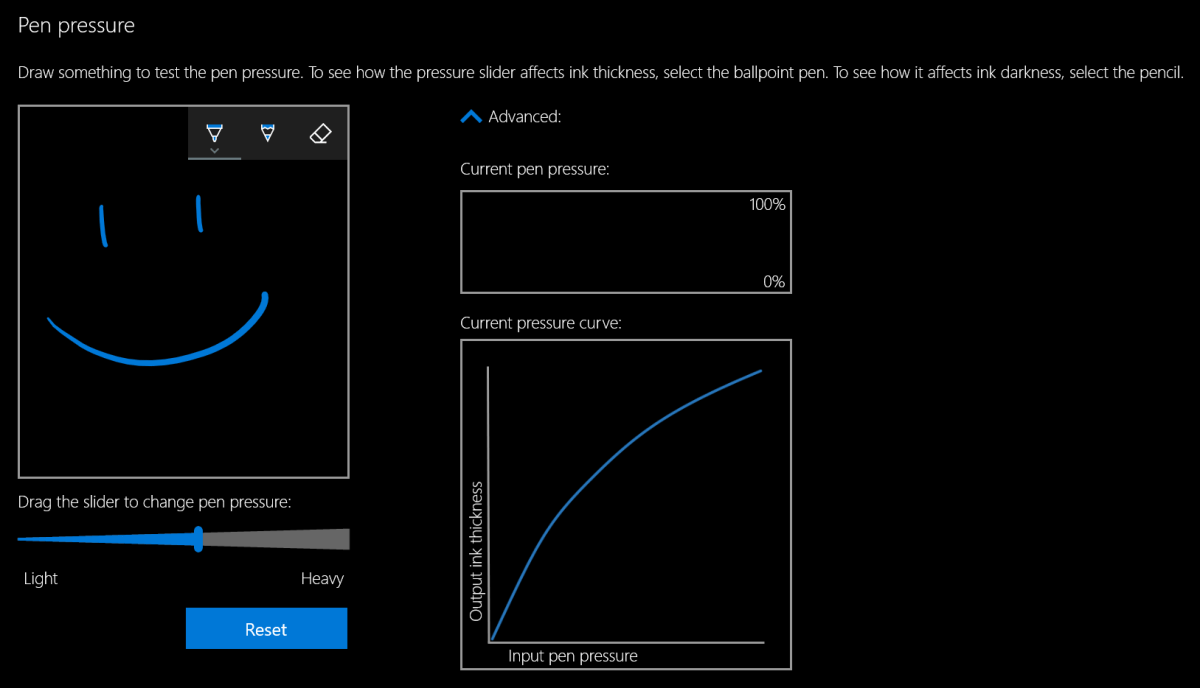
Most Windows 10 based tablets allow you to adjust the pressure sensitivity of your stylus, which in turn changes how hard you end up pressing on the pen tip to write or draw. Setting your system to require more pressure will cause you to press harder and feel more drag. On Microsoft Surface devices you use the Surface app to change the setting. Samsung tablets have a Samsung Book app, most manufacturers have some type of settings app; look in your start menu.

Pressure settings

The last piece of advice I have to offer around the “feeling” of writing on your screen is to add a soft silicone screen protector. A significant part of the difference between drawing on a paper versus drawing on glass, is that the paper will slightly give way to the tip of your writing instrument. Silicone on silicone also results in more drag and lessens the likelihood of over-strokes occurring. Personally, I prefer the matte options because they also help reduce glare.

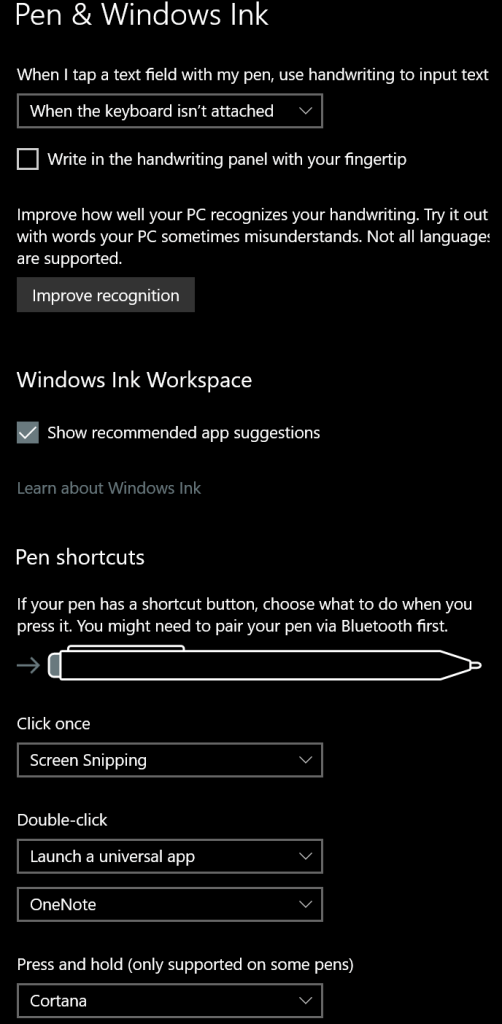
Once you have the physical issues addressed, you’ll need to spend some time with settings in both your operating system and applications. I suggest that you start off getting your windows profile all squared away. Lucky for you, I’ve written a detailed post about how to go about it. The 1809 update for Windows 10 caused me to change a few of my settings since writing that guide. You can see the updated configuration below.

Pen setting

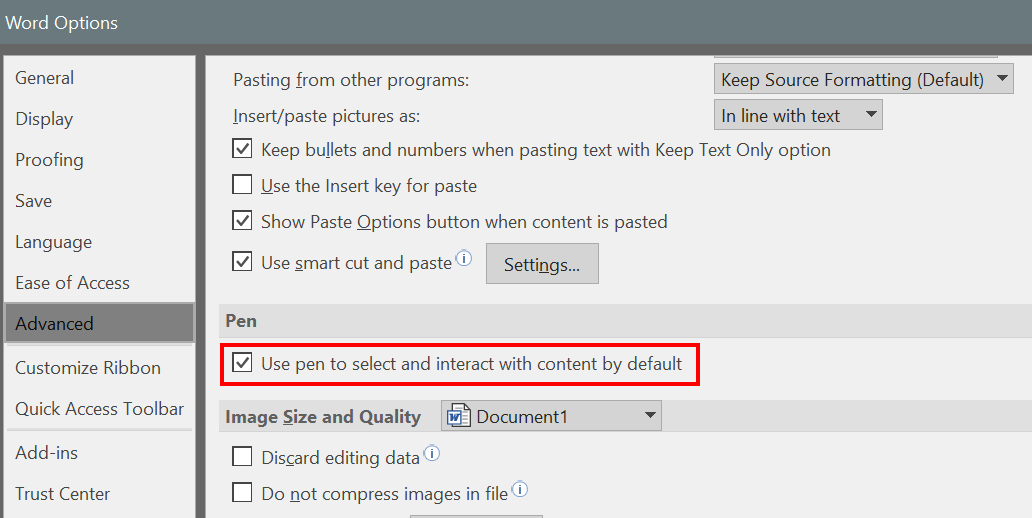
Great, so we’ve taken care of the way it feels to write on your screen and adjusted Windows to operate with a pen, we’re done right? Ha, don’t you wish…. Unfortunately, most applications also have specific settings that improve the stylus experience. Quite a few of the Microsoft Office programs, Word, Excel, PowerPoint, etc., have a setting in their advanced options that allows the pen to automatically select text. The function is turned off by default and I cannot fathom why Microsoft doesn’t turn it on for everyone. Checking this box will drastically improve the pen experience in these apps.

Word_Pen
This setting is in most MS Office apps. Go to File -> Options -> Advanced Options to find it.

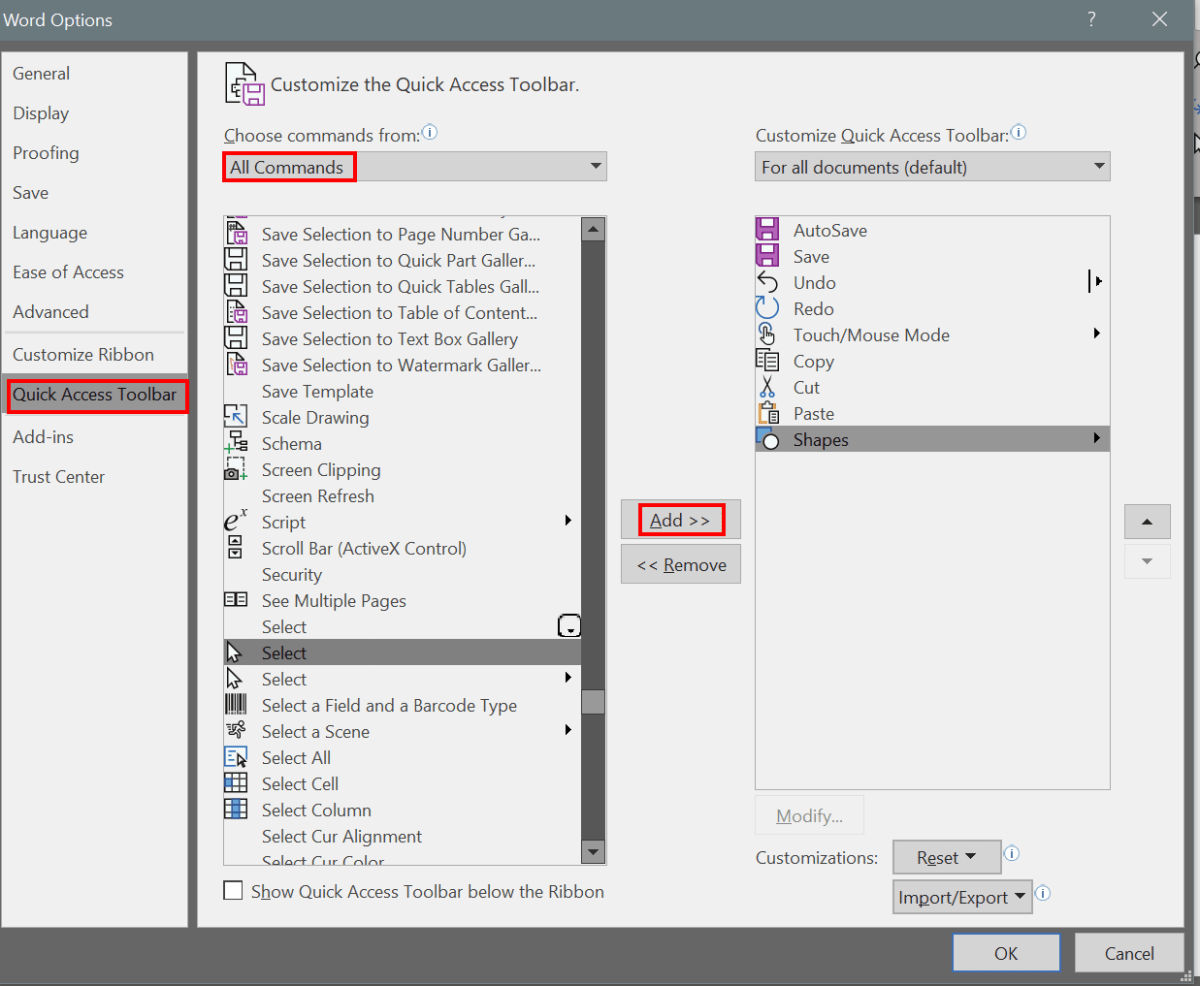
Whether you use a pen or a mouse, customizing the quick access toolbar in Microsoft Office applications adds efficiency to your workflow by reducing the amount of time you spend hunting for commands. The quick access toolbar is different for each application but can literally save you thousands of clicks and taps if you spend a little time setting them up.

Quick_Access
Add your most used commands to the quick access toolbar.

Quick_Access_Bar

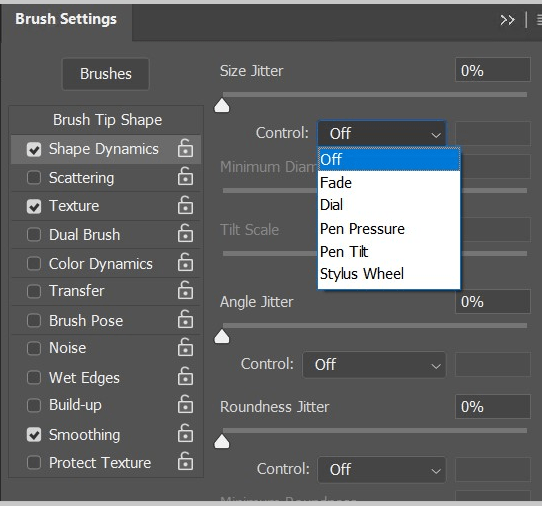
I wouldn’t want you to go away thinking that MS Office apps are the only ones that have specific pen settings that you may need to turn on or adjust. Of course purpose-built drawing and editing apps have all kinds of pen settings. I’ve even seen the options to use a pen show up in games. Take a few minutes to poke around in the menus of the software that you use, it’s almost always worth your time.

Photoshop_Brush_Settings
Each brush or tool in Photoshop has multiple pen settings

Diagnosing and correcting Windows power and sleep issues for a single system or en mass.

After we push out updates to Windows desktops we will inevitably end up with some that will no longer go to sleep. Occasionally they will sleep but their monitors won’t turn off. When this happens to one or two systems it’s an annoyance. If it happens to a lot of them, there can be a financial impact due to the extra power consumption.

Generally, the problem is caused by an incompatibility between one of the newly installed updates and a system driver. Sometimes it’s caused by the update itself. How are you supposed to figure out exactly what is causing the problem?

Microsoft has embedded a utility named “powercfg” in the operating system. This tool can diagnose and assist in the repair of most power related problems. The first step is to run a diagnostics report. You can do this from a command prompt on a single computer but you should be getting used to PowerShell by now and if you’ve got lots of systems you need to check, it will be your best bet anyway.

Open an elevated PowerShell console, the command is;

PowerCfg /SystemSleepDiagnostics /Output $env:userprofile\Documents\sleep-diagnostics-report.html

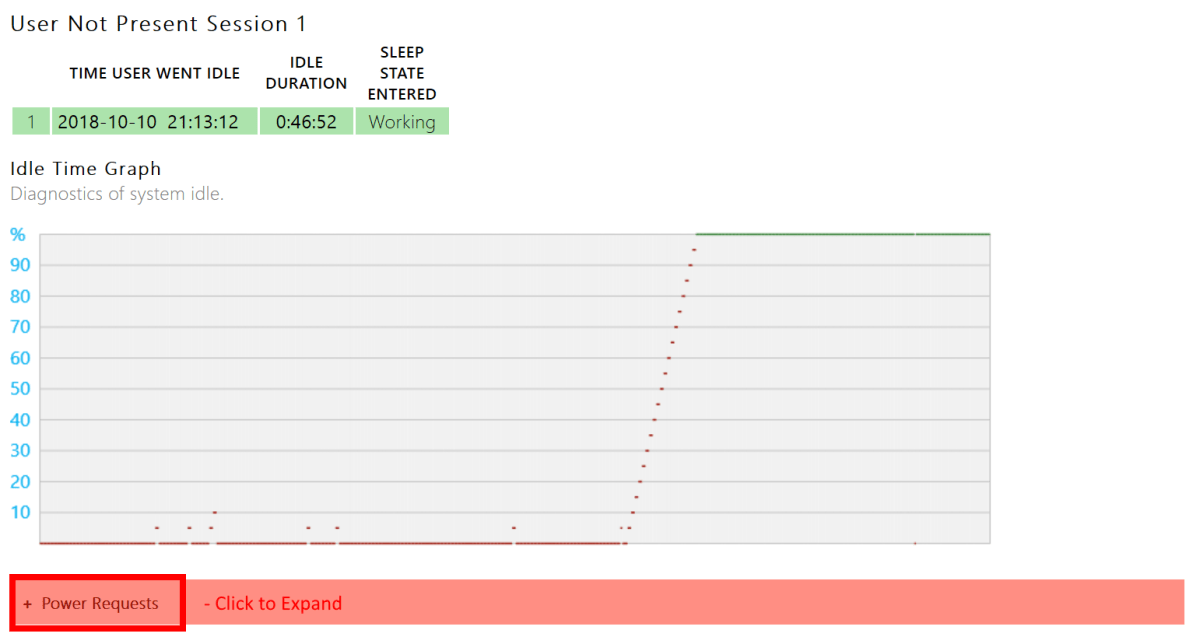
The command will create a nicely formatted report in your documents folder showing all the information you should need to determine the cause. Scroll through the user sessions and expand the Red menus to see the cause of your issue.

PowerReport_Red

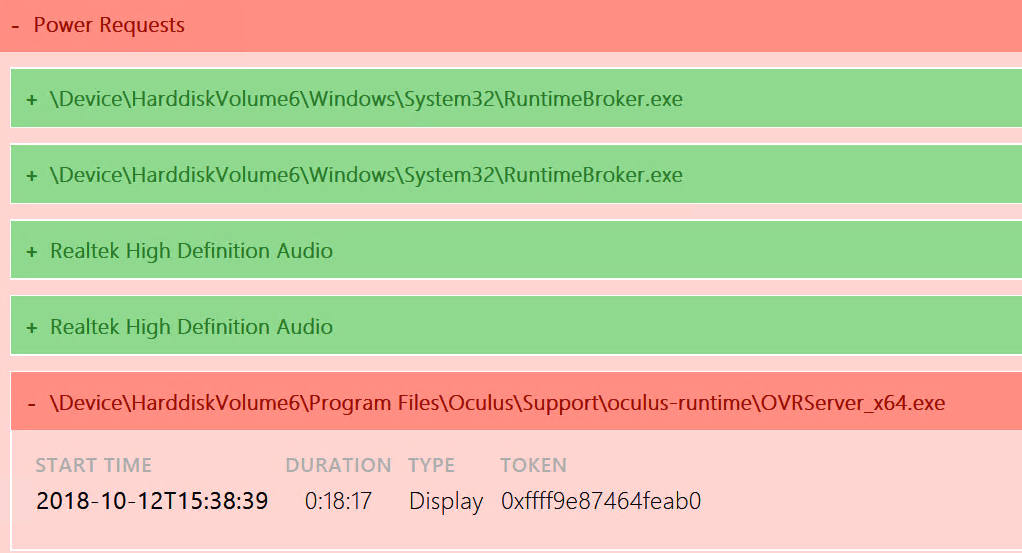
Below, you can see that in my case, OVRServer_x64.exe continued to request power after the system had tried to sleep. As you can probably tell from the file path, that EXE file is part of the Oculus Rift software package. Again, you can click the Red bar to gain more information.

PowerReport_Error

Now that we know what’s causing the problem there are several things we can try to correct it. First, I always check to see if there’s an update for the application or driver. For many programs, in the help menu you’ll find a “Check for updates” option. If you need to visit the software or hardware vendor’s web site, updates are usually found under the “Support” section.

What if there is no update? Are you just out of luck? There are still options available that we need to investigate before giving up. PowerCfg can be used to override power requests from mis-behaving apps and drivers. The command differs depending on what’s causing the problem. Let’s check help to see what our options are.

PowerCfg_OverRide_Help

Looks easy enough, to create an override for my trouble maker the command would be;

PowerCfg /RequestsOverRide PROCESS OVRServer_x64.exe DISPLAY

As the help suggests, to figure out the name and type of your issue you can run “PowerCfg /Requests”  After creating the override you’ll need to wait for the sleep interval to occur to know if it worked or not. Most of the time it will.

If the override doesn’t solve your problem you are left with rolling back the update. You can either uninstall the update or use a system restore point. I also recommend waiting a few days and checking for updates from both Microsoft and the vendor again. Many times, once they become aware of the issue one of them will release a patch for the problem.

So how do we apply what we’ve learned to a lot of systems? We use a PowerShell script of course. Since PowerCfg is an exe embedded on each computer we’ll use invoke-command to activate it in a foreach loop. You’ll probably want to redirect the reports to a network share rather than connecting to each system to view them. That will mean naming the reports in a way that tells you where they came from.

Import-Module ActiveDirectory
$domains=(Get-ADForest).domains

$dcs = foreach ($domain in $domains) {Get-ADDomainController -DomainName $domain -Discover -Service PrimaryDC|select -ExpandProperty hostname}

$systems = foreach ($dc in $dcs) {
Get-ADComputer -properties * -Filter {(OperatingSystem -like "*Windows*") -and (OperatingSystem -NotLike "*Server*")} -Server $domain |select DNSHostName -ExpandProperty DNSHostName}

Foreach ($system in $systems) {
Invoke-Command -ComputerName $system -ScriptBlock {PowerCfg /SystemSleepDiagnostics /Output \\report_share\$system+sleep-diagnostics-report.html}}

The script above will generate the sleep diagnostics report for every workstation computer on your network and store the report in the share you specify with the computer’s name in appended to the report. The same invoke-command technique would let you create an override for each computer that has an issue.